
The UX decisions that make or break small business websites

Most small business websites fail on the same UX fundamentals. A designer with 13+ years of experience breaks down the decisions that separate sites that convert from sites that just exist.

The UX decisions that make or break small business websites
Research

Published on

April 15, 2026

|

4 min read

Tutorials

The UX decisions that make or break small business websites

Navigation

Subscribe to new posts

Thank you! Your submission has been received!
Oops! Something went wrong while submitting the form.

By subscribing you agree to with our Privacy Policy.

Share this post

Author image

Stan Suboticki

Small business websites occupy a strange corner of web design. The stakes are genuinely high, because for most of these companies, the website is the primary sales channel but the people making design decisions aren’t designers. They’re electricians, attorneys, consultants, and contractors who know their trade inside out but have never thought about visual hierarchy or tap target sizes.

After 13+ years of building WordPress sites for small businesses, I keep seeing the same UX failures. Not edge cases or exotic usability problems. Fundamental decisions that get made wrong early and then quietly cost the business conversions and clients/customers for years. The site looks “fine”, nobody complains. But the contact form barely gets used, the bounce rate stays high, and the owner assumes the website just doesn’t work for their industry.

It almost always does. The UX is just working against them. Here are the decisions that make the difference.

The Hierarchy Problem: When Everything Is Important, Nothing Is

Small business owners tend to approach their homepage like a brochure. Every service, every credential, every phone number needs to be visible immediately. The result is a flat layout where nothing stands out because everything is competing for attention at the same volume.

Visual hierarchy is the single most important UX principle on a service business website, and it’s the one that gets broken most often. When a visitor lands on a page, their eyes need somewhere to go first. A primary headline, a clear value statement, one obvious next step. If the page presents eight services, three phone numbers, a Google Maps embed, a testimonial carousel, and a “We’re Hiring” banner all within the first viewport, the visitor’s brain doesn’t prioritize. It bounces.

The fix sounds simple but requires real discipline: one primary action per section. The hero gets a headline and one CTA. The services section introduces what you do without trying to explain every offering in detail. The testimonial section builds confidence. Each section has a job, and when a section tries to do two jobs, it does neither well.

Research consistently shows that users form an impression of a website in under a second. In that window, they’re not reading your copy. They’re scanning for structure. If the structure tells them “here’s what we do, here’s proof we’re good at it, here’s how to contact us,” they stay. If the structure says “here’s everything all at once,” they leave.

Trust Signals in the Wrong Place

Most small business websites fall into one of two camps with social proof. Either they have none at all, or they dump everything into the footer: a Google rating, a BBB badge, three testimonials, and a row of partner logos that nobody ever scrolls down to see.

The problem isn’t a lack of trust signals. It’s placement. Trust elements work when they appear at the moment a visitor is deciding whether to take action. A testimonial positioned next to a contact form reduces the anxiety of submitting personal information right when that anxiety peaks. A Google review badge sitting in the footer does almost nothing because the visitor who needed that reassurance already bounced two screens ago.

There’s also a difference between decorative credibility and functional credibility. Scattering logos across the page with no context is decorative. Placing a specific client testimonial that mentions a measurable result directly below your service description is functional. One looks nice. The other actually influences behavior.

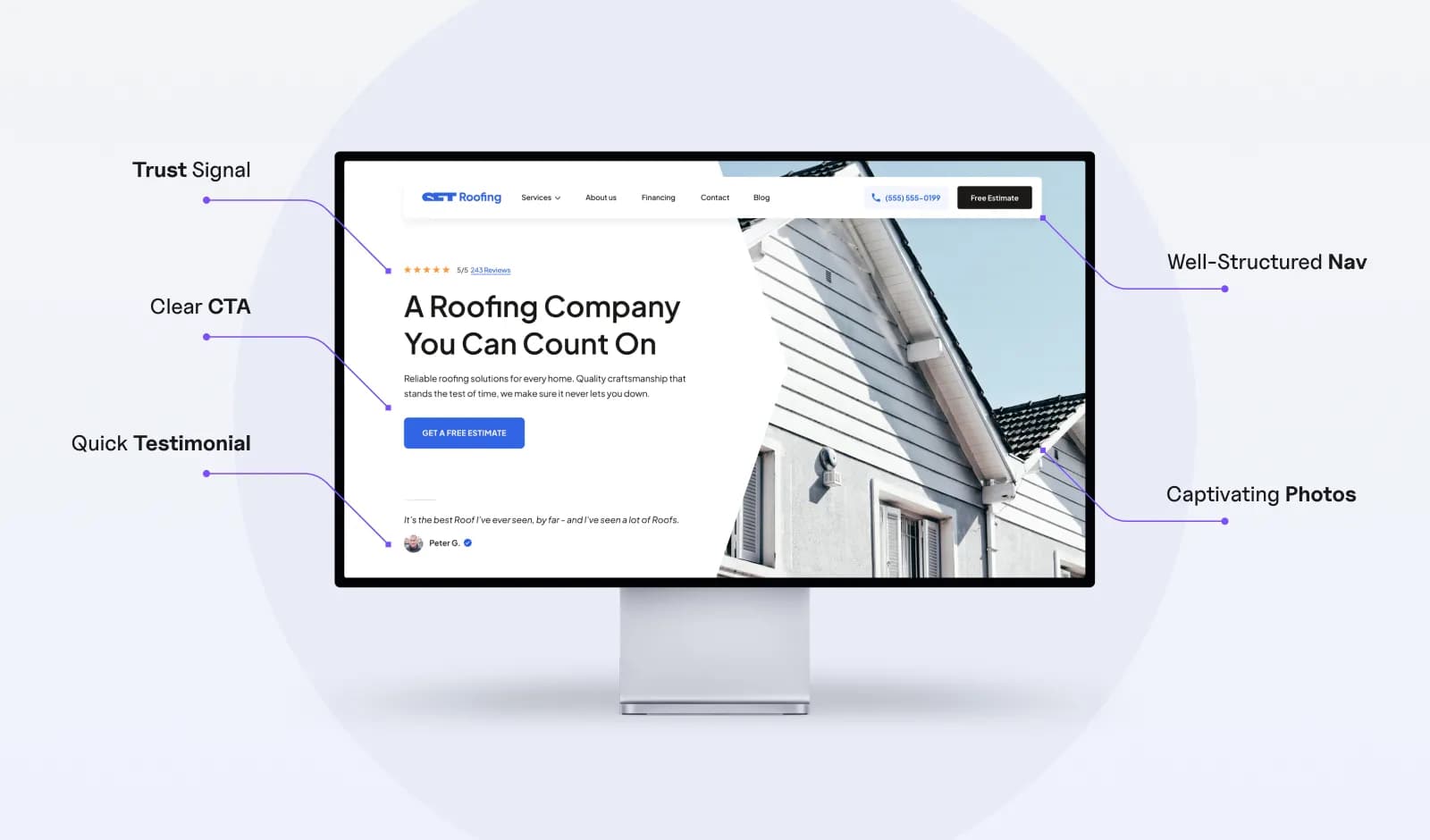
The best small business sites treat trust signals the same way they treat CTAs: placed with intention at specific decision points throughout the page, not clustered in a single section. A short testimonial near the hero. A review count beside the pricing. A case study reference near the “schedule a call” button. Each one does a job at the moment it matters most.

This kind of intentional placement rarely happens on a one-and-done project. It requires a dedicated web design team that understands how visitors actually move through the site and can adjust based on real behavior over time.

A notable issue with trust signals such as TrustAdvisor, BBB on small business websites, apart from the positioning, is also lack of adherence to official brand guidelines - so you will find stretched, distorted or semi-visible logos, which in my opinion hurt the credibility more than they contribute to it.

Navigation That Solves the Wrong Problem

A seven-page service business website does not need a dropdown menu. It definitely doesn’t need a mega menu. And yet, small business sites routinely ship with navigation patterns borrowed from e-commerce stores or SaaS platforms with hundreds of pages.

The instinct makes sense. Complex navigation feels professional, like the business is big enough to need it. But for a site with a homepage, an about page, three service pages, and a contact page, that complexity just adds friction. Every extra click, every nested submenu, every hamburger icon hiding visible links on the desktop is a small barrier between the visitor and the thing you actually want them to do: make contact.

The real navigation question for a service business isn’t “how do we organize all our content?” It’s “how do we get a visitor from landing to contact in two clicks or fewer?” That reframe changes everything. Suddenly the goal isn’t to build an impressive menu structure. It’s to make every destination visible and reachable without thinking.

Flat, fully visible navigation works best for small sites. Every page in the top bar, no dropdowns, no icons replacing labels. The visitor sees the full picture of the site in one glance and picks where to go. It feels simple, and that simplicity is the point. When someone lands on a plumber’s website at 10pm with a burst pipe, they’re not browsing. They need the phone number or the contact form, and the navigation should make that a one-second discovery.

The guiding star at all times should be accessibility, proper structure and conversion optimization.

Mobile as an Afterthought, Not a Starting Point

Over 60% of web traffic now comes from mobile devices. For local service businesses, that number is often higher because people search for plumbers, dentists, and lawyers on their phones while the problem is happening. Despite this, most small business websites are still designed on a desktop monitor and then squeezed onto smaller screens through responsive CSS.

Responsive doesn’t mean mobile-friendly. A button that technically fits on a phone screen but measures 30 pixels wide is responsive. It’s also nearly impossible to tap accurately with a thumb. A contact form that renders on mobile but requires pinch-zooming to read the field labels is responsive. It’s also unusable. Responsive is a technical checkbox. Mobile-friendly is a design decision.

The specific failures repeat across almost every small business site I audit. Hero images that push the first meaningful content below three full swipes. Tap targets smaller than 44x44 pixels, which is the minimum recommended size for comfortable touch interaction. Phone numbers displayed as plain text instead of tap-to-call links. Forms with five fields that could be two. Each one seems minor in isolation. Together, they create an experience that quietly drives mobile visitors away before they ever reach the contact page.

The fix is a process change, not a technical one. Design the mobile layout first. Make every interaction comfortable on a 6-inch screen with a thumb. Then expand that layout for desktop, not the other way around. The businesses that build this way end up with sites that work well everywhere instead of sites that only work well on the screen they were designed on.

The Redesign Trap: Fixing Symptoms Instead of Structure

When a small business website underperforms, the first instinct is almost always cosmetic. New colors. New photos. A trendier font. Maybe a fresh homepage banner. The owner feels like the site looks dated, so they assume a visual refresh will fix the conversion problem.

Sometimes it does. But more often, the real issues are structural. The visual hierarchy is flat. Trust signals are buried. The navigation adds friction. The mobile experience is broken. A new coat of paint on top of those problems produces a site that looks modern and still doesn’t convert. The owner ends up exactly where they started, just with a lighter wallet and a different color palette.

The diagnostic is straightforward. If visitors are arriving but not converting, the problem is almost never aesthetics. It’s information architecture, page flow, and interaction design. The question to ask isn’t “does this site look good?” It’s “does this site make the next step obvious at every point in the visitor’s journey?” If the answer is no, surface-level changes won’t move the needle.

Knowing when a site needs cosmetic updates versus a full structural rethink is one of the harder judgment calls in web design. A practical website redesign guide сan help frame that decision, but the core principle is simple: if the problems on your site map to the patterns described in this article, you’re looking at a rebuild, not a refresh.

The One Decision That Prevents All of This

These UX failures don’t happen because small business owners are careless. They happen because design decisions are being made by people whose real expertise is running a roofing company or managing a dental practice. That’s not a criticism. It’s just a mismatch between the problem and the person solving it.

A roofer doesn’t expect homeowners to inspect their own flashing. An attorney doesn’t expect clients to draft their own contracts. But somehow, small business owners are expected to make complex UX decisions about visual hierarchy, trust signal placement, mobile interaction patterns, and information architecture with no training and no feedback loop telling them what’s working.

The single highest-impact UX decision a small business can make has nothing to do with fonts or color schemes. It’s recognizing that a website is a working tool that needs professional design attention, not just at launch, but continuously as the business evolves and visitor behavior shifts. The businesses that figure this out early build sites that quietly generate leads for years. The ones that don’t keep cycling through redesigns every two years, wondering why nothing changes.

{{stars-conclusion}}

About the Author

Stan Suboticki is the founder of North Pole Digital, where he designs and builds WordPress websites for small businesses across the US. After 13+ years of design experience, he now focuses on creating sites that convert visitors into customers.


Share this post

Subscribe to Setproduct

Once per week we send a newsletter with new releases, freebies and blog publications
Thank you! Your submission has been received!
Oops! Something went wrong while submitting the form.

By clicking Sign Up you're confirming that you agree with our Terms and Conditions.

Congratulations!

You're in! Expect awesome updates in your inbox

FAQs

Lorem ipsum dolor sit amet, consectetur adipiscing elit. Suspendisse varius enim in eros elementum tristique.
No items found.

Our Dashboard Templates Will Make It A Treat To View Data

Experience the magic of data visualization with our user-friendly dashboard templates. Try out our dashboards now and enjoy efficient reporting processes, greater transparency in, among others monitoring and making educated decisions easily.
Nocra UI kit

Nocra UI kit

Nocra is a design system for AI products. Built specifically for startups harnessing AI generation: images, video, audio, music, prompts, and beyond.

Material X for Figma

Material X for Figma

Figma library with 1100+ components & 40 app templates beyond Material Design. Powered by top-notch shapes and Manrope font. Customizable & Adjustable UI kit now available for Angular & Figma

Material You UI kit

Material You UI kit

Figma & React library with 2600+ variants of 32 components compatible with Material Design 3. Plus 220+ dashboard templates for all the viewports. Now available for NextJS & TailwindCSS.

Figma React UI kit

Figma React UI kit

Designed and well-organized in Figma React-based UI toolkit for the web. Optimized for building complex data-dense interfaces for desktop and mobile applications.

Panda Design System

Panda Design System

Figma library with dashboard, calendar, kanban, profile, table, ecommerce and 80+ templates in total. Components with variants, dark theme included.

Eclipse UI kit

Eclipse UI kit

Figma library with 1100+ components & 74 templates for data-driven web applications. Powered by auto-layout. Supercharged by Figma's variants.

Rome UI kit for Figma

Rome UI kit for Figma

Customizable and well-organized team library. Contains 250+ components & 30 web app templates powered by stylish and trendy guidelines.

Material Design System

Material Design System

Figma library is based on 100% guidelines compliance with Material.io. Contains ready‑to-use templates to accelerate app UI design.

Neolex Dashboard UI kit

Neolex Dashboard UI kit

Customizable & adjustable dashboard design system with 50+ ready-to-use app layouts, 1900+ variants for 30 components with auto-layout.

Material Desktop Dashboard UI kit

Material Desktop Dashboard UI kit

Figma library with 48+ dashboard templates based on reusable desktop app patterns carefully handpicked from the most popular web apps.

Xela UI kit for Figma

Xela UI kit for Figma

Figma library with 1900+ variants of 30 components categories to craft perfectly shaped desktop & mobile apps. Customizable & Adjustable dashboard design system with 50+ web app templates.

Figma S8 Design System

Figma S8 Design System

Figma design library for mobile and desktop apps made of high quality styled components. Full version includes 67 dashboard templates.

OE Figma Design System

OE Figma Design System

Customizable and well-organized Figma library. This design system aimed to build highly loaded interfaces, boost the speed and save more costs.

Related posts

Lorem ipsum dolor sit amet, consectetur adipiscing elit.

Research

2 min read

Your startup’s user persona is probably wrong (and it’s costing you)

Most founders I meet can describe their product in 30 seconds… but freeze when I ask: Who exactly is buying it, and why?

Research

3 min read

How to cancel Adobe subscription without fees

The frustrations of a long-time Adobe user who's had enough of the subscription model, bloated software, and sneaky cancellation fees. Get ready to vent and find out why it's time to explore alternatives.

Research

3 min read

Campaign marketing dashboards designed right. Know who cares, where they live, and why they click

Learn to design dashboards that reveal who engages with campaigns, where they’re located, and how to turn data into decisions.

Figma Templates & UI kits

Save time and human resources by reusing hundreds of pre-made templates crafted by us. Based on top notch UX taken from the World's best apps.

Nocra UI kit

Nocra is a design system for AI products. Built specifically for startups harnessing AI generation: images, video, audio, music, prompts, and beyond.

Material X for Figma

Figma library with 1100+ components & 40 app templates beyond Material Design. Powered by top-notch shapes and Manrope font. Customizable & Adjustable UI kit now available for Angular & Figma

Material You UI kit

Figma & React library with 2600+ variants of 32 components compatible with Material Design 3. Plus 220+ dashboard templates for all the viewports. Now available for NextJS & TailwindCSS.

Figma React UI kit

Designed and well-organized in Figma React-based UI toolkit for the web. Optimized for building complex data-dense interfaces for desktop and mobile applications.

Panda Design System

Figma library with dashboard, calendar, kanban, profile, table, ecommerce and 80+ templates in total. Components with variants, dark theme included.

Eclipse UI kit

Figma library with 1100+ components & 74 templates for data-driven web applications. Powered by auto-layout. Supercharged by Figma's variants.

Rome UI kit for Figma

Customizable and well-organized team library. Contains 250+ components & 30 web app templates powered by stylish and trendy guidelines.

Material Design System

Figma library is based on 100% guidelines compliance with Material.io. Contains ready‑to-use templates to accelerate app UI design.

Neolex Dashboard UI kit

Customizable & adjustable dashboard design system with 50+ ready-to-use app layouts, 1900+ variants for 30 components with auto-layout.

Material Desktop Dashboard UI kit

Figma library with 48+ dashboard templates based on reusable desktop app patterns carefully handpicked from the most popular web apps.

Xela UI kit for Figma

Figma library with 1900+ variants of 30 components categories to craft perfectly shaped desktop & mobile apps. Customizable & Adjustable dashboard design system with 50+ web app templates.

Figma S8 Design System

Figma design library for mobile and desktop apps made of high quality styled components. Full version includes 67 dashboard templates.

OE Figma Design System

Customizable and well-organized Figma library. This design system aimed to build highly loaded interfaces, boost the speed and save more costs.

Figma iOS kit

Figma library of iOS patterns served as ready-made templates. This UI kit inspired by World's best apps. Based on Human Interface guidelines.

Figma S8 Design System

Figma design library for mobile and desktop apps made of high quality styled components. Full version includes 67 dashboard templates.

Most iOS UI kit for Figma

iOS native components and app templates organized into a «Most Design System» fully compatible with Apple's Human Interface guidelines.

Rome UI kit for Figma

Customizable and well-organized team library. Contains 250+ components & 30 web app templates powered by stylish and trendy guidelines.

Material Design System

Figma library is based on 100% guidelines compliance with Material.io. Contains ready‑to-use templates to accelerate app UI design.

Nucleus UI

Nucleus UI contains 1000 components and variants with 500+ mobile screens designed for Figma (including 9 themes from Event, E-commerce, Finance, NFT, etc.).

Figma Android UI kit

Components-driven Android mobile UI library for Figma. Consists of 140 high quality application templates made of total 250+ UI components.

Mobile X UI kit

Customizable & adjustable iOS / Android design system loaded with ready-made 157 app templates based on 860+ variants for 20 components.

Appka iOS UI kit

Customizable & adjustable iOS design system with 4100+ variants for 28 components and 280+ ready-to-use app layouts crafted for Figma.

Full iOS UI kit

Customizable iOS design system with 320 ready-to-use app layouts. You can modify them or use as it is to save time and never design from scratch again.

Xela for Flutter

XelaUI for Flutter is a simple, modular and accessible component library that gives you the building Flutter apps for mobile and desktop.

Xela for Android

Ready-made collection of fully customizable widgets, UI screens and reusable components for Android coded with Jetpack Compose.

Xela for Swift

Designed for iOS Developers. We provide fully coded customizable components, widgets and well-organized iOS screens for Figma & SwiftUI.

Material You UI kit

Figma & React library with 2600+ variants of 32 components compatible with Material Design 3. Plus 220+ dashboard templates for all the viewports. Now available for NextJS & TailwindCSS.

Figma Charts UI kit

Components-driven graphs design kit for dashboards, presentations, infographics & data visualisation. Includes 25+ charts types for all the viewports.

Hyper Charts

Create impressive visuals with Figma's graphs templates – dozens of scalable and customizable data visualization blocks for dark and light modes.

Orion UI kit

Figma library with 40+ full-width charts templates served in light & dark themes. Contains 200+ of dataviz widgets that look perfect on desktop & mobile screens.

Xela for React

React based components library for beautiful user interface in React apps. Lightweight library for your projects. Contains pre-made web app templates.

Figma React UI kit

Designed and well-organized in Figma React-based UI toolkit for the web. Optimized for building complex data-dense interfaces for desktop and mobile applications.

Material X for Figma

Figma library with 1100+ components & 40 app templates beyond Material Design. Powered by top-notch shapes and Manrope font. Customizable & Adjustable UI kit now available for Angular & Figma

Xela for Flutter

XelaUI for Flutter is a simple, modular and accessible component library that gives you the building Flutter apps for mobile and desktop.

Xela for Android

Ready-made collection of fully customizable widgets, UI screens and reusable components for Android coded with Jetpack Compose.

Xela for Swift

Designed for iOS Developers. We provide fully coded customizable components, widgets and well-organized iOS screens for Figma & SwiftUI.

Material You UI kit

Figma & React library with 2600+ variants of 32 components compatible with Material Design 3. Plus 220+ dashboard templates for all the viewports. Now available for NextJS & TailwindCSS.

Xela for React

React based components library for beautiful user interface in React apps. Lightweight library for your projects. Contains pre-made web app templates.

Levitate 3D kit for Figma

Components-driven 3D kit to design eye-catching Figma presentations. Helps to enhance your landing page, product or app, brand ident, etc.

Website templates UI kit

Landing pages reusable templates kit based on most effective web design patterns. 140+ dark & light constrained design blocks.

Figma Landing Pages UI kit

Landing pages templates library based on constrained & organized components aimed to speed-up the production of effective websites.

Zeus UI kit

Create hassle-free landing pages in Figma. This kit is based on 10 landing page templates, powered by 1600+ variants for 630+ web blocks.

This is some text inside of a div block.