
How to pay for Claude Pro with USDT, USDC, or SOL in 4 steps

Step-by-step guide to purchasing Claude Pro subscriptions using Solana virtual card, USDT, or USDC when credit cards are not accepted. No KYC required.

How to pay for Claude Pro with USDT
Technology

Published on

April 16, 2026

|

3 min read

Tutorials

How to pay for Claude Pro with USDT

Navigation

Subscribe to new posts

Thank you! Your submission has been received!
Oops! Something went wrong while submitting the form.

By subscribing you agree to with our Privacy Policy.

Share this post

Author image

Jeff Flipper

Why pay for Claude Pro with crypto

Anthropic accepts credit and debit cards through Stripe. If your card works, subscribe directly at anthropic.com.

This guide is for everyone else. People in dozens of countries where Stripe declines transactions. People without access to international banking. People who prefer paying with crypto for privacy or convenience.

I started using this method three months ago after my fifth attempt to pay with a local card failed. The frustration was real. I had the money, I wanted the product, and the payment infrastructure said no.

Why crypto payments work for Claude Pro when credit cards fail

☞ No geographic restrictions. Works in countries where Stripe declines cards.
☞ No KYC required. No documents, no verification, no waiting.
☞ Fast processing. Most subscriptions arrive within a few hours.
☞ Multiple tokens supported. Pay with USDT, USDC, or SOL on six networks.
☞ Official Anthropic gift subscriptions. Identical access to credit card subscribers.

What you need to pay for Claude Pro with USDT or USDC

Before starting, you need:

☞ A crypto wallet with USDT, USDC, or SOL
☞ An email address for receiving the gift subscription
☞ The exact amount ready in your wallet
☞ Basic familiarity with sending crypto transactions

No KYC documents. No bank verification. No geographic restrictions.
This method of payment is fully supported by awesome SolCard.cc service (which backs ClaudeWithCrypto.com) I personally use to pay either for ChatGPT, Cursor, Webflow, Figma, Vercel and others.

So, ClaudeWithCrypto.com is powered by SolCard, a Solana-based payment service that also offers virtual cards for other subscriptions

Step ❶: Choose your Claude Pro plan and duration

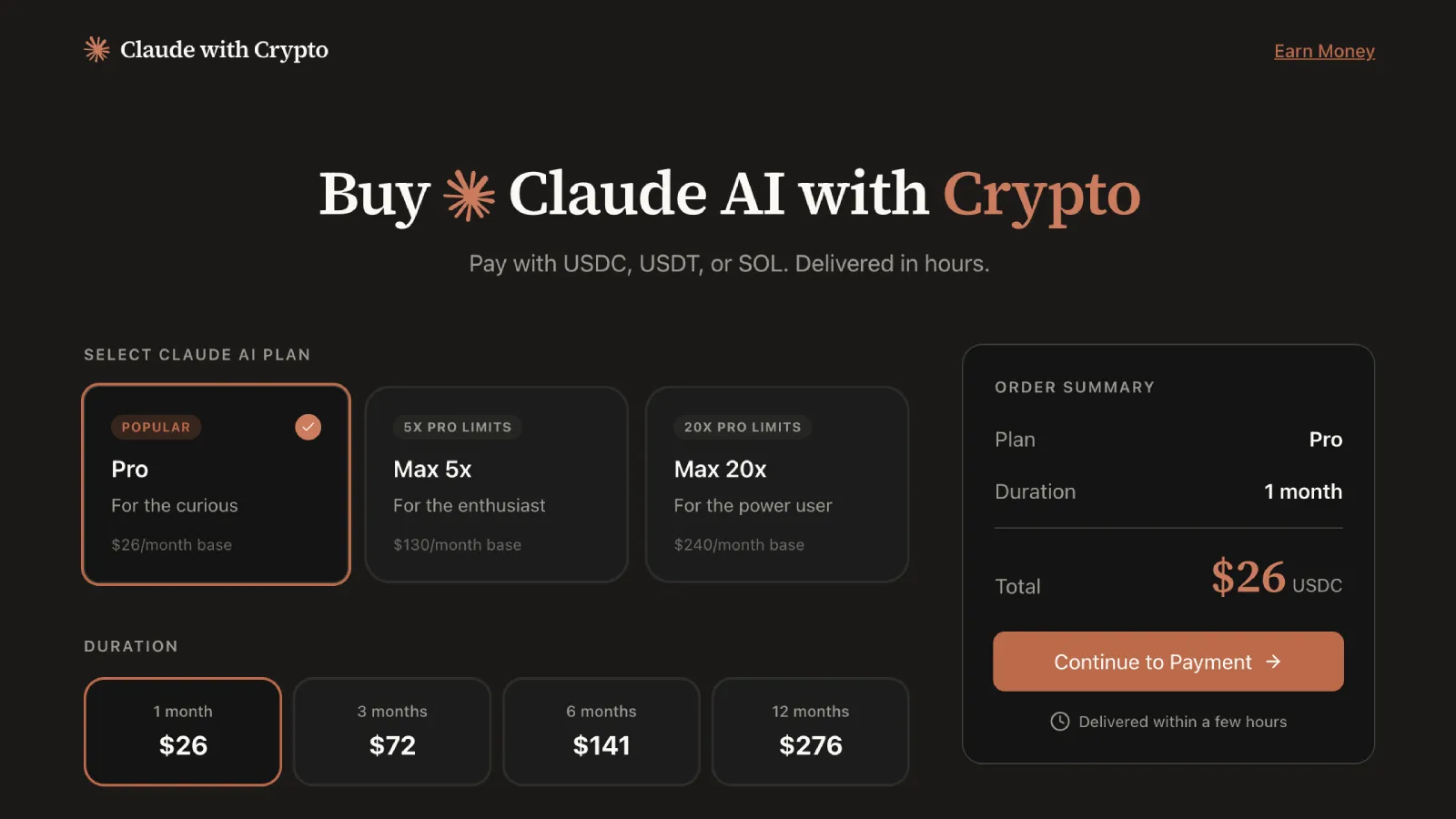
Visit ClaudeWithCrypto.com and select your subscription parameters.

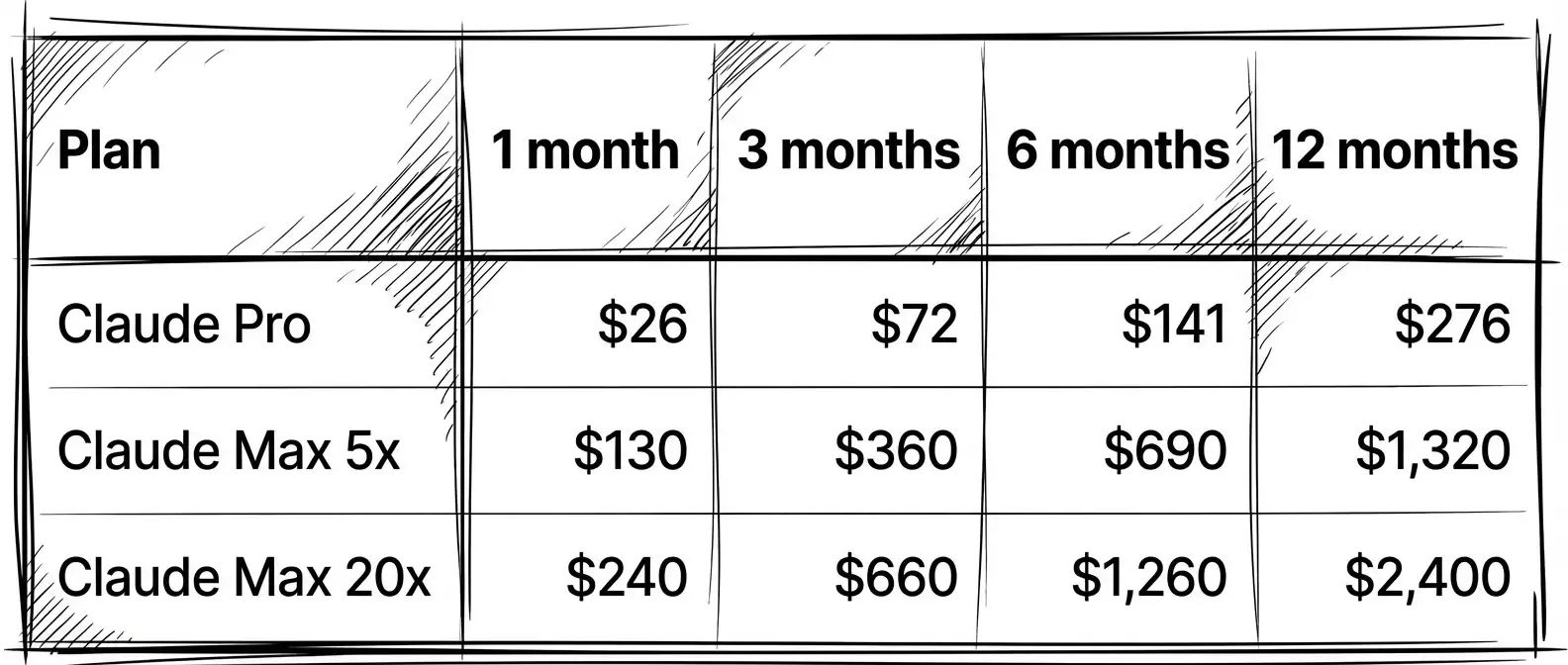
Pick Pro unless you are running through limits daily. Max 5x is for heavy users who hit Pro caps regularly. Max 20x is for power users who need maximum capacity.

The only table you need:
Why pay for Claude Pro with crypto - comparison table

Longer durations reduce the effective monthly cost. The 12-month Pro plan works out to $23/month instead of $26. That saves you $36 over a year.

I chose 3 months for my first purchase. Long enough to commit, short enough to test the service. Now I buy 12 months at a time.

Select your plan and duration, then enter your email address. The website generates a unique deposit address for your USDT, USDC, or SOL transaction.

Step ❷: Get your USDT, USDC, or SOL deposit address

Each transaction gets a fresh, unique deposit address. This tracks your payment accurately without requiring account creation. It also rotates addresses for security.

The service supports six networks. Solana is my top choice for USDC and USDT. Transactions confirm in seconds and cost fractions of a cent. I use Solana for every payment.

Polygon works well too. Similar speed, similar fees for USDT and USDC.

Arbitrum, Base, and BSC are solid options. Slightly higher fees, still reasonable.

Ethereum mainnet is the expensive option. Gas fees can exceed some more bucks as the transaction comission during peak hours. On a $26 subscription, that adds 20% to your total cost. Avoid it unless you have no other option.

For SOL payments, Solana is your only network and supported by SolCard. Fees are negligible.

Your USDT, USDC, or SOL deposit address is unique to each transaction. Always verify the address before sending.

Step ❸: Send your USDT, USDC, or SOL payment

Open your wallet and send the exact amount to the deposit address displayed on claudewithcrypto.com/r/setproduct.

☞ Send only the exact amount shown. Overpayments and underpayments require manual resolution and delay your subscription.
☞ Send only on the network specified. Cross-chain sends to wrong networks result in lost funds.
☞ Double-check the address before confirming. I cannot stress this enough. One wrong character and your funds are gone. Crypto transactions are irreversible.

When sending USDT on Solana, confirmation takes 1-5 seconds. When sending USDC on Polygon, expect 5-30 seconds. Both are fast and cheap.

My first transaction took 47 minutes from payment to email. My second took three hours. Both worked perfectly. The service says to allow up to 6 hours, but in practice it is faster.

Peak periods like month start or holidays may take longer. Plan accordingly.

Step ❹: Activate your Claude Pro subscription

You receive an email from Anthropic containing your gift subscription link.

Click the link. Log in to your Anthropic account or create one if needed. The subscription activates immediately. Claude Pro features become available in your account right away.

Your Claude Pro subscription activates immediately, whether you paid with USDC, USDT, or SOL. Full Claude Pro access. Projects. Extended context. Priority capacity. No functional difference from a credit card purchase.

Your subscription does not auto-renew. This is intentional. When your subscription expires, purchase a new one through claudewithcrypto.com/r/setproduct.

To check expiration, navigate to Settings in your Claude account. The subscription end date appears there.

How to renew your Claude Pro crypto subscription

Since subscriptions do not auto-renew, plan your renewal approach.

Set a calendar reminder 3-5 days before expiration. Purchase your next subscription 1-2 days before the current one ends. Return to SolCard dashboard to renew with USDT, USDC, or SOL.

There is no penalty for overlapping subscriptions. They simply extend your access period.

For long-term users, the 12-month plan offers the best value and reduces renewal frequency to once per year.

Common issues with crypto payments for Claude Pro

Payment sent but no email received after 6 hours:

Check your spam folder first. Gift subscription emails come from Anthropic, not the payment service. If nothing in spam, contact the service through their website with your transaction hash.

Sent the wrong amount:

Transactions require manual intervention. Contact support with your transaction hash and the correct amount. Resolution typically takes 12-24 hours.

Sent on the wrong network:

This is critical. Cross-chain sends to incorrect networks may result in permanent loss of funds. Always verify the network matches the deposit address format.

Gift link expired:

Anthropic gift links remain valid for a limited time. Activate promptly after receiving. If your link expired, contact the payment service for a replacement.

Frequently asked questions about paying for Claude Pro with crypto

❶ Can I pay for Claude Pro with USDT?
Yes. USDT is supported on Solana, Ethereum, Polygon, BSC, Arbitrum, and Base networks. Solana and Polygon offer the lowest fees and fastest confirmation times.

❷ Can I pay for Claude Pro with USDC?
Yes. USDC is supported on all six networks including Solana. Solana USDC offers the lowest fees and fastest confirmation times.

❸ Can I pay for Claude Pro with SOL?
Yes. SOL payments process on the Solana network with negligible fees and near-instant confirmation.

❹ Is paying for Claude Pro with crypto legitimate?
Yes. The service purchases official Anthropic gift subscriptions on your behalf. You receive the same Claude Pro access as direct credit card subscribers.

❺ Does this work in countries where Stripe is not available?

Yes. Crypto payments bypass geographic restrictions entirely. No bank account or credit card required. For other subscription payments, SolCard also offers virtual cards without KYC.

❻ How long does it take to receive my Claude Pro subscription?
Most subscriptions arrive within a few hours of payment confirmation. Allow up to 6 hours during peak periods.

Security tips for paying Claude Pro with crypto

Use a dedicated wallet for subscription payments. This limits exposure if any address is compromised. Never share your seed phrase with any service. Verify deposit addresses each time.

The official service is accessible at claudewithcrypto.com/r/setproduct. Verify the domain before sending funds. Gift subscription emails come from anthropic.com. Check the sender address carefully. Never click gift links received from unofficial sources.

Why crypto payments work for Claude Pro when credit cards fail

Direct Stripe payment takes minutes but requires a supported card and geographic access. Gift subscription via crypto takes a few hours but works everywhere and requires no KYC.

P2P exchange plus a friend's card takes days, involves social dependency, and offers no guarantees. Virtual card services require KYC and still face geographic restrictions.

The crypto gift subscription method trades auto-renewal convenience for geographic freedom and privacy. For users blocked by traditional payment infrastructure, this trade-off makes sense.

I have been using this method for three months. Missing auto-renewal is annoying, but not being locked out of Claude is worth it. The $6 premium on a monthly Pro subscription buys access that Stripe simply cannot provide.


Share this post

Subscribe to Setproduct

Once per week we send a newsletter with new releases, freebies and blog publications
Thank you! Your submission has been received!
Oops! Something went wrong while submitting the form.

By clicking Sign Up you're confirming that you agree with our Terms and Conditions.

Congratulations!

You're in! Expect awesome updates in your inbox

FAQs

Lorem ipsum dolor sit amet, consectetur adipiscing elit. Suspendisse varius enim in eros elementum tristique.
No items found.

Our Dashboard Templates Will Make It A Treat To View Data

Experience the magic of data visualization with our user-friendly dashboard templates. Try out our dashboards now and enjoy efficient reporting processes, greater transparency in, among others monitoring and making educated decisions easily.
Nocra UI kit

Nocra UI kit

Nocra is a design system for AI products. Built specifically for startups harnessing AI generation: images, video, audio, music, prompts, and beyond.

Material X for Figma

Material X for Figma

Figma library with 1100+ components & 40 app templates beyond Material Design. Powered by top-notch shapes and Manrope font. Customizable & Adjustable UI kit now available for Angular & Figma

Material You UI kit

Material You UI kit

Figma & React library with 2600+ variants of 32 components compatible with Material Design 3. Plus 220+ dashboard templates for all the viewports. Now available for NextJS & TailwindCSS.

Figma React UI kit

Figma React UI kit

Designed and well-organized in Figma React-based UI toolkit for the web. Optimized for building complex data-dense interfaces for desktop and mobile applications.

Panda Design System

Panda Design System

Figma library with dashboard, calendar, kanban, profile, table, ecommerce and 80+ templates in total. Components with variants, dark theme included.

Eclipse UI kit

Eclipse UI kit

Figma library with 1100+ components & 74 templates for data-driven web applications. Powered by auto-layout. Supercharged by Figma's variants.

Rome UI kit for Figma

Rome UI kit for Figma

Customizable and well-organized team library. Contains 250+ components & 30 web app templates powered by stylish and trendy guidelines.

Material Design System

Material Design System

Figma library is based on 100% guidelines compliance with Material.io. Contains ready‑to-use templates to accelerate app UI design.

Neolex Dashboard UI kit

Neolex Dashboard UI kit

Customizable & adjustable dashboard design system with 50+ ready-to-use app layouts, 1900+ variants for 30 components with auto-layout.

Material Desktop Dashboard UI kit

Material Desktop Dashboard UI kit

Figma library with 48+ dashboard templates based on reusable desktop app patterns carefully handpicked from the most popular web apps.

Xela UI kit for Figma

Xela UI kit for Figma

Figma library with 1900+ variants of 30 components categories to craft perfectly shaped desktop & mobile apps. Customizable & Adjustable dashboard design system with 50+ web app templates.

Figma S8 Design System

Figma S8 Design System

Figma design library for mobile and desktop apps made of high quality styled components. Full version includes 67 dashboard templates.

OE Figma Design System

OE Figma Design System

Customizable and well-organized Figma library. This design system aimed to build highly loaded interfaces, boost the speed and save more costs.

Related posts

Lorem ipsum dolor sit amet, consectetur adipiscing elit.

Technology

4 min read

Why some designers dislike AI, and why they may be right

Not every hesitation around AI is conservative thinking. Sometimes it is a rational response to a workflow that makes output easier while making deeper design decisions shallower.

Technology

4 min read

SolCard review: USDT crypto card that actually helps pay for online subscriptions

I am testing SolCard for subscriptions: A practical guide for paying ChatGPT and other services using USDT on Solana.

Technology

3 min read

State of crypto 2025 - A closer look at what they’re not telling you

The “State of Crypto” report from a16z makes big claims. But behind the charts and hype, there’s a lot it doesn’t say. Let’s unpack it.

Figma Templates & UI kits

Save time and human resources by reusing hundreds of pre-made templates crafted by us. Based on top notch UX taken from the World's best apps.

Nocra UI kit

Nocra is a design system for AI products. Built specifically for startups harnessing AI generation: images, video, audio, music, prompts, and beyond.

Material X for Figma

Figma library with 1100+ components & 40 app templates beyond Material Design. Powered by top-notch shapes and Manrope font. Customizable & Adjustable UI kit now available for Angular & Figma

Material You UI kit

Figma & React library with 2600+ variants of 32 components compatible with Material Design 3. Plus 220+ dashboard templates for all the viewports. Now available for NextJS & TailwindCSS.

Figma React UI kit

Designed and well-organized in Figma React-based UI toolkit for the web. Optimized for building complex data-dense interfaces for desktop and mobile applications.

Panda Design System

Figma library with dashboard, calendar, kanban, profile, table, ecommerce and 80+ templates in total. Components with variants, dark theme included.

Eclipse UI kit

Figma library with 1100+ components & 74 templates for data-driven web applications. Powered by auto-layout. Supercharged by Figma's variants.

Rome UI kit for Figma

Customizable and well-organized team library. Contains 250+ components & 30 web app templates powered by stylish and trendy guidelines.

Material Design System

Figma library is based on 100% guidelines compliance with Material.io. Contains ready‑to-use templates to accelerate app UI design.

Neolex Dashboard UI kit

Customizable & adjustable dashboard design system with 50+ ready-to-use app layouts, 1900+ variants for 30 components with auto-layout.

Material Desktop Dashboard UI kit

Figma library with 48+ dashboard templates based on reusable desktop app patterns carefully handpicked from the most popular web apps.

Xela UI kit for Figma

Figma library with 1900+ variants of 30 components categories to craft perfectly shaped desktop & mobile apps. Customizable & Adjustable dashboard design system with 50+ web app templates.

Figma S8 Design System

Figma design library for mobile and desktop apps made of high quality styled components. Full version includes 67 dashboard templates.

OE Figma Design System

Customizable and well-organized Figma library. This design system aimed to build highly loaded interfaces, boost the speed and save more costs.

Figma iOS kit

Figma library of iOS patterns served as ready-made templates. This UI kit inspired by World's best apps. Based on Human Interface guidelines.

Figma S8 Design System

Figma design library for mobile and desktop apps made of high quality styled components. Full version includes 67 dashboard templates.

Most iOS UI kit for Figma

iOS native components and app templates organized into a «Most Design System» fully compatible with Apple's Human Interface guidelines.

Rome UI kit for Figma

Customizable and well-organized team library. Contains 250+ components & 30 web app templates powered by stylish and trendy guidelines.

Material Design System

Figma library is based on 100% guidelines compliance with Material.io. Contains ready‑to-use templates to accelerate app UI design.

Nucleus UI

Nucleus UI contains 1000 components and variants with 500+ mobile screens designed for Figma (including 9 themes from Event, E-commerce, Finance, NFT, etc.).

Figma Android UI kit

Components-driven Android mobile UI library for Figma. Consists of 140 high quality application templates made of total 250+ UI components.

Mobile X UI kit

Customizable & adjustable iOS / Android design system loaded with ready-made 157 app templates based on 860+ variants for 20 components.

Appka iOS UI kit

Customizable & adjustable iOS design system with 4100+ variants for 28 components and 280+ ready-to-use app layouts crafted for Figma.

Full iOS UI kit

Customizable iOS design system with 320 ready-to-use app layouts. You can modify them or use as it is to save time and never design from scratch again.

Xela for Flutter

XelaUI for Flutter is a simple, modular and accessible component library that gives you the building Flutter apps for mobile and desktop.

Xela for Android

Ready-made collection of fully customizable widgets, UI screens and reusable components for Android coded with Jetpack Compose.

Xela for Swift

Designed for iOS Developers. We provide fully coded customizable components, widgets and well-organized iOS screens for Figma & SwiftUI.

Material You UI kit

Figma & React library with 2600+ variants of 32 components compatible with Material Design 3. Plus 220+ dashboard templates for all the viewports. Now available for NextJS & TailwindCSS.

Figma Charts UI kit

Components-driven graphs design kit for dashboards, presentations, infographics & data visualisation. Includes 25+ charts types for all the viewports.

Hyper Charts

Create impressive visuals with Figma's graphs templates – dozens of scalable and customizable data visualization blocks for dark and light modes.

Orion UI kit

Figma library with 40+ full-width charts templates served in light & dark themes. Contains 200+ of dataviz widgets that look perfect on desktop & mobile screens.

Xela for React

React based components library for beautiful user interface in React apps. Lightweight library for your projects. Contains pre-made web app templates.

Figma React UI kit

Designed and well-organized in Figma React-based UI toolkit for the web. Optimized for building complex data-dense interfaces for desktop and mobile applications.

Material X for Figma

Figma library with 1100+ components & 40 app templates beyond Material Design. Powered by top-notch shapes and Manrope font. Customizable & Adjustable UI kit now available for Angular & Figma

Xela for Flutter

XelaUI for Flutter is a simple, modular and accessible component library that gives you the building Flutter apps for mobile and desktop.

Xela for Android

Ready-made collection of fully customizable widgets, UI screens and reusable components for Android coded with Jetpack Compose.

Xela for Swift

Designed for iOS Developers. We provide fully coded customizable components, widgets and well-organized iOS screens for Figma & SwiftUI.

Material You UI kit

Figma & React library with 2600+ variants of 32 components compatible with Material Design 3. Plus 220+ dashboard templates for all the viewports. Now available for NextJS & TailwindCSS.

Xela for React

React based components library for beautiful user interface in React apps. Lightweight library for your projects. Contains pre-made web app templates.

Levitate 3D kit for Figma

Components-driven 3D kit to design eye-catching Figma presentations. Helps to enhance your landing page, product or app, brand ident, etc.

Website templates UI kit

Landing pages reusable templates kit based on most effective web design patterns. 140+ dark & light constrained design blocks.

Figma Landing Pages UI kit

Landing pages templates library based on constrained & organized components aimed to speed-up the production of effective websites.

Zeus UI kit

Create hassle-free landing pages in Figma. This kit is based on 10 landing page templates, powered by 1600+ variants for 630+ web blocks.

This is some text inside of a div block.