

Jeff Flipper
Jupiter is the router most Solana users hit without realizing it. When you swap one token for another and want the best possible price, Jupiter scans every major liquidity source on Solana and splits your order to get the cheapest route. It also runs lending, perps, a prediction market, a mobile wallet, and a referral program that pays across three levels. This guide covers the parts you will actually use.
TL;DR
❶ Jupiter is a DEX aggregator on Solana that finds the cheapest swap route across many liquidity pools, so you rarely overpay.
❷ Swapping takes three clicks once your wallet is connected, and Solana network fees stay around a fraction of a cent.
❸ Jupiter Lend lets you earn yield on stablecoins like USDC, with smart contract and depeg risks you should understand first.
❹ Fees beat centralized exchanges on most pairs, and there is no KYC because you stay self-custodial the whole time.
❺ The referral program pays 30% on direct invites, 3% on the next level, and 2% on the level after that, which is rare in DeFi.
What Jupiter actually does on Solana
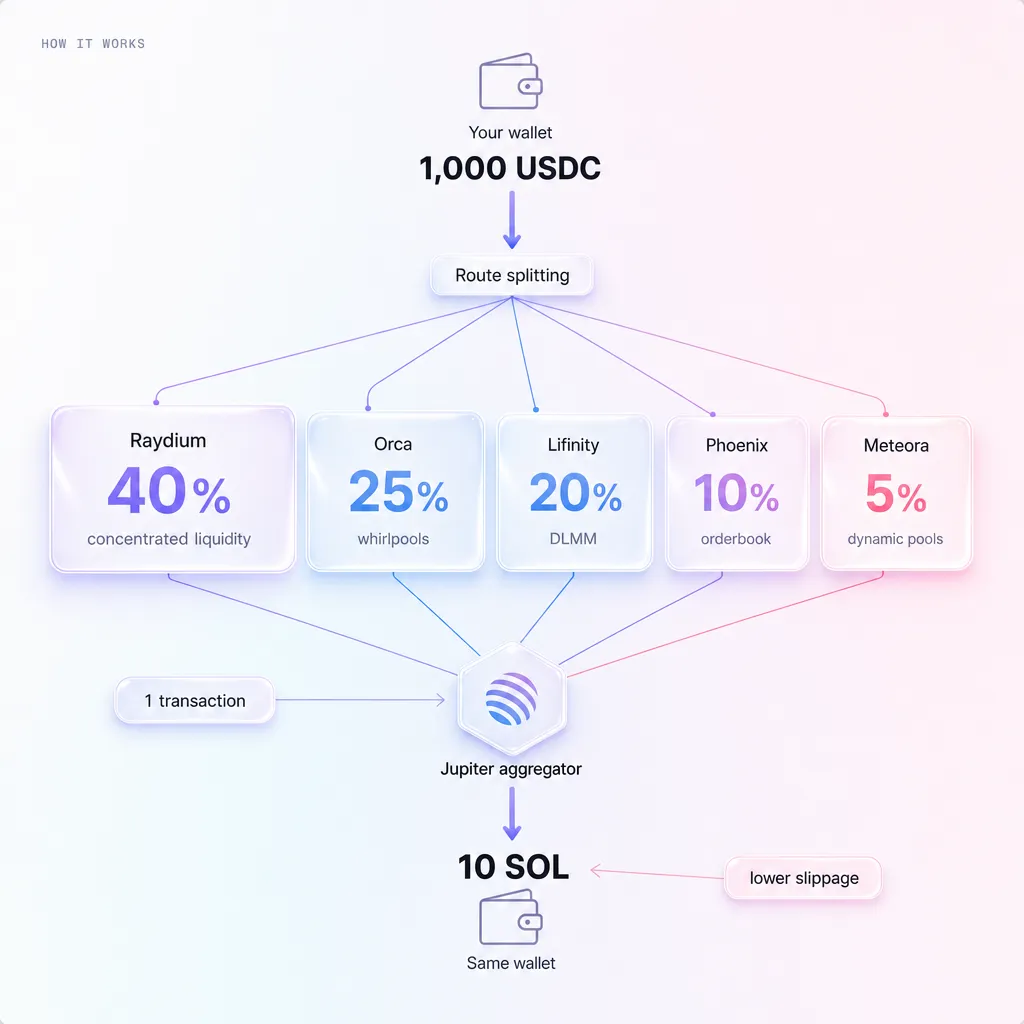 A DEX aggregator is a tool that checks many decentralized exchanges at once and routes your trade through whichever combination gives the best price. Instead of manually comparing pools on Raydium, Orca, and a dozen smaller venues, you get one quote that already accounts for all of them.
That is the whole pitch. On a single DEX you take whatever price that one pool offers. Jupiter splits a large order across several pools when that lowers your slippage, then settles it in one transaction. For anything above a small trade, the price difference is real money.
Solana is the reason this works smoothly. Transactions confirm in under a second and cost a tiny fraction of a cent, so the aggregator can route through multiple pools without you paying ten dollars in gas like you would on Ethereum. According to Solana's own documentation, base fees are denominated in fractions of a lamport, which is why complex multi-hop swaps stay cheap.
Jupiter sits at the center of Solana trading volume. Rather than quote a number I cannot verify, I will point you to DefiLlama, where you can watch Jupiter's aggregator volume in real time. It handles multi-billion dollar daily volume across the ecosystem, which matters because deeper routing means tighter prices for you.
☞ The practical takeaway: if you are swapping on Solana and not using Jupiter, you are probably leaving money on the table on every trade.
How to swap on Jupiter step by step
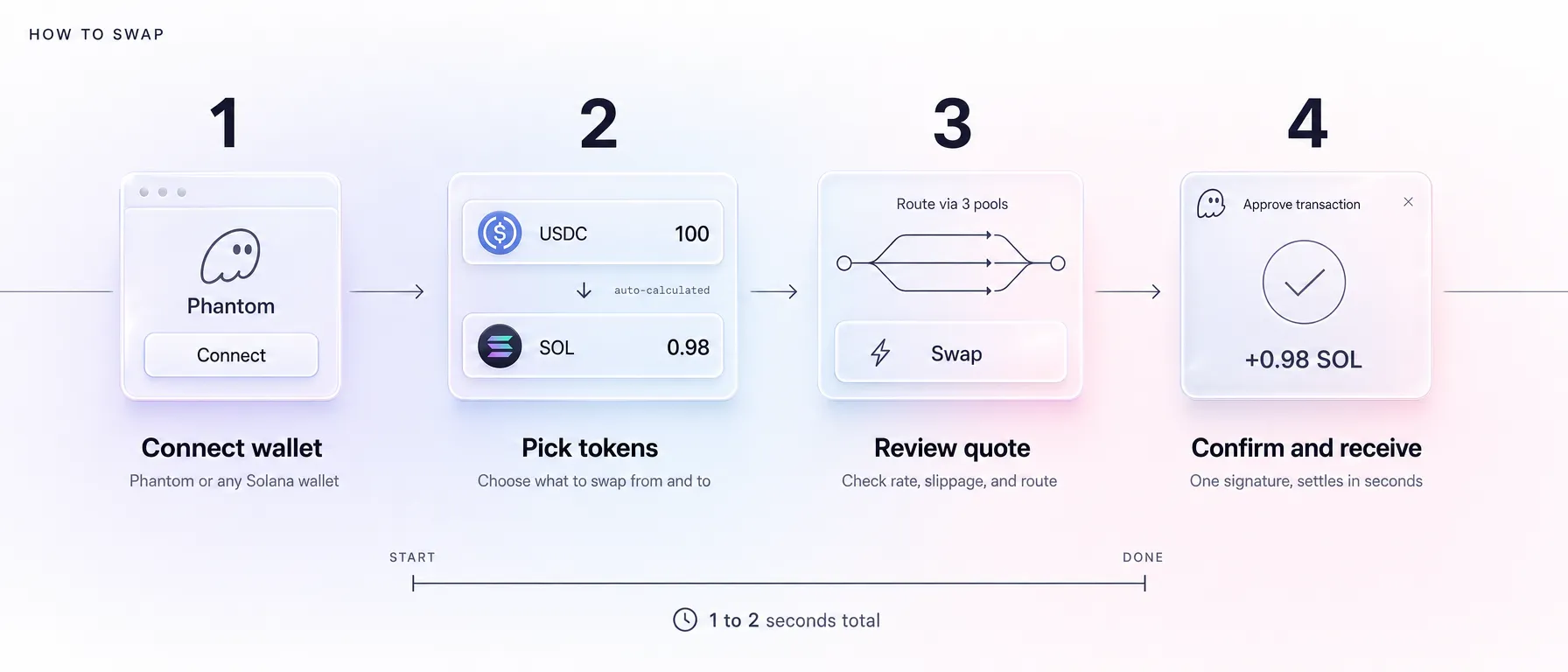
The flow is short. Connect a wallet, pick two tokens, confirm. Here is each piece with the details that trip people up.
Connect a wallet with Phantom
You need a Solana wallet before anything else. I recommend Phantom because it is the most widely supported and the onboarding is friendly for first-timers. Install the browser extension or mobile app, write down your seed phrase on paper, and store it somewhere offline.
Then open Jupiter and click connect in the top right. Phantom pops up, you approve the connection, and your balances appear. No email, no password, no account creation. The wallet is your account.
☛ What most people miss: connecting a wallet does not give the site any spending power. Every swap still needs a separate signature from you, and you can reject any transaction that looks wrong.
Your first swap
Pick the token you are selling in the top field and the token you want in the bottom field. Type the amount. Jupiter instantly shows the quote, the route it will take, and the estimated output.
Review the numbers, then click swap. Phantom asks you to confirm, you approve, and the trade settles in a second or two. Your new balance updates immediately. For your first run, send a tiny amount, something like five dollars, so you learn the rhythm before moving real size.
Slippage and how to set it
Slippage is the gap between the price you saw and the price you actually got, because prices move while your transaction confirms. You set a tolerance, and if the price moves past it, the trade fails instead of filling at a bad rate.
For large, liquid pairs like USDC to SOL, a low setting around 0.5% is usually fine. For thin, volatile tokens, you may need to raise it or your transaction keeps bouncing. Jupiter has an auto mode that estimates a sane value per trade, and for most people that is the right default.
One note on gas. Solana fees are tiny, but during heavy congestion you may want to add a small priority fee so your transaction lands faster. Jupiter exposes this in settings, and the cost is still pennies.
Best rates and fees compared
Here is the honest comparison most guides skip. Decentralized aggregators win on cost and privacy. Centralized exchanges win on fiat onramps and hand-holding. The table below sums up where each one lands.
| Platform | Typical fee | Settlement | Network | KYC required | Mobile support |
|---|---|---|---|---|---|
| Jupiter | Best routed rate, minimal aggregator fee | ~1 second | Solana | No | Yes, self-custody app |
| Raydium | Around 0.25% pool fee | ~1 second | Solana | No | Limited |
| Orca | Around 0.30% pool fee | ~1 second | Solana | No | Limited |
| Binance | Around 0.1% spot, plus spreads | Instant internal | Centralized | Yes | Yes, custodial app |
| Coinbase | Often 0.5% to 1.5% retail | Instant internal | Centralized | Yes | Yes, custodial app |
Two things stand out. First, Jupiter does not charge the kind of percentage spread that retail-facing centralized apps bake in, so for a like-for-like swap you usually keep more. Second, you never hand over your identity, because you trade straight from your own wallet.
The trade-off is that Jupiter assumes you already have crypto in a Solana wallet. If you are converting fiat for the first time, you still need an onramp or an exchange to get your initial stablecoins, then you move to Jupiter for the actual trading.
Jupiter Lend and passive yield on stablecoins
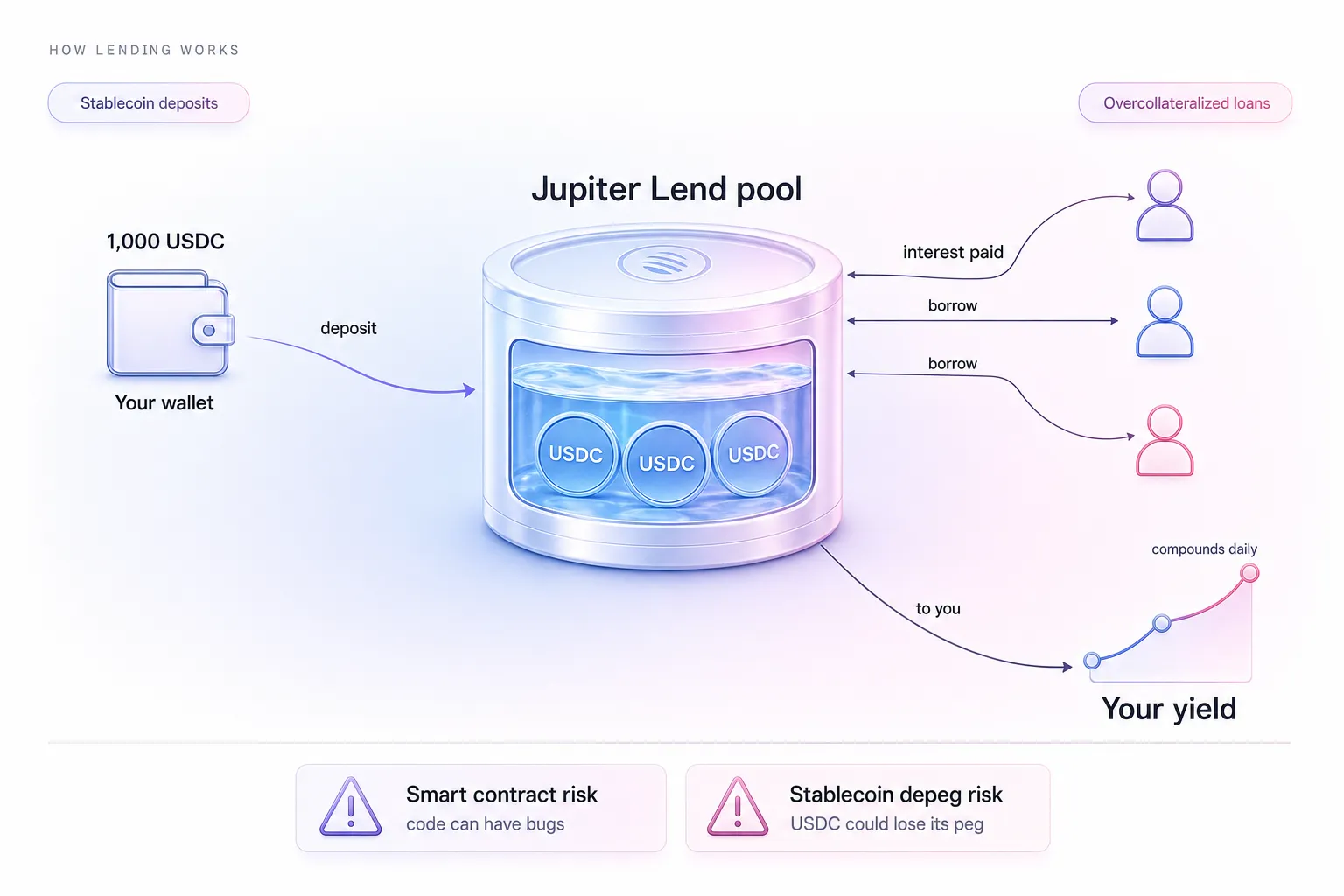
Swapping is the entry point. Jupiter Lend is where the platform starts paying you. You deposit stablecoins like USDC and earn yield from borrowers who pay interest to use that liquidity.
This is for people who hold stablecoins anyway and want them working instead of sitting idle. If you keep a spending balance in USDC on Solana, lending a portion of it can earn more than a typical savings account, with the caveats below.
Getting started is short:
❶ Open the Lend section inside Jupiter with your wallet connected.
❷ Choose the asset you want to supply, usually USDC for predictable value.
❸ Approve the deposit transaction in Phantom.
❹ Watch your position accrue yield, and withdraw whenever you want.
Now the honest part, because anyone who skips this is selling you something. Lending carries smart contract risk, meaning a bug or exploit in the protocol could put funds at risk. It also carries depeg risk, where a stablecoin could temporarily trade below its intended one dollar value during market stress. Neither is unique to Jupiter, but both are real.
Compared to centralized alternatives, the yield is often competitive, and you keep custody the entire time rather than trusting an exchange to stay solvent. That self-custody point is the whole reason DeFi exists. You can read more market context in my piece on the state of crypto in 2025, which covers why on-chain yield kept growing while several centralized lenders collapsed.
☞ My rule: only lend what you can afford to leave untouched for a while, and never deposit money you need for rent next week.
Connecting Jupiter with real-world spending
Swapping and earning is satisfying, but at some point you want to spend. This is the bridge that turns on-chain balances into things you actually pay for.
The workflow I use is simple. Swap to a stablecoin on Jupiter, then load it onto a crypto-funded card, then pay for the subscription. If you live somewhere international cards are hard to get, a USDT debit card like SolCard bridges that gap and lets you check out anywhere Mastercard is accepted.
For AI tools specifically, this stack is how a lot of people in restricted regions keep their subscriptions running. I wrote a full walkthrough on how to pay for Claude Pro with USDT using exactly this kind of flow. The same approach works for ChatGPT, design tools, and most global SaaS that takes card payments.
The mental model is a short chain. Jupiter handles the cheap conversion, the card handles the checkout, and you keep only a small spending balance loaded at any time. Treat the card like a wallet you walk around with, not a vault.
The Jupiter referral program and how 30/3/2 works
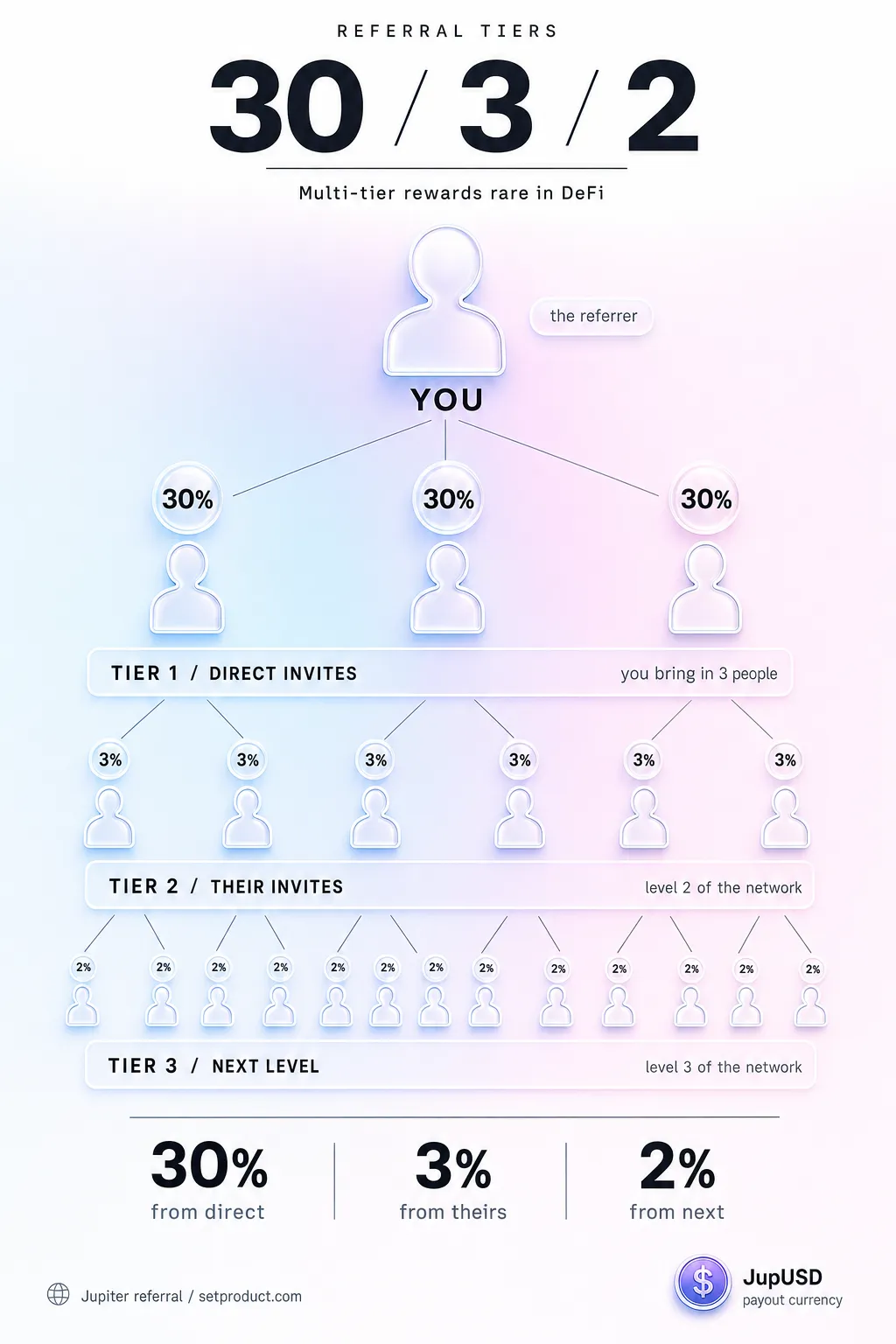 Here is the part that turns Jupiter from a tool into a small income stream. The referral program pays you across three levels, and multi-tier structures like this are genuinely rare in DeFi.
The breakdown:
→ Tier 1, 30%. You earn 30% of the referral fees from people who sign up through your link directly.
→ Tier 2, 3%. When someone you referred brings in their own referrals, you earn 3% on that activity.
→ Tier 3, 2%. One more level down, you earn 2% on the people your referrals' referrals bring in.
Most affiliate programs are flat. You refer someone, you earn once, the chain ends. A three-level structure means your early invites can keep compounding as your network grows its own network, without any extra work from you.
Let me put rough numbers on it so it is concrete. These are illustrative, not promises, because actual earnings depend entirely on how much your audience trades.
→ With 100 engaged followers, a handful become active traders, and your tier-one cut is a modest but real monthly trickle.
→ With 500 followers, the math improves, and a few of those traders start referring friends, which kicks in your tier-two share.
→ With 5,000 followers, you have enough active volume underneath you that tier two and tier three stop being rounding errors and start mattering.
Is this MLM
No, and the distinction is important. A multi-level marketing scheme requires you to buy inventory, recruit to recover your own cost, and pays primarily for recruitment rather than a product. Jupiter's program has none of that. There is no buy-in, nothing to purchase, and no requirement to recruit. People earn the underlying value by trading on a real platform they would use anyway, and you simply share in the fees they generate. You can earn nothing and lose nothing.
How to get your referral link
The steps are quick:
❶ Open Jupiter and connect your wallet.
❷ Find the referral or rewards section in your account.
❸ Generate your unique link, which includes your wallet as the referral identifier.
❹ Copy it and start sharing.
Where you place it matters more than how often. The links that convert are the ones embedded in genuinely useful content. A tutorial like this one, a thread explaining a swap, a video walking through your first deposit. If you are a creator, your existing audience already trusts your recommendations, so a single honest mention in a guide beats spamming the link a hundred times.
How I use Jupiter as a designer turned creator
I came to crypto sideways. I am a designer first, and for years I treated wallets as a thing other people dealt with. What changed was the practical need to pay for tools that my regular cards kept rejecting.
Now Jupiter is part of my weekly routine. I keep working stablecoin balances on Solana, swap when rates are good, and lend the portion I am not actively using. The whole thing takes minutes, and the fees are low enough that I stopped thinking about them.
The referral side has been a slow build, and I want to be straight about that. It is not a money printer. The first month, my earnings would barely cover a coffee. What changed it was writing genuinely useful content, this guide included, and letting people decide for themselves. The income that comes from a tutorial someone actually found helpful feels honest in a way that pure promotion never did. If you want to see the exact link I use, it is right here, and I would rather you click it because the guide earned it than because I begged.
Safety, risks, and what nobody tells you
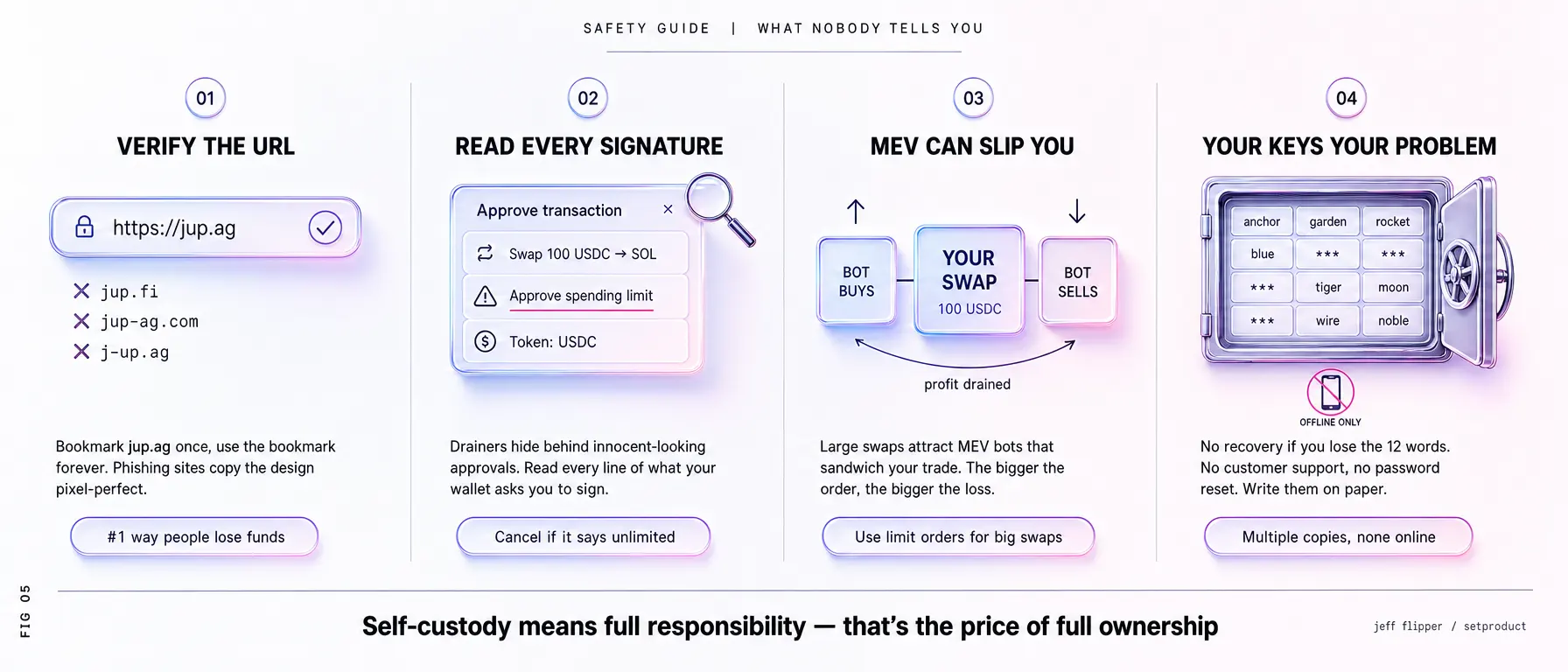
Self-custody means you are the bank, which is freedom and responsibility in the same breath. Here is what actually protects you.
→ Smart contract risk is real. Any DeFi protocol can have bugs. Spread larger amounts across positions and never put your entire net worth in one contract.
→ Phishing is the biggest practical threat. Always verify the URL is jup.ag before connecting. Fake sites like jup.fi or lookalike domains exist specifically to drain wallets. Bookmark the real one and use the bookmark.
→ Mobile wallet security. Use a strong device passcode, enable biometric lock on your wallet app, and never screenshot your seed phrase. A photo in your camera roll is a photo in someone's cloud.
→ Self-custody basics. Your seed phrase is the master key. Anyone who has it owns your funds, and no support team can reverse a theft. Write it on paper, store it offline, and consider a hardware wallet once your balances grow.
☛ The one habit that saves people: before approving any transaction, read what it is actually asking permission to do. If a swap of five dollars asks for unlimited spending access, reject it.
Frequently asked questions
What is Jupiter and how does it work?
Jupiter is a DEX aggregator on Solana. When you want to swap one token for another, it scans every major liquidity source at once and routes your trade through whichever path gives the best price, splitting large orders across pools to reduce slippage. You connect a self-custody wallet like Phantom, pick two tokens, and confirm. The trade settles on-chain in about a second. Beyond swaps, Jupiter also offers lending, perpetual futures, a prediction market, and a mobile wallet.
Is Jupiter safe to use?
Jupiter is one of the most established protocols on Solana and is non-custodial, meaning you control your funds the entire time and never hand them to a company. The main risks are smart contract bugs and phishing sites that imitate the real one. Protect yourself by verifying the URL is jup.ag, bookmarking it, reading each transaction before approving, and keeping your seed phrase offline. No protocol is risk-free, but using it carefully puts you in a strong position.
How does Jupiter compare to Uniswap?
Both route trades across decentralized liquidity, but they live on different chains. Uniswap is primarily an Ethereum-based exchange, where network fees can run several dollars per swap during busy periods. Jupiter runs on Solana, where fees stay a fraction of a cent and trades confirm in about a second. Jupiter is also a pure aggregator, scanning many Solana venues for the best route, while Uniswap is a single protocol. If you want cheap, fast swaps and your assets are on Solana, Jupiter wins on cost.
What fees does Jupiter charge?
Jupiter's strength is that it finds the cheapest routed price rather than padding a wide spread, so for most swaps you keep more than you would on a retail-facing centralized app. You still pay the underlying Solana network fee, which is tiny, plus any pool fees baked into the route. During congestion you can add a small priority fee for faster confirmation, still costing pennies. There is no account fee and no withdrawal fee, because your funds never leave your own wallet.
How does the 3-tier referral program work?
You earn across three levels. Tier one pays 30% of referral fees from people who sign up through your direct link. Tier two pays 3% when those people bring in their own referrals. Tier three pays 2% on the level below that. To start, connect your wallet, open the referral section, generate your link, and share it inside genuinely useful content. Multi-tier programs are rare in DeFi, which is what makes this worth setting up if you have any audience at all.
Can I earn passive income with Jupiter?
Yes, through two paths. The first is Jupiter Lend, where you supply stablecoins like USDC and earn yield from borrowers, with smart contract and depeg risks to weigh first. The second is the referral program, which pays recurring fees as the people you invited keep trading. Lending is hands-off once deposited. Referral income compounds if you create content people find useful. Neither is guaranteed, and both reward patience over hype, so treat any projection as illustrative rather than a promise.
Do I need to do KYC for Jupiter?
No. Jupiter is self-custodial, so there is no account to register and no identity verification. You connect a Solana wallet and trade directly from it, which is the core privacy advantage over centralized exchanges that require KYC. The one place identity may enter the picture is your initial fiat onramp, since buying crypto with a bank card through a regulated exchange usually involves verification. Once your funds are on-chain, Jupiter itself asks for nothing.
Closing thoughts
If you trade on Solana, Jupiter is already the smart default, and the only real question is whether you use it deliberately or by accident. Start with one small swap this week. Feel how fast and cheap it is, then decide whether lending a slice of your stablecoins makes sense for you.
The referral angle is a bonus, not the point. I would not have written three thousand words about a tool I did not actually use every week. Set up your link only after you understand the product well enough to explain it, because the income that lasts comes from being genuinely helpful, not from chasing clicks. Get the fundamentals right and the rest follows.
If you want to try it from the same starting point I use, here is my referral link. You get the best routed rates and a working self-custody setup, and I get a small, transparent cut if you end up trading. No pressure, no countdown timer, just a fair trade.