


Connor Patterson
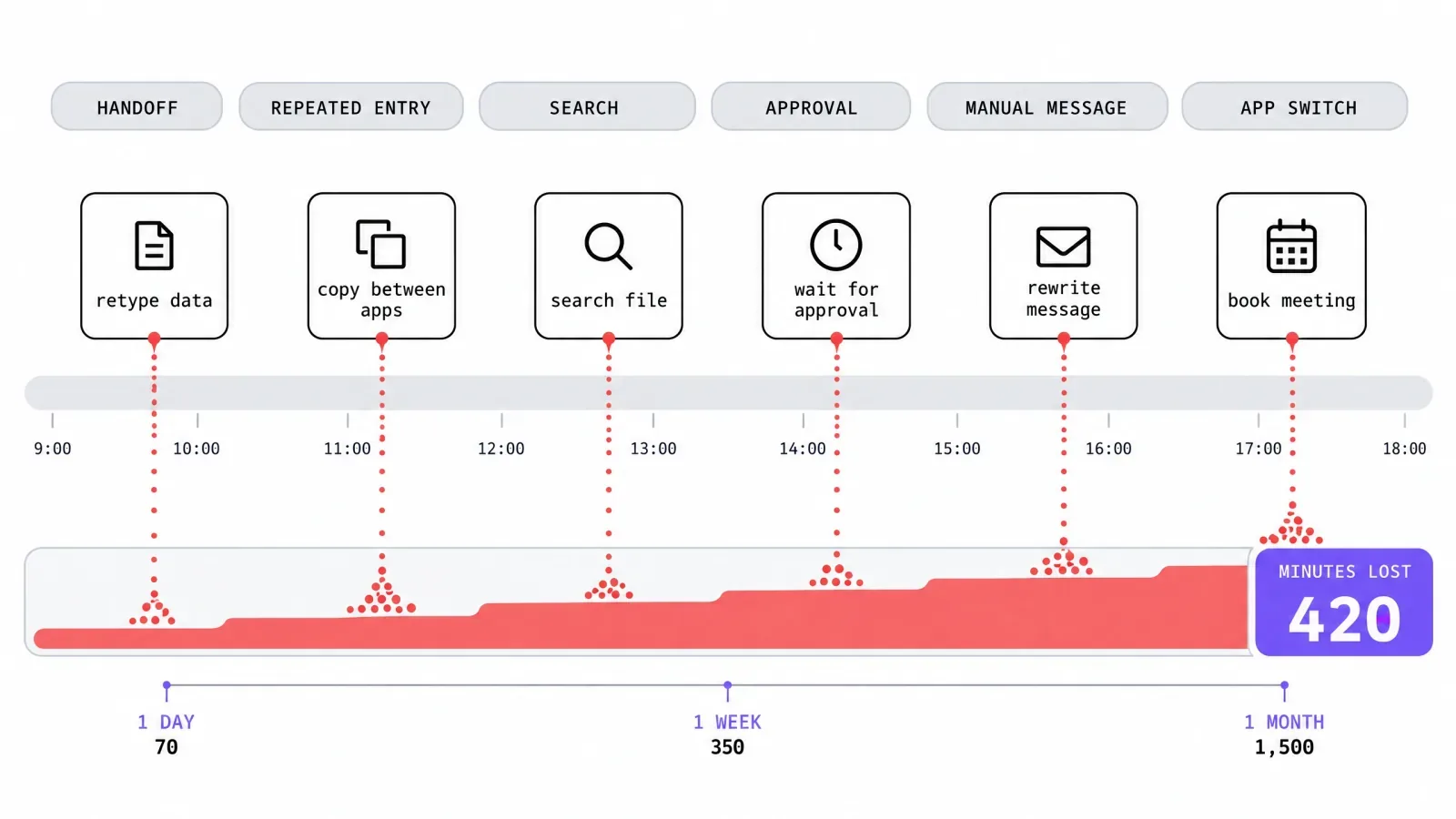
When work slows down, the cause is not always a difficult project or an understaffed team. Sometimes it is the accumulation of tiny delays: typing the same information twice, searching for a document, copying notes into another system, waiting for an approval, or manually arranging another appointment. Individually, these tasks seem harmless. Repeated across employees and working days, they become an operational problem. The most useful business software does not merely add features. It removes steps, shortens handoffs, and lets employees spend more of the day on decisions that actually require their attention.
Turn speaking into a faster input method
Typing is so embedded in office work that businesses rarely question how much time it consumes. Employees type emails, notes, instructions, reports, AI prompts, and internal messages throughout the day, even when the information already exists clearly in their heads.
Voice-to-text software provides another input method. Modern dictation tools can turn natural speech into usable written text, reducing the need to manually type every sentence. OpenWhispr, for example, is designed to work across text fields in different applications and offers both local and cloud-based transcription options. Learn how OpenWhispr handles voice dictation across email, documents, messaging, notes, or AI tools.
The broader principle is simple: improving a task employees perform across multiple applications can produce gains throughout the working day.
Automate the handoffs between applications
A surprising amount of office work exists only because two software systems do not communicate.
A salesperson receives a form submission and manually creates a CRM record. A signed contract triggers an employee to notify finance. A completed project requires someone to copy information into an invoicing system.
Workflow automation tools can connect events in one application with actions in another. A trigger might automatically create a task, update a record, send a notification, or transfer information.
The best candidates are repetitive processes with clear rules. If employees repeatedly say, “Whenever this happens, I always do that,” the workflow deserves examination.
Automation should not remove judgment from decisions that genuinely need it. Its greatest value often comes from eliminating the mechanical steps surrounding those decisions.
Make project software reduce meetings
Project-management software can easily become another place employees have to update. Used well, it can reduce the need to constantly ask people what is happening.
Tasks should have clear owners, deadlines, dependencies, and statuses. Important documents and decisions should remain connected to the work rather than scattered across email threads.
This creates operational visibility. A manager can see whether work is blocked without arranging a meeting simply to request updates. Employees can understand what comes next without searching through old conversations.
The test of a project platform is therefore not how many dashboards it provides. Ask whether it reduces uncertainty.
If teams still need several meetings each week to discover who owns a task or whether something is finished, the software may be documenting confusion instead of eliminating it.
Give customer information one reliable home
Customer information becomes difficult to use when part of it lives in spreadsheets, part in individual inboxes, and the rest inside employees' memories.
Customer relationship management software can centralize contacts, conversations, opportunities, follow-ups, and account history. That can shorten the time employees spend reconstructing what happened before the latest customer interaction.
Centralization also reduces dependence on particular employees. If an account manager is unavailable, another authorized team member can review the relevant history instead of starting from zero.
The benefit depends heavily on data quality. A CRM filled with outdated records and inconsistent fields simply centralizes bad information.
Businesses should decide which information genuinely needs to be captured, standardize how it is entered, and automate data collection where appropriate. A smaller amount of reliable information is often more useful than a huge database nobody trusts.
Stop scheduling meetings through email chains
Scheduling is a perfect example of a small task that becomes expensive through repetition.
One person proposes Tuesday afternoon. Another suggests Wednesday morning. A third participant has different availability. Several messages later, everyone finally agrees on 30 minutes.
Scheduling software can replace much of this exchange by showing approved availability and allowing people to select suitable times. Systems can also account for meeting length, buffers, working hours, time zones, and different appointment types.
The improvement is modest for one meeting. It becomes significant when recruiters, sales teams, consultants, managers, or service businesses arrange appointments constantly.
Software can also send confirmations and reminders automatically.
Removing this administrative coordination shortens the distance between deciding that a conversation should happen and actually getting it onto the calendar.
Use search to recover institutional knowledge
Businesses create enormous amounts of information and then regularly lose track of where they put it.
Policies sit in shared drives. Project decisions remain buried in chat channels. Instructions live in documents created by employees who have since left. Teams can end up recreating answers the organization already possesses.
Knowledge-management and enterprise-search tools can make internal information easier to retrieve. AI-powered search can sometimes improve this further by allowing employees to ask questions naturally instead of guessing filenames or exact keywords.
The underlying information still needs governance. Permissions must be respected, outdated material needs maintenance, and important policies require authoritative versions.
A fast search system that confidently surfaces obsolete instructions creates a different kind of inefficiency.
The objective is not finding more information. It is helping employees reach the correct information with fewer interruptions.
Let software handle routine financial administration
Finance teams often manage processes that are predictable but administratively heavy: invoices, expense reports, receipt collection, payment reminders, purchase approvals, and reconciliation.
Accounting and expense-management platforms can automate parts of these workflows. Receipts can be captured digitally, invoices generated from structured information, approvals routed to the correct person, and reminders sent without someone manually checking every overdue account.
This does not remove the need for financial controls. Automation actually makes clear rules more important.
Businesses need approval limits, access permissions, review processes, and procedures for unusual transactions. Employees should know when the system can proceed automatically and when a human needs to intervene.
Well-designed financial software makes routine transactions move quickly while making exceptions more visible. That is more valuable than simply making every process faster regardless of risk.
Measure software by the steps it removes
Businesses sometimes judge software by feature lists. Operational speed is better measured by friction.
Map a recurring process from beginning to end. Count the handoffs, repeated entries, searches, approvals, manual messages, and times employees switch applications. Then ask which steps create genuine value and which exist only because the current workflow requires them.
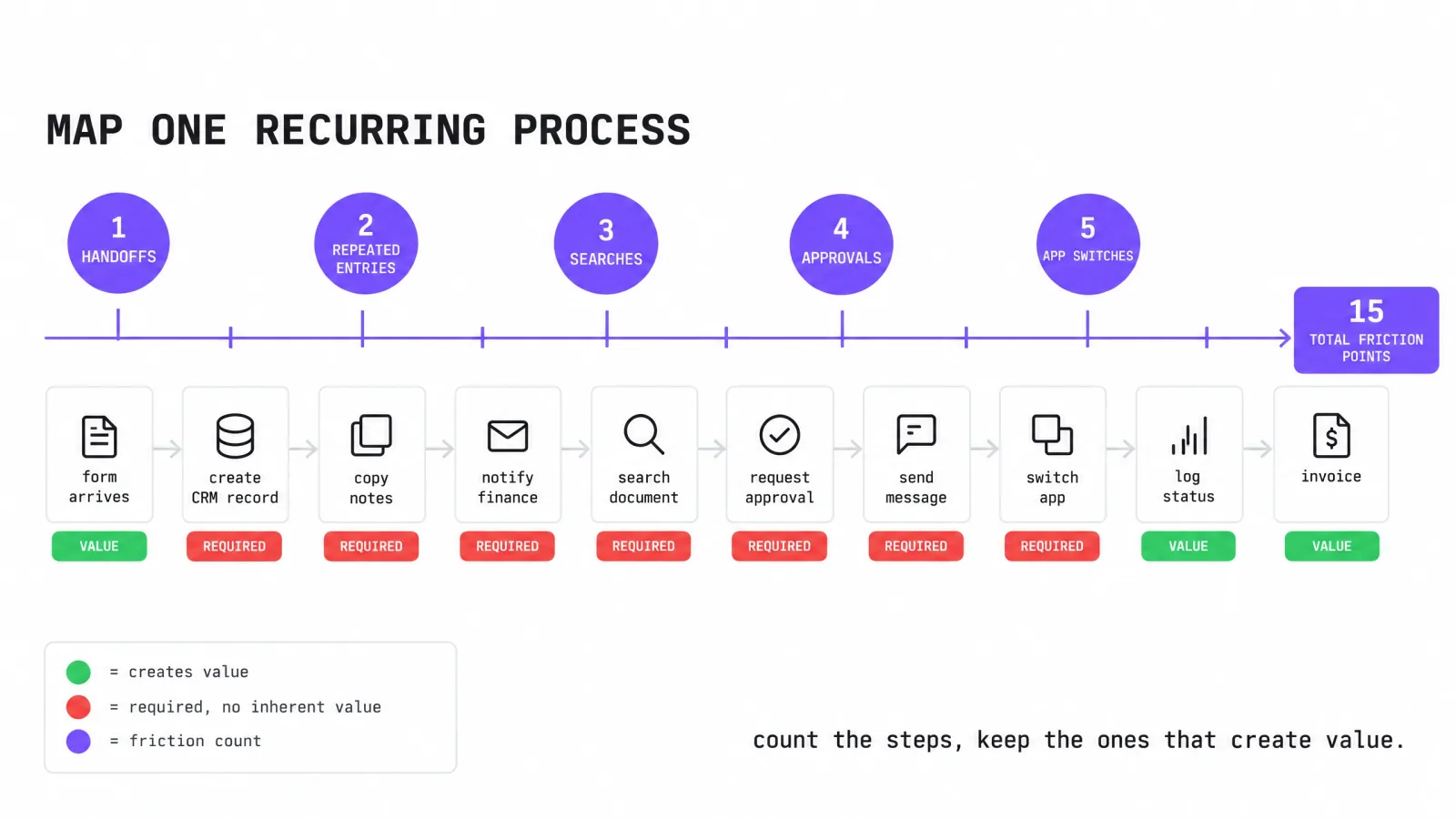
Software should remove or simplify the second group.
This also prevents businesses from buying technology that creates more work than it saves. A powerful platform requiring constant manual maintenance may be less useful than a simpler tool employees actually use consistently.
The fastest operation is not necessarily the one with the most automation either. Some decisions benefit from conversation, professional judgment, or deliberate review.
The objective is to reserve human attention for those moments. When dictation speeds up input, integrations move data automatically, project systems clarify ownership, scheduling tools remove coordination, and financial platforms handle routine administration, employees regain small pieces of time throughout the day. Added together, those minutes can become one of the most valuable productivity improvements a business makes.
Frequently asked questions
How do you find the steps slowing your business down?
Map one recurring process from start to finish, then count each repeated entry and handoff. Note every search and approval, plus each switch between applications. Sort the steps into two groups: ones that create real value and ones that exist only because of the current workflow. The second group is where the hidden minutes live.
Which tasks should you automate first?
Start with repetitive processes that follow clear rules, such as creating a record from a form, notifying another team after a signature, or moving data between two systems. If employees describe the work as “whenever this happens, I always do that,” it is a good candidate. Keep judgment calls with people.
Can workflow automation replace human judgment?
It should not. Automation works best on the mechanical steps around a decision, like collecting data, routing an approval, or sending a reminder. The decision itself often needs context or a conversation, and sometimes professional judgment. Removing the mechanical parts is what frees up time for the parts that require a person.
Is more automation always faster?
No. A powerful platform that needs constant manual maintenance can create more work than it saves. Some decisions benefit from deliberate review, and a fast search that surfaces outdated instructions creates a different problem. Speed comes from removing friction, not from stacking tools on top of each other.