

Roman Kamushken
Most gradient tools designers pass around stop at the same trick. Two stops, a direction, a CSS snippet. Open one and you get a flat blend that looks like the last hundred you saved.
The gradients designers want in 2026 are grainy, warped, closer to a shader than a CSS rule. They come from domain warping and FBM noise, which almost nobody writes by hand.
Get Gradients hides that work behind sliders. This review is independent and unpaid: I opened the tool and ran it for real, then hit the parts that frustrate.
What Get Gradients is and how it looks inside
Get Gradients is not a CSS generator. It is a canvas and WebGL engine that draws raster background art in real time.
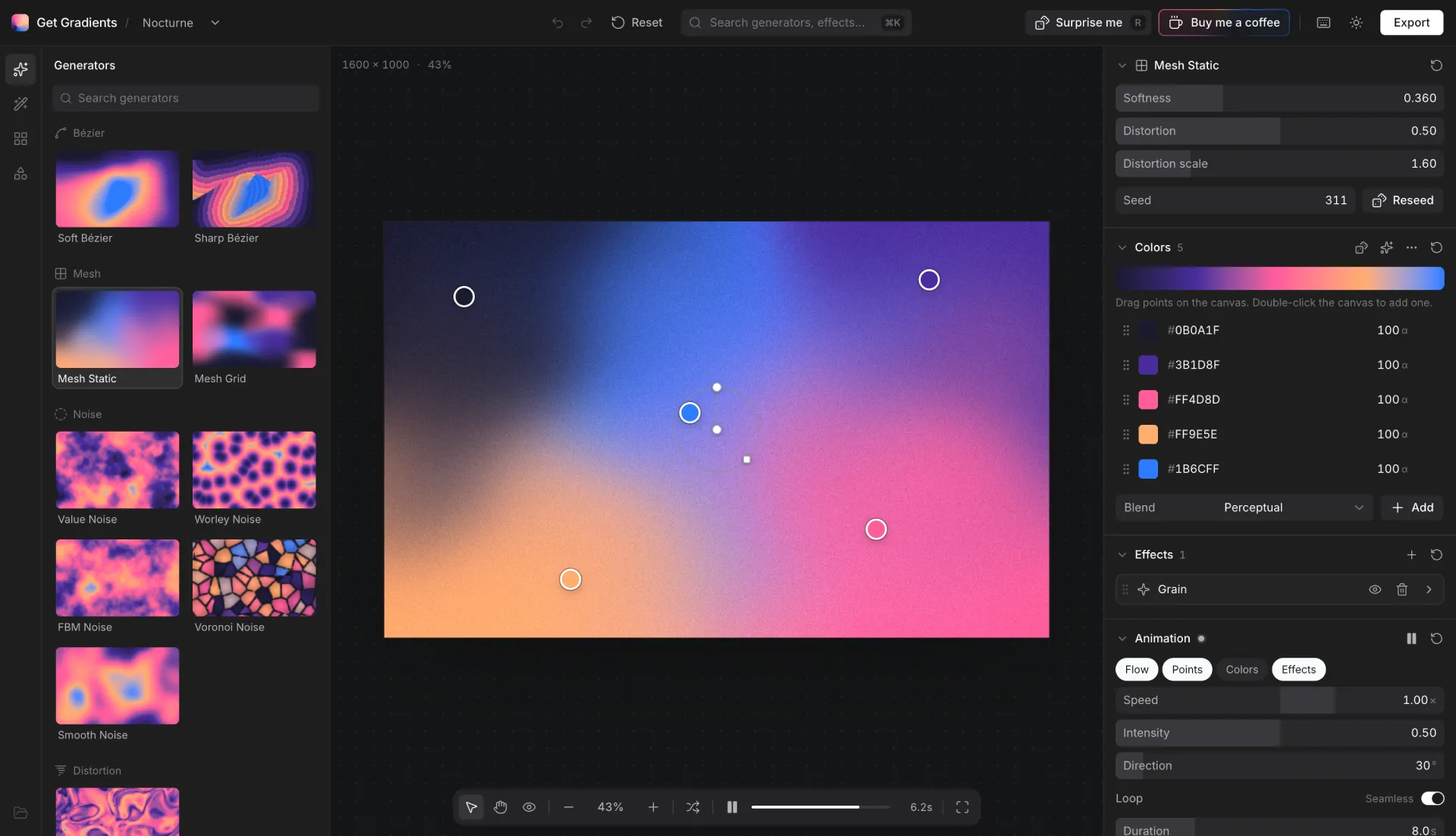
Open the app and the layout explains itself. A generator library sits left with a search field above it, the canvas fills the center, and the starter project Nocturne opens already colored with #0B0A1F, #3B1D8F, #FF4D8D, #FF9E5E, #1B6CFF.
The right column holds collapsible parameter sections. Softness, Distortion, Distortion scale, Seed with a Reseed button, an ordered list of color stops with hex and alpha, and a Blend mode that toggles between Perceptual and Add. Undo and redo stay one keystroke away, ⌘K opens a command menu, and R rolls a random result. Roundups like our design tools review surface tools this way.
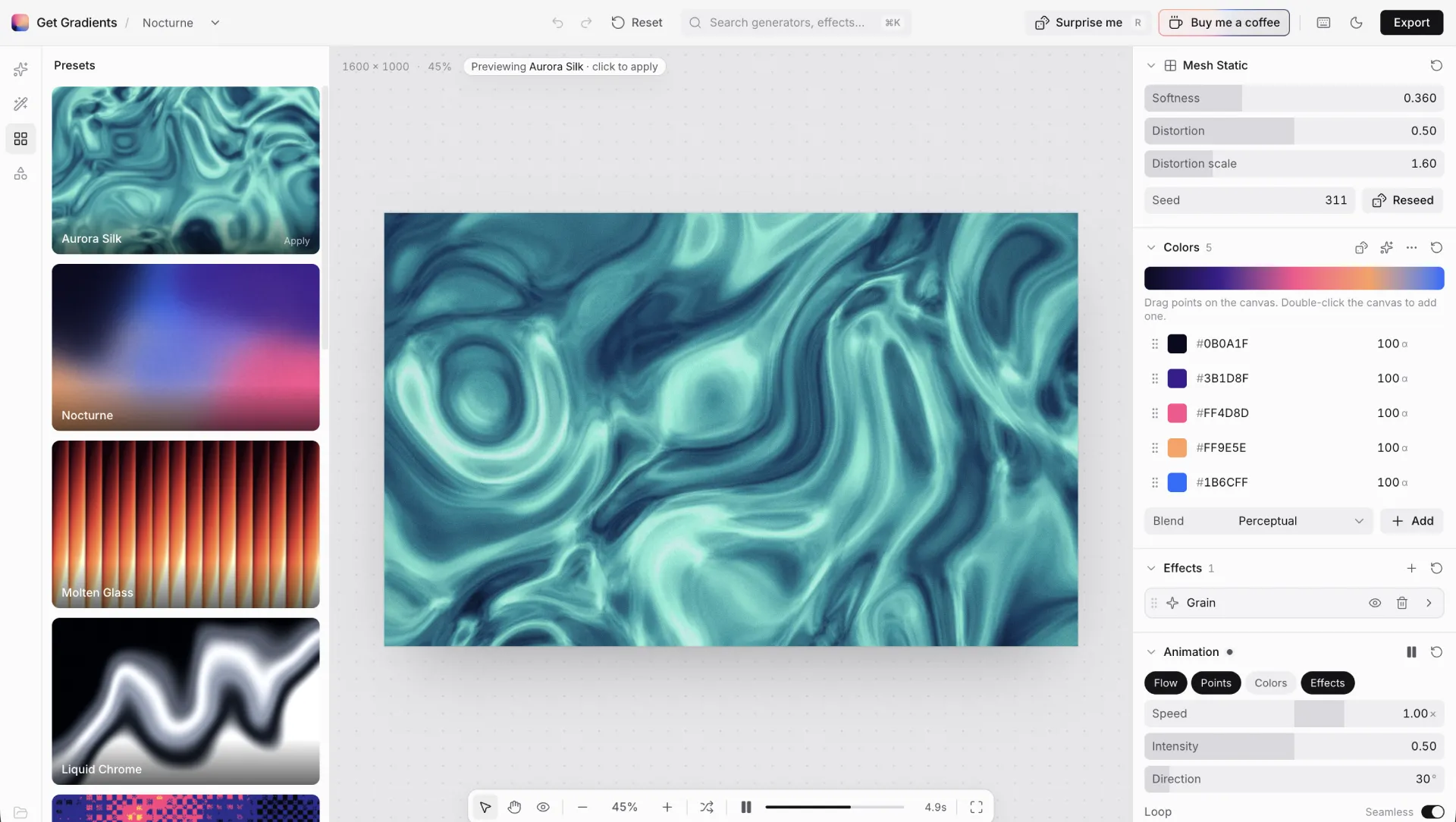
The presets panel is what I would show a skeptic first. Tiles like Nocturne, Aurora Silk, Molten Glass, Liquid Chrome render live previews, and clicking one drops a strip that reads "Previewing … · click to apply".
Seventeen generators, family by family
The sidebar splits generators into collapsible families, each reachable from the search field above. Seventeen generators, eight families, and the further down the list you go the further it moves from anything a CSS tool does.
Simple and Flat handle basics. Soft Bézier and Sharp Bézier add curve-driven blends.
Mesh Static and Mesh Grid place color nodes across the canvas for light and shadow.
Noise gets the most room, and that is the point. Value, Worley, FBM, Voronoi, Smooth Noise each produce a different surface: soft clouds, cell structures, cracked surfaces.
Distortion holds Domain Warping, Pattern covers Waves, Oval and Columns, Flow ships Gravity, Painterly holds Watercolor.
Noise and domain warping without a shader degree
Five generators sit in the Noise family, and their names mean specific things. Knowing them turns guesswork into intent.
Value Noise builds smooth blotches from random values on a grid. Smooth Noise softens those values so the surface stops showing grid lines. FBM Noise stacks layers called octaves, at rising frequency and falling strength, for fractal detail.
Worley and Voronoi both work from scattered points. Worley gives rounded, cellular islands. Voronoi draws the boundaries between those cells, so you get cracked lines that read as stone. The Book of Shaders covers these fields in depth if the previews leave you wanting the math.
Domain warping is the technique behind marble and smoke. It feeds the output of one noise field back in as the coordinates of a second, so the surface folds into itself. Most pipelines make this GLSL work you write line by line, which is why Inigo Quilez documented it. Here it ships as one generator with two sliders. You get less control than a hand-written shader and far more than a two-stop CSS tool.
Effects, grain and masks
Effects
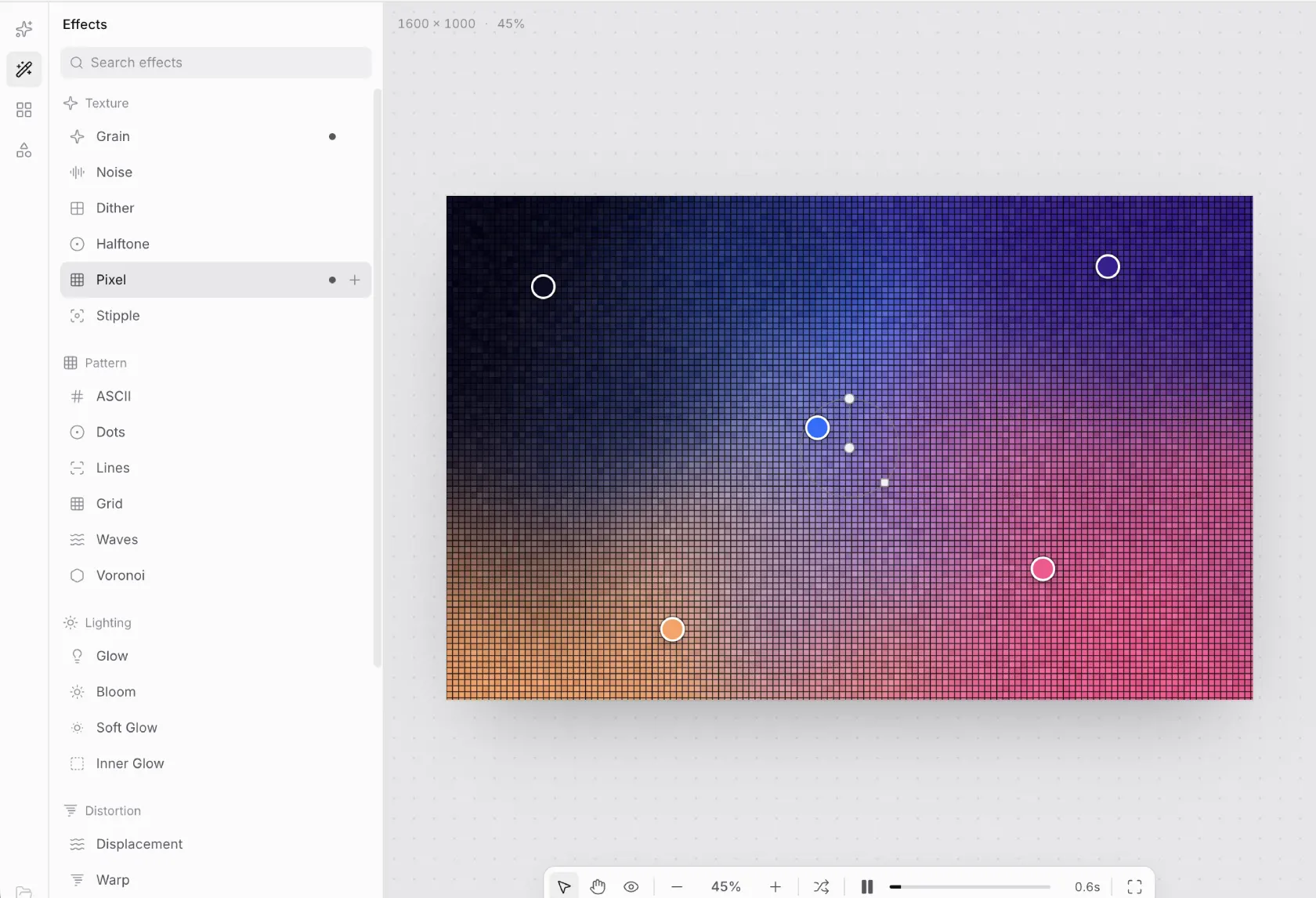
The Effects panel mirrors the generator library, with a search box and four groups: Texture, Pattern, Lighting, Distortion. An applied effect shows a dot, and some offer a plus button for a second instance.
Texture holds Grain, Noise, Dither, Halftone, Pixel, Stipple. Grain is the fastest route to the look everyone wants now, and turned up too far it eats smooth transitions. It pairs well with the frosted layers of liquid glass and the soft surfaces of claymorphism.
Pattern adds ASCII, Dots, Lines, Grid as overlays. Lighting adds Glow, Bloom, Soft Glow, Inner Glow around bright stops. Distortion pushes pixels with Displacement, Warp, Ripple. Each effect multiplies the one below it, and stacking four at high strength flattens a careful composition.
Masks
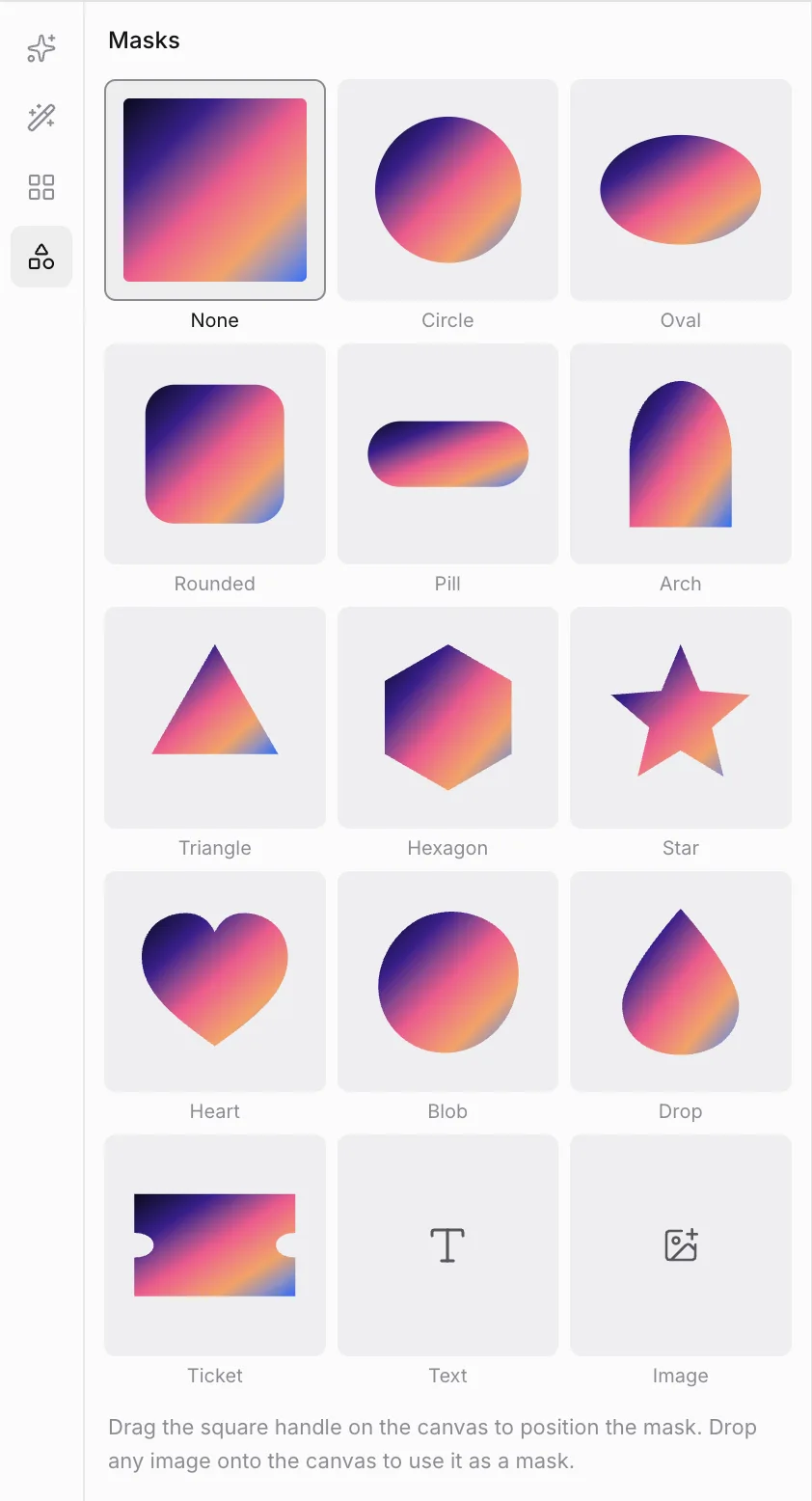
Masks surprised me most. The panel shows 14 shapes, from None and Circle to Oval, Rounded, Pill, Arch, Triangle, Hexagon, Star, Heart, Blob, Drop, Ticket, plus two tiles marked Text and Image. A square marker on the canvas moves the mask, and you drag an image file onto the canvas to use it as a mask.
The image mask pours the gradient into any logo or silhouette.
Animation and loops
The bottom toolbar holds play and pause plus a timeline scrubber for checking a loop before export.
Animation is layered rather than global. Flow, Points, Colors, Effects each move on their own, with their own speed and intensity. Direction sets an angle in degrees, and Easing switches between Linear, Ease, Ping-pong.
Seamless matters for anything that repeats. Hero backgrounds and video overlays punish a visible jump at the cut. These loops slot under the hero blocks of a bento grid layout without stealing attention from the content.
Export options and multipliers
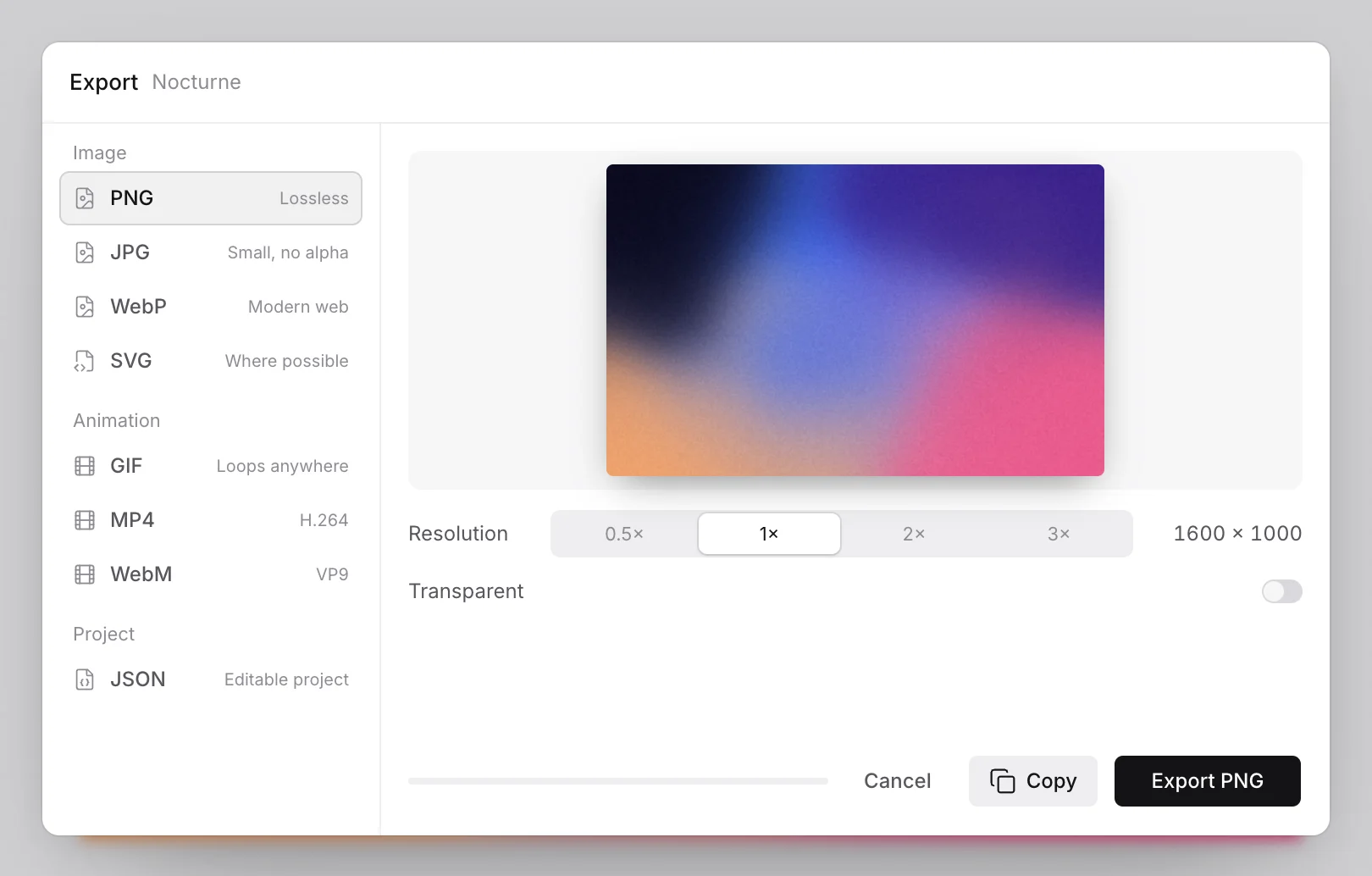
The export dialog opens with the format list on the left, a live preview in the center, a multiplier row, and a Transparent toggle along the bottom.
Images come as PNG, JPG, WebP and SVG, where the dialog labels JPG as the small one with no alpha channel and lists SVG as where possible, so the vector option depends on the composition. Animation comes as GIF, MP4 in H.264, WebM in VP9. A project leaves as JSON.
The Transparent toggle drops the canvas background, which is what you want when the gradient will sit over an app shell or a photograph. The multiplier sets resolution: the canvas defaults to 1600 × 1000, so 3× gives 4800 × 3000, enough for print and 4K backgrounds without upscaling.
A Copy button sits next to Cancel, and the dialog never says whether it hands you an image or a snippet. That ambiguity matters for anyone who wanted a stylesheet rule.
Use GIF for a small loop where quality is not the point, MP4 for the widest support, and WebM when file size matters more than compatibility, since VP9 compresses harder than H.264.
What it gets right and what it gets wrong
Strip the landing page copy away and two lists remain. One is why the tool deserves a bookmark, the other is what it will cost you in time.
What it gets right
- Seventeen generators across eight families cover soft blends, cell structures, watercolor in one place.
- Editing happens on the canvas, where dragging control points beats typing values.
- Animation goes past most browser tools, with layered motion and loop playback.
- The keyboard workflow is real: ⌘K finds generators and effects, and R rerolls a result.
- Export covers still images and video in one dialog.
- The default project opens usable, which lowers the cost of a first visit.
- The price is zero, with no account, no paywall, one Buy me a coffee link.
What it gets wrong
- No documentation that I could find explains what FBM or Worley noise means.
- No accounts, so projects live in JSON files on your machine.
- No code export that I could find, so a button gradient has to be rebuilt by hand, and the Copy button does not clarify what it copies.
- The entry is abrupt for picker users expecting two stops.
- Effects stack easily, and four at high strength turn a careful composition into mush.
How it compares and the final verdict
How it compares
The free pickers and this tool solve different problems, so they read as trade-offs, not a ranking. Grabient and uiGradients are quicker when all you need is two colors and a CSS rule.
| Tool | Approach | Best for | Weak spot |
|---|---|---|---|
| Get Gradients | WebGL canvas engine | Warped, animated backgrounds | No code out, steep stack |
| uiGradients | Curated CSS presets | Fast copy-paste gradients | No texture or motion |
| Grabient | Live CSS editor | Tweaking stops in real time | Linear and radial only |
| Coolors gradients | Palette-first generator | Matching an existing palette | Weak surface control |
| gradients.design | CSS and mesh presets | Quick mesh for product pages | No raster export |
| ShaderGradient.co | React shader component | Animated gradient in a React app | Code-bound, not a design tool |
| makegradient.com | Pattern and mesh generator | Decorative fills | Fewer effects, no animation |
I kept the free pickers in on purpose. They are smaller, and for a button background they are exactly right.
Who it is for and who should skip it
Take it if you build hero sections or app shells or social assets that need texture a CSS rule cannot reach.
Skip it if all you need is a CSS snippet for one button, since the export hands you files rather than code.
Verdict
8 out of 10. Get Gradients is the most capable free gradient tool I have used in a browser, and the gap sits in the hard techniques, not the interface. The missing documentation and the absent code export are real costs, and neither is fatal for image work.
Who should take it: designers and front-end developers shipping gradient backgrounds who want shader-grade texture without writing a shader.
Who should skip it: anyone who needs a copyable CSS or GLSL snippet, or a two-stop picker.
Try it at getgradients.com.
Frequently asked questions
Is Get Gradients free?
Yes. It is free with no account and no paywall. It runs in the browser and monetizes through one Buy me a coffee link on Polar. Exports carry no watermark.
Is Get Gradients a CSS gradient generator?
No. It is a canvas and WebGL engine that draws raster background art. Exports return image files and video files, plus a JSON project, with no CSS or GLSL export. Use Grabient when you need a copyable CSS rule.
Can Get Gradients export animated gradients?
Yes. The animation panel drives layered motion, and the export dialog writes GIF, MP4 and WebM files. The Seamless toggle keeps a repeating loop from showing a jump at the cut, which matters for hero backgrounds.
What is domain warping in gradient design?
Domain warping feeds the output of one noise field back in as the coordinates of another. The surface folds into itself and stops looking like a grid, which is how you get marble and smoke. Get Gradients ships it as one generator.
What is the best free gradient generator in 2026?
It depends on the job. For a copyable CSS rule, the pickers are quicker. For textured and animated backgrounds, Get Gradients covers more ground than any other free browser tool I tested, though the missing code output limits it.
Get Gradients is strong where the free pickers stop: noise, warping, animated loops. It asks nothing but patience with its parameter panel, and if you build backgrounds rather than button snippets, the trade is worth it.