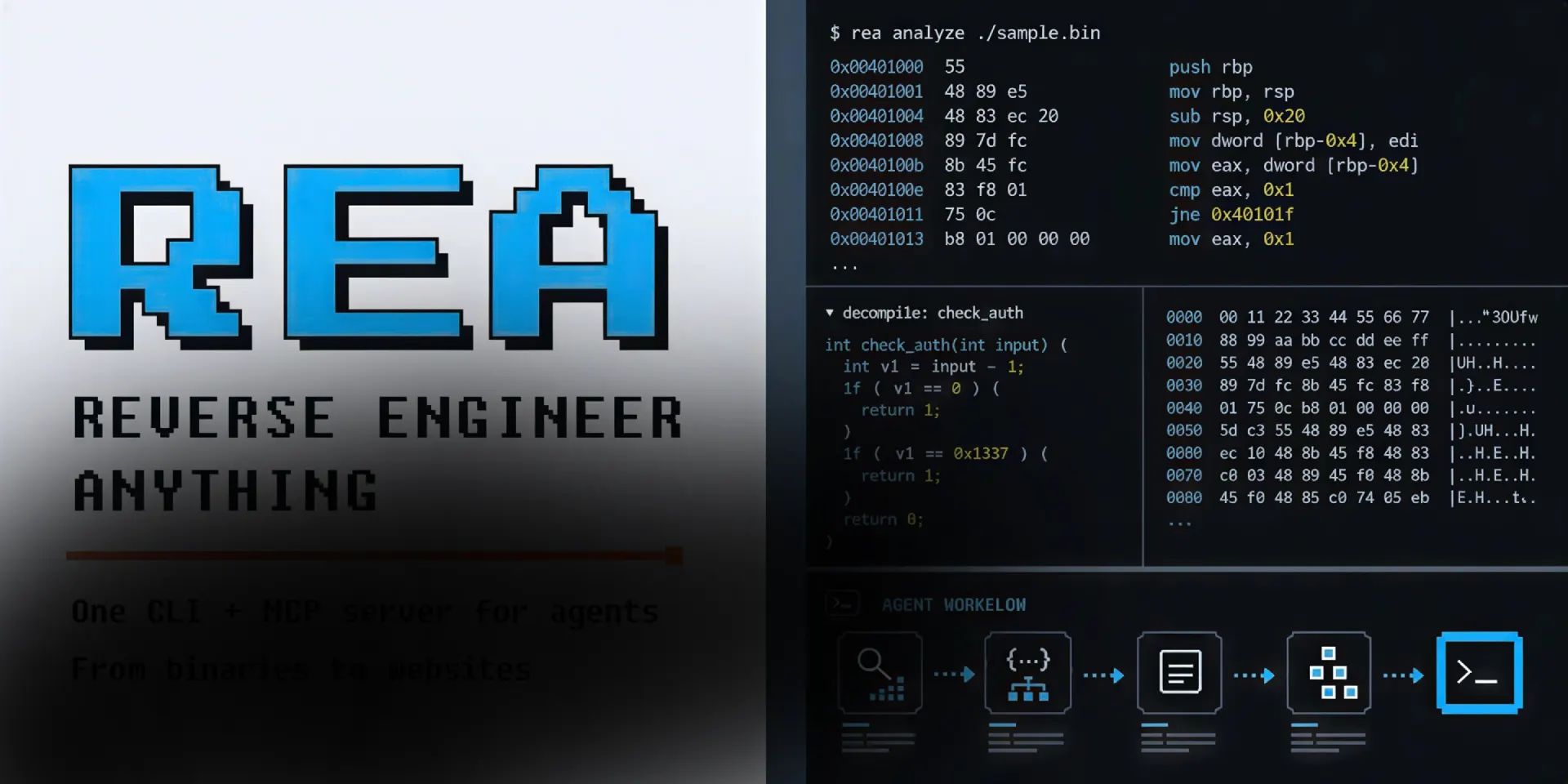

You see a feature in an app and want the same behavior in your own product. You cannot read the source. Asking an AI agent to reimplement it from a screenshot gives you a guess, and a guess ships bugs. REA gives your agent the missing half: local tools to take the app apart, follow the code path, and hand back the evidence behind each conclusion.
What REA actually does
REA is an open-source MCP server for reverse engineering. It connects an AI agent to a set of inspection tools, so the agent can look inside a target without its source code, explain how a feature works, and then write a version for your project. MCP is the protocol agents already use to call outside tools, so installation is one command and no new interface to learn.
Setup registers the server with your agent and installs matching workflow instructions. Supported clients include Claude Code and Cursor. Other agents that speak MCP can register the server by hand. Everything runs on your machine, and the project carries an MIT license, so you use it in personal and commercial work without paying anyone.
Why building a feature blind is expensive
Copying behavior from a screenshot looks fast until the edge cases arrive. The state machine behind a toggle, the order two requests fire in, the fallback when a field is empty: none of that is visible in a picture, and each missing detail becomes a bug report later. You end up guessing at the one part of the feature that made it worth copying.
Reading the actual code path removes the guessing. You learn how the original handles the case you have not thought of, and you build the same behavior on purpose instead of by accident. That is the difference between a feature that works in the demo and a feature that survives first contact with real users.
How the MCP bridge works
You point your agent at a local target and ask a question in plain language. The agent calls REA through MCP, REA inspects the files or the running process, and the findings come back with the evidence attached. The agent uses those findings to answer you, to ask follow-up questions, or to write and test an implementation. The terminal uses the same workflows, so you can run a single inspect command yourself when you want the raw view.
Static inspection reads the files without running the application. Runtime capture runs or interacts with the target under your own user permissions, and each runtime guide describes what that touches. You choose the mode, which matters when the target is something you cannot safely launch on a whim.
What you can point it at
The tool covers more than one kind of target. The same interface handles all of these:
- ❶ Native binaries: pseudocode and assembly through a deep analysis engine
- ❷ JavaScript and Electron apps: recovered modules, imports, and the boundaries between renderer and main process
- ❸ .NET assemblies, inspected without running them
- ❹ Android APKs: manifest declarations and decompiled methods
- ❺ Firmware images and extraction handoffs
- ❻ Packages and resources: file inventories and Apple bundle anatomy
- ❼ Process behavior: terminal output, interactions, exit codes, and run comparisons
A designer rebuilding an app usually starts with the JavaScript and Electron path, because it needs no native analysis engine and returns the module map that explains how the interface is wired. Native analysis is there for the deeper question underneath it.
Evidence, not raw output
A decompiler that dumps thousands of lines leaves you where you started, just with more text. REA frames each result with the evidence behind it and the limitations of the method, so you can judge how much to trust a conclusion before you build on it. That framing is what makes the output usable by an agent: the agent can cite what it saw and flag what it inferred.
The project is honest about the trade. Static analysis and native formats depend on the provider and the host operating system, and some features land after the current npm release. The REA website carries illustrated guides and worked case studies, including a sound-pan reconstruction and an Electron clipboard trace, so you can read an investigation end to end before you run your own.
Choosing a deep analysis provider
Deep native analysis leans on an engine you already own. REA works with Hopper, Ghidra, or IDA, and setup can install Hopper with your approval while Ghidra and IDA use existing installations. Static JavaScript and .NET inspection need none of them, which is the fast lane if you are only chasing interface behavior.
Host support varies by provider, and the documentation is specific about which combinations are tested. Start with the JavaScript path, add a native provider only when a question reaches below the app layer, and let the guides tell you which engine fits the target in front of you.
Local by default
REA analyzes targets on your machine. Your agent receives the tool results, and then your model provider applies its own data policy, which is worth checking before you point the tool at anything sensitive. The analysis itself does not upload the app to a third-party service, and runtime capture stays within the permissions your user account already has.
For a solo builder this keeps the workflow private and the setup small. One command registers the server, the agent keeps its normal interface, and the reverse engineering happens next to the codebase you are about to change.
Frequently asked questions
Do I need to know reverse engineering to use it?
No. You describe the feature you want to understand, and the agent drives the tools. You read the evidence and the plain language summary. Deeper native work rewards some familiarity with assembly, but the JavaScript and Electron path stays close to ordinary front-end code.
Do I need a native analysis engine installed?
Only for native binaries. Static JavaScript and .NET inspection run without a native engine, so a web or Electron target needs nothing extra. Setup can install Hopper with your approval, and Ghidra and IDA use the copies you already have.
Which agents can call REA?
Any agent that supports local MCP servers. Setup configures Claude Code and Cursor, and other clients can register the server manually. If your agent speaks MCP, it can use REA.
Is it free and can I use it commercially?
Yes on both. The project is MIT licensed, the source lives on GitHub, and the code is open for commercial work. You are responsible for having the authorization to analyze whatever you point it at.
Does it upload my app anywhere?
REA analyzes targets locally and returns results to your agent. The analysis does not ship your app to a third party. Your model provider still sees the tool results, so check its data policy before you inspect anything sensitive.
Why it belongs in your stack
If you build by prompting an agent, the bottleneck is no longer writing code. It is knowing what to build. REA closes that gap: one setup command, your existing agent, and a local investigation that ends with evidence instead of a confident guess.
It is free and open source, and it is honest about the limits of each method. Point it at the feature you keep circling, read how the original works, and ship the version your own product needs. When you want the interface you are rebuilding to hold up against the original, the rest of our free code resources and design and code kits are built for the same fast, solo workflow.

.webp)