

Roman Kamushken
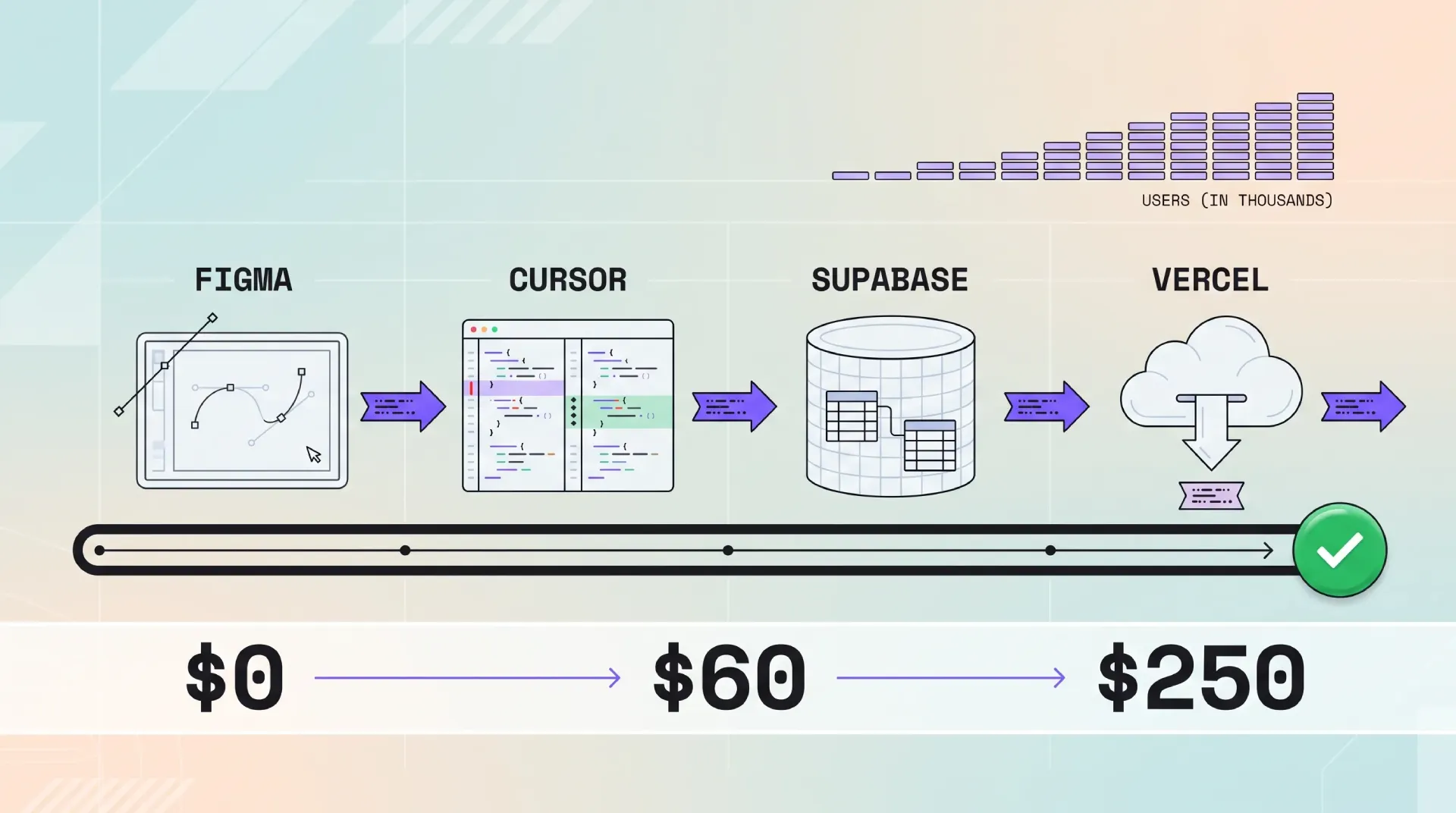
The stack itself is old news. You have seen the logos a hundred times. What changes everything is the handoff between the layers, because those handoffs are where solo founders lose weeks.
This particular chain has the cleanest handoffs available today, and there is one reason. Every layer is readable by an AI agent as plain text. Call it vibe coding with guardrails.
Below is the full breakdown: what each layer does, what it costs at zero, 1,000 and 10,000 users, the five ways it breaks, and a plan to ship a real product in one weekend.
The one principle behind the whole stack
Pick tools that expose their state as text an agent can read. That is the principle. Design tokens as JSON, TypeScript types, a SQL schema file, an environment file. All of it in the repo, all of it diffable.
Why does this matter more than any individual feature? You cannot hold a whole SaaS in your head, and neither can the agent.
A tool that keeps its state inside a GUI is invisible to your agent. Figma without variables is a pile of pictures. A database you only touch through a web console is a black box. The agent guesses, and guesses compound.
☞ The test for any new tool: can I show its configuration to the agent as text? If the answer is no, the tool will quietly cost you more than it saves.
Four readable layers beat four powerful layers that cannot talk to each other.
Layer 1, design with Figma as the source of truth
Why not skip straight to code in 2026? Because the cheapest place to change a decision is still the drawing. Renaming a color in a variables panel takes five seconds. Renaming it after it lives in 40 components takes an afternoon.
Figma stopped being a picture maker a while ago. Variables, modes, and component properties turned it into a decision database. That database is the thing worth keeping.
Variables are the bridge to code
A Figma variable is a named value. A color, a spacing step, a corner radius, a font size. Give it a name and the agent can use that name.
Export your variables and you get a tokens file, the cleanest handoff in the entire stack. The agent does not need to see your design. It needs the names you decided on.
{
  "color": {
    "bg": { "$type": "color", "$value": "#ffffff" },
    "fg": { "$type": "color", "$value": "#19181b" },
    "primary": { "$type": "color", "$value": "#7c4dff" },
    "primaryHover": { "$type": "color", "$value": "#39198f" },
    "border": { "$type": "color", "$value": "#ebe0ff" }
  },
  "space": {
    "sm": { "$type": "dimension", "$value": "8px" },
    "md": { "$type": "dimension", "$value": "16px" },
    "lg": { "$type": "dimension", "$value": "32px" }
  },
  "radius": {
    "card": { "$type": "dimension", "$value": "12px" },
    "pill": { "$type": "dimension", "$value": "999px" }
  }
}
Getting the design into the editor
The first path is Figma's official Dev Mode MCP server. It lets Cursor read a selected frame, including layout, variables, and component names. It requires a paid Figma seat, and output quality depends on layer naming.
Start with the screenshot path anyway. It is free and it teaches you what the agent needs to hear before you wire up MCP.
I wrote a whole build log on this exact handoff, and what it takes to make a design editable by an AI agent without wrecking the system. The lesson there carries over here: constraints beat freeform.
☛ If you would rather not spend your first weekend drawing foundations, a Figma template is a legitimate shortcut. Setproduct ships UI kits and dashboards with variables already organized, which means the tokens file already exists and the agent already has names to read.
Layer 2, build with Cursor as the pair programmer
Three agents matter right now. Cursor lives inside a code editor and shows you inline diffs. Claude Code runs in the terminal and is comfortable with long autonomous tasks. Windsurf sits between them with its own agent flow.
They share the same underlying models and the same project files. So the choice is about the interface you will actually keep using, not raw capability.
For this stack I pick Cursor, because a designer moving into code needs to see the change before accepting it. Inline diff review is the skill you are really learning. It is also the cheapest safety net you have.
The rules file is the real spec
Most people treat project rules as a nice-to-have. It is the product. It is where you put the decisions you refuse to repeat in every prompt.
Here is a realistic rules file for a Next.js and Supabase project. Rules live in .cursor/rules/, one .mdc file per concern with a small frontmatter block. The single .cursorrules file still works, though Cursor treats it as legacy.
---
description: Core project rules for the SaaS app
alwaysApply: true
---

# Project rules: SaaS app (Next.js App Router + Supabase)

STACK
- Next.js latest, TypeScript strict, Tailwind CSS v4
- Supabase for Postgres, Auth, Storage. No other database.
- Stripe for payments. Never touch card data directly.

FOLDER CONVENTIONS
- /app for routes, /components for UI, /lib for helpers
- /lib/supabase/server.ts is the only file that creates a server client
- /types holds shared TypeScript types. Import, never redeclare.

DATABASE
- NEVER bypass Row Level Security. No service role key in client code.
- Every new table ships with an RLS policy in the same migration.
- Migrations live in /supabase/migrations. Never edit the schema by hand.

CODE STYLE
- Use server actions for mutations. No ad-hoc API routes.
- Use design tokens from /styles/tokens.json. No hardcoded colors or spacing.
- Named exports. No default exports except Next.js pages.

WHEN UNSURE
- Ask before adding a dependency.
- Show the migration SQL before applying it.
Read that file again and notice what it does. It removes entire categories of mistake before the agent starts typing.
The loop you actually run
The workflow is boring on purpose. Pick one Figma frame, then screenshot it or read it through MCP. Ask the agent for one component.
Review the diff line by line, then commit when the preview looks right. One frame, one component, one commit.
Founders who skip the review step are the same people who discover at launch that the agent wired the client to the wrong key.
Where Cursor lies to you
Cursor hallucinates in patterns, and the patterns are predictable. It invents package versions. It references environment variables that do not exist. It quietly writes client-side queries that ignore Row Level Security.
☞ The rules file is a mitigation, not a cure. A rule that says "never bypass RLS" stops the obvious mistake. It does not stop a subtle one. Read every diff that touches auth, database access, or money.
Layer 3, Supabase as the entire backend
Supabase ships Postgres, Auth, Storage, Edge Functions, and Realtime in one product. It is tempting to use all five in week one. Do not.
In month one you need three things: Postgres, authentication, and Row Level Security. Storage and Realtime can wait until a feature demands them.
Row Level Security in plain English
A Postgres database normally trusts whoever connects to it. Row Level Security flips that. It makes the database check every row against the person asking.
So you can stop guarding data in your application code. The database itself refuses to return rows a user should not see. This matters when an agent writes your queries, because the safety lives below its reach.
Here is a policy that lets users read only their own rows.
alter table public.projects enable row level security;

create policy "Users read their own projects"
  on public.projects
  for select
  using (auth.uid() = user_id);
☛ Supabase documents the full pattern in Row Level Security. Read it before you write your second table, not after.
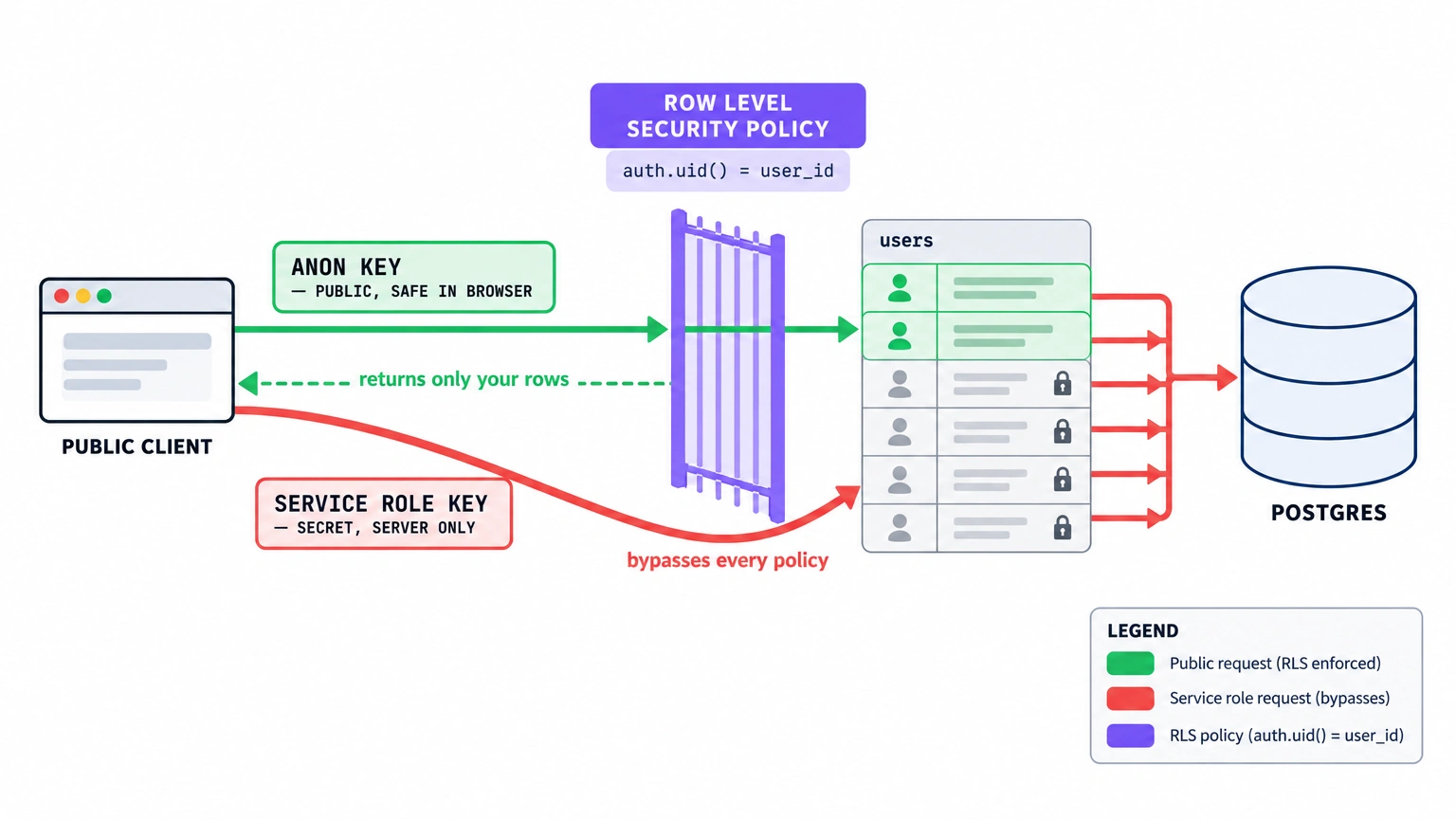
That diagram is the whole security model on one page. The green lane carries the public anon key, and the gate hands back only the rows that belong to the signed-in user. The red lane carries the service role key, arcs over the gate, and reaches every row at once. Same database, two very different outcomes.
Migrations keep the agent honest
Use the Supabase CLI and keep migrations as files in the repo. Now the schema is text, which means the agent can read it. It stops inventing column names that never existed.
Where people get burned
Two traps catch almost everyone. The first is a new table without RLS enabled. The table works perfectly in your testing and leaks data in production, because the default is wide open.
The second is the free tier pausing a project after a period of inactivity. Free-tier projects pause after seven days without activity, and Pro projects never pause. Upgrade the moment a stranger can reach your signup form, because a sleeping project greets your first visitor with an error page.
Layer 4, deploy with Vercel and the preview URL workflow
Vercel turns a git push into a live URL. You have no QA team, so the preview URL is your QA team.
Every branch gets its own address. You open it on your phone, click the one flow that matters, and merge only when it behaves. The loop takes two minutes and it catches the mistakes review misses.
Keys, and the mistake that costs you everything
Your project needs two Supabase keys, and confusing them is the classic disaster. The anon key is public and safe in the browser, protected by RLS. The service role key bypasses every policy and must never reach the client.
# .env.example

# Public. Safe in the browser. RLS still protects every row.
NEXT_PUBLIC_SUPABASE_URL=https://your-project.supabase.co
NEXT_PUBLIC_SUPABASE_ANON_KEY=your-anon-key

# SECRET. Bypasses Row Level Security. Server only. Never expose to the client.
SUPABASE_SERVICE_ROLE_KEY=your-service-role-key

# Server only. Used by API routes and server actions.
STRIPE_SECRET_KEY=your-stripe-secret
☛ Ship the service role key to the browser once and someone can read your entire database. Put a comment above it in the file so the agent reads the warning too.
The bill spike nobody warns you about
Vercel's free and hobby tiers are generous until they are not. Hobby is free, and Pro starts at $20 per seat. Real cost grows through usage: image optimization, edge middleware invocations, and bandwidth.
Worry when you cross a few thousand real users, not before. Until then, watch the usage dashboard and stop optimizing for a bill you do not have. The current numbers live on Vercel's pricing page.
The supporting cast
Seven smaller decisions complete the stack. None of them deserve a chapter, but getting them wrong wastes a weekend each.
Payments
Stripe is the default and has the deepest documentation, at 2.9% plus $0.30 per transaction. Lemon Squeezy charges 5% plus $0.50, and Polar charges 4% plus $0.40. Both are merchant of record, so they handle global sales tax and VAT for you. That paperwork removal is often worth the higher fee.
Resend with React Email lets you write transactional templates as components. The same TypeScript you already know, rendered to HTML and delivered through one API call. The free tier covers 3,000 emails a month, which is more than a solo product sends in its first year.
Analytics
PostHog bundles product analytics, session replay, and feature flags into one tool, free up to one million events a month. Session replay is the part solo founders undervalue, and watching one stranger struggle with your signup flow teaches more than a week of dashboards. When you do build dashboards, this teardown shows which numbers deserve a chart.
AI inference
Most products shipped in 2026 call a model somewhere: a summary, a search, a draft, a classifier. That means a fifth vendor, and the default choice sends every user prompt to a provider that logs it.
Venice.ai is the pick for this stack because it fits the principle. An OpenAI-compatible API, so the swap is one base URL in your config. Private inference, so prompts and outputs are not stored on their servers, which is a sentence you can put in your privacy policy without a lawyer. And the same key runs open-source text models and image models, which matters in the checklist below.
Domain, DNS, and edge protection
Cloudflare handles your DNS, gives you a free CDN, and absorbs the first wave of bots. It sits in front of Vercel and costs nothing at this scale. Set it up on day one, since migrating DNS later is a boring evening.
Marketing site
You can build marketing pages inside the Next.js app or use Framer. Framer wins if you want to change copy without a deploy, and the app wins if pricing and docs must stay honest with the product. Most founders end up with both.
Support
A shared inbox is enough until roughly 500 users. Do not buy a help desk on day one. Answer the first hundred emails yourself, because those conversations are your roadmap.
What it costs, 0 → 1K → 10K users
Prices below are the published tiers at the time of writing. Every one of them moves once or twice a year, so treat the totals as a shape, not an invoice.
| Line item | 0 users (building) | 1,000 users | 10,000 users |
|---|---|---|---|
| Figma | $0 Starter | $16/seat Professional | $16/seat Professional |
| Cursor | $0 Hobby | $20/mo Pro | $20–$60/mo Pro or Pro+ * |
| Supabase | $0 Free | $25/mo Pro | $25–$75/mo Pro + usage |
| Vercel | $0 Hobby | $20/mo Pro | $20 + usage, typically $80–$200 |
| Stripe / MoR fee | $0 | ~2.9% + $0.30 | ~2.9% + $0.30 |
| Resend | $0 free | $0–$20/mo | $20/mo |
| PostHog | $0 free | $0–$50/mo | $50–$150/mo |
| Cloudflare | $0 | $0 | $0–$20/mo |
| Domain | ~$12/yr | ~$12/yr | ~$12/yr |
| Total per month | ~$0 | ~$60–$90 | ~$250+ |
* Cursor scales with how much you ask the agent to do, not with how many users you have. A heavy build month costs more than a quiet maintenance month.
The line that grows fastest is hosting, not the database. Vercel costs track traffic and image work, and both climb with users in a way that a Postgres bill never does. Payment fees grow fastest in raw dollars, but they scale with revenue, so they stay proportional.
Where this stack breaks
Every stack breaks somewhere. Here are the five places this one will, in the order you are likely to hit them.
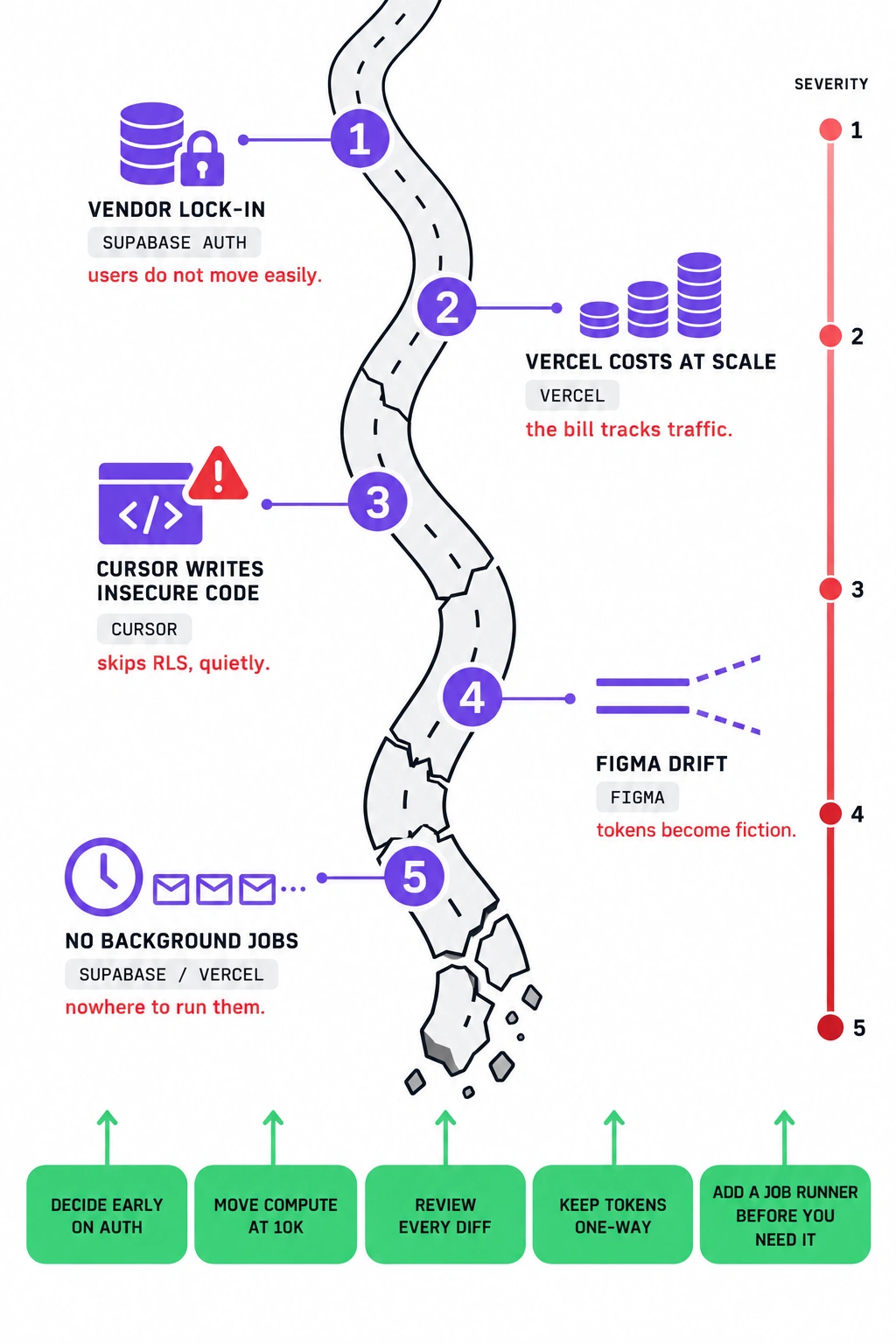
The infographic on the right is the whole chapter in one glance. The road cracks deeper as it descends, the severity scale marks how painful each break gets, and every break ends with a green fix at the bottom of the page.
1. Vendor lock-in on Supabase Auth
Supabase Auth handles sessions, providers, and user records in a way that is pleasant until you want to leave. Moving those users to another provider means exporting accounts and rebuilding session logic. Postgres data moves easily, and the auth layer is the sticky part. Decide early whether that is acceptable, because it gets harder the longer you wait.
2. Vercel costs at scale
At some traffic level, a $20 VPS running Coolify, or a managed platform like Railway or Fly.io, becomes the sane answer. Vercel earns its price through developer experience, not raw compute economics. That trade is correct until your bandwidth bill disagrees with it. Revisit the decision at 10,000 users, not before.
3. Cursor writing insecure code confidently
The agent will happily write a query that skips RLS. It will paste a service role key where the browser can read it, with clean formatting and total confidence. This failure hurts most, because it is silent and it touches money and user data.
4. Figma drift
Your design file and your codebase start identical and slowly diverge. Someone adds a shade of purple in code that never existed in Figma. Multiply that by fifty small choices and the tokens file becomes fiction. The fix is discipline, plus a periodic pass where tokens flow one direction only, from Figma into code.
5. No background jobs out of the box
Sending a welcome email sequence, generating a report, retrying a failed webhook. None of that has a home in this stack by default. Inngest or Trigger.dev fills the gap, and both read as text like everything else here. Add one before you need it, because bolting jobs onto a live product is worse.
Alternatives if you disagree with a layer
The picks above are opinions, and opinions should come with exits. Here is what to reach for if a layer does not fit how you work.
| Layer | Our pick | If you want no-code | If you want control |
|---|---|---|---|
| Design | Figma | Skip design, prompt straight into Lovable or v0 | Figma plus a hand-rolled token pipeline |
| Build | Cursor | Bolt, Lovable | Claude Code plus a strict review pass |
| Backend | Supabase | Supabase with the dashboard only | Neon, Convex, or self-hosted Postgres |
| Deploy | Vercel | Webflow, Framer | Railway, Fly.io, Coolify, a $20 VPS |
| Payments | Stripe | Lemon Squeezy, Polar | Stripe with your own tax handling |
Notice the pattern in the middle column. No-code tools move you faster through the first version and slower through every version after. That is a real trade, and it is worth taking if your product is a landing page with a form.
Ship it in a weekend, the checklist
Twelve items, Friday evening to Sunday night. Each one is small enough to finish in a sitting.
❶ Friday: create the Figma file, define variables for color, spacing, and radius, export the tokens JSON into the repo.
❷ Friday: open Cursor, scaffold the Next.js project, write the .cursor/rules file before any feature code.
❸ Friday: create the Supabase project, connect the CLI, and commit an empty migration so the schema folder exists.
❹ Saturday morning: build the marketing page from tokens only, no hardcoded values. Generate the hero illustration and the OG image with Venice's image models instead of losing an hour to stock photo sites. Feed it your brand hex codes from the tokens file.
❺ Saturday morning: add Supabase Auth and get one user able to sign up and log out.
❻ Saturday afternoon: create your first data table with RLS enabled in the same migration.
❼ Saturday afternoon: write the first policy, then open a second account and prove it cannot see the first account's rows.
❽ Saturday evening: push to git and watch Vercel build a preview URL for the branch.
❾ Saturday evening: wire Stripe or Lemon Squeezy and complete one test purchase end to end.
❿ Sunday morning: deploy to production and set environment variables, keeping the service role key server-side only.
⓫ Sunday afternoon: add Resend for a single welcome email and confirm it arrives.
⓬ Sunday evening: put the checkout link in front of three real strangers, then get your first users from Reddit with a build story instead of a pitch.
Frequently asked questions
What is the best tech stack for a solo founder in 2026?
Figma for design, Cursor for code, Supabase for the backend, Vercel for hosting. The four tools share one property: every layer exposes its state as text an AI agent can read. That keeps the handoffs clean when one person plays every role, from layout to database policy.
Is Supabase good for a SaaS MVP?
Yes. One service covers Postgres, authentication, file storage, and realtime updates. You pay nothing until you outgrow the free tier, and you can export your database to any Postgres host later. The main risk is forgetting Row Level Security on a new table.
Cursor or Claude Code for a non-engineer?
Cursor if you have used Figma and think in files, because the editor view and inline diffs are easier to review. Claude Code if you prefer the terminal and long agent runs. Both read the same project, so the choice is about interface, not capability.
How much does it cost to run a SaaS with Vercel and Supabase?
Around $0 while you build, roughly $60 to $90 a month at 1,000 users, and $250 or more at 10,000 users once real traffic and payment fees land. Most of that growth comes from hosting bandwidth and your payment processor's cut, not the database.
Do I still need Figma if I'm using AI to build the UI?
Yes, and for one reason. Figma is where you decide, and the agent is where you type. Variables give you reusable tokens, and tokens are the only clean bridge from a design decision to a codebase an agent can read. Skip it and you get the average of the internet.
What is vibe coding?
Vibe coding means describing what you want in plain language and letting an AI agent write the code. You review the result instead of typing every line. It works for solo founders because the agent handles syntax while you handle product decisions, but it demands a rules file and careful review of anything touching security.
Keep the handoffs clean and ship before you optimize
Pick tools an agent can read. That is the whole stack. Figma writes your decisions down as tokens, Cursor reads them and writes code.
Supabase keeps the schema in the repo, and Vercel turns a push into a URL. The chain works because each layer hands the next one something a machine can parse.
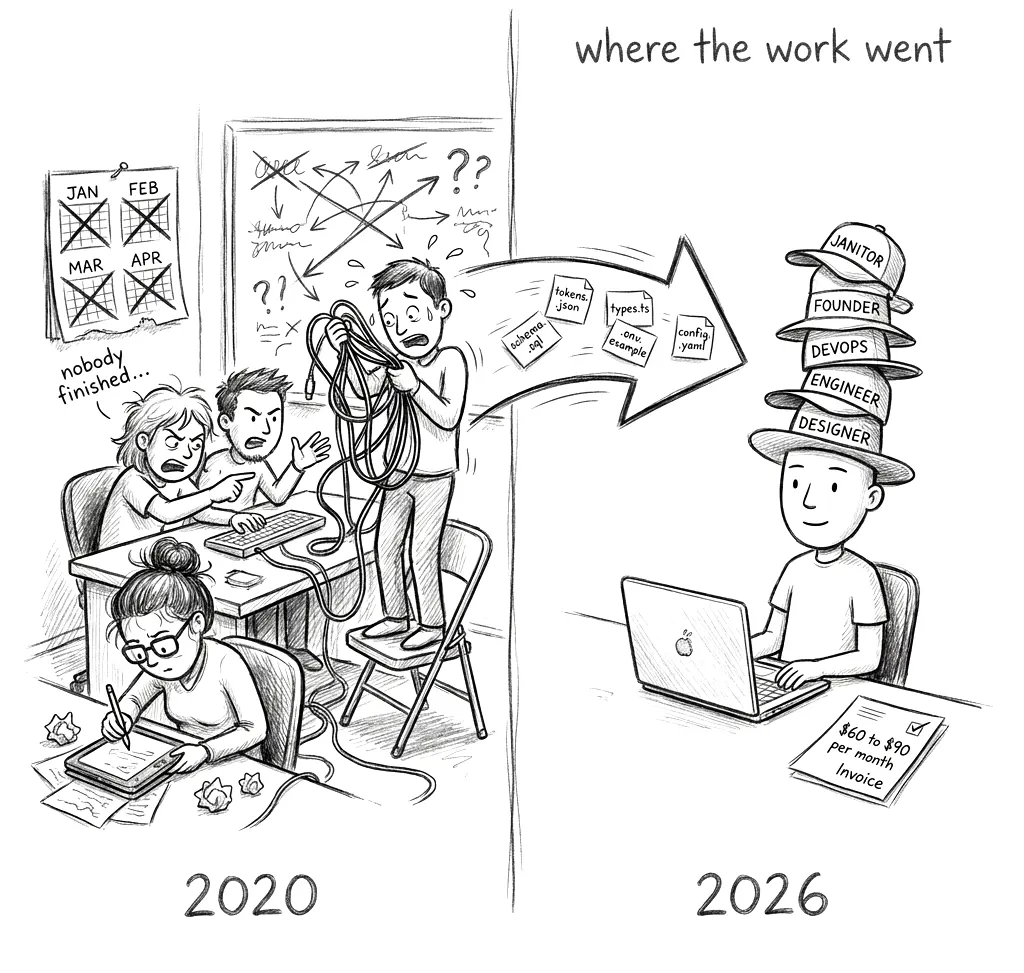
That is why one person can now do the work of four.
Your job is not to pick the perfect tool. It is to ship something real, in front of real people, before the stack has a chance to matter.
Shipping a SaaS with this stack? Founders publish their build stories, launch retrospectives and growth playbooks on Setproduct in front of 17,000 designers and founders every month. Publish on Setproduct →
If you skipped the design skeleton and want real foundations, the Nocra AI design system kit ships with tokens already named. For fresh patterns to hand your agent, keep the AI inspiration gallery open while you work.