

Jeff Flipper
Venice.ai has quickly become a go-to platform for designers and developers who value privacy and creative freedom. Unlike mainstream AI tools, Venice doesn’t censor outputs, filter ideas, or sell your data.
Everything you create, from code snippets to graphic designs, stays between you and the machine.
No middlemen.
No surveillance.
Just raw, unfiltered AI power.
For UI/UX designers, this means generating user flows, wireframes, or copy variations without hitting “content policy” roadblocks.
Developers can prototype apps, debug code, or experiment with open-source models like Llama 3.1 405B without worrying about corporate restrictions.
Venice’s privacy-first approach ensures your IP address and email are the only details stored. Everything else vanishes after your session.
I highly recommend you to start building with Venice.ai today.
Use open-source models, decentralized power
Venice hosts cutting-edge models most platforms avoid.
Think Llama 3.3, DeepSeek, and Dogge 70B for text, plus FLUX and StableDiffusion 3.5 for images.
These aren’t watered-down versions.
You get full access to models trained on diverse datasets, capable of handling niche technical queries or generating edgy visuals.
The infrastructure relies on decentralized GPU providers.
No single company owns your workflow.
This setup isn’t just about privacy – it’s about reliability. If one provider goes down, others pick up the slack. For developers, this means consistent uptime. For designers, it translates to faster render times for complex image generations.
Since launching in May 2024, Venice has hit 400,000 users and 15,000 hourly requests. Growth isn’t slowing: new models get added on a regular basis.
Time to build without restrictions
Mainstream AI tools often block requests deemed “controversial.”
Venice removes those guardrails.
Need to simulate dark patterns for a UX case study?
Generate code for a decentralized app?
Create politically charged artwork?
Venice handles everything!
Designers benefit from uncensored image generation.
StableDiffusion 3.5 produces detailed visuals without auto-filtering “sensitive” content. Developers automate tasks using AI agents that self-manage compute resources via the VVV token.
Costs stay low because Venice isn’t paying for expensive censors or legal teams. Those savings pass to users, most features are free, and paid upgrades (like Venice Pro) cost far less than competitors.
However, Venice.ai PRO subscription is required to unlock premium tools.
The $VVV token is more than just crypto hype
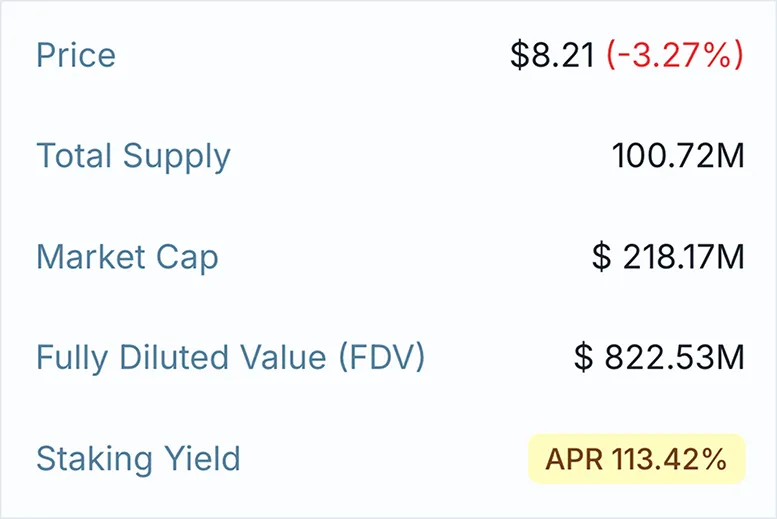
Venice’s ecosystem runs on the VVV token, built on the Base blockchain. It’s not a meme coin. It’s a utility powerhouse:
- Pay for AI services: Skip subscription models. Use VVV for inference credits or Venice Pro access.
- Stake for rewards: Earn 100%+ annual yields (current rate) while securing the network.
- Governance: Token holders vote on new features and model integrations.
Yes, 14 million new VVV enter circulation yearly. But inflation is offset by staking rewards tied to platform usage. The more you build with Venice, the more tokens you earn. Developers can even offset API costs by staking (a rare win-win in crypto economics).
Image generation for rebellious creatives
Tired of hitting “content violation” errors when generating edgy artwork?
Venice’s image models ignore arbitrary filters. FLUX handles photorealistic scenes; StableDiffusion 3.5 nails abstract concepts.
UI/UX designers use these tools for mood boards, iconography, or logo drafts. Need a placeholder image for a fintech app? Describe it plainly. No need to sanitize prompts.
The best part? Venice stores outputs locally in your browser. Nothing gets uploaded to servers. Your controversial masterpiece stays yours.
Made for developers, by developers
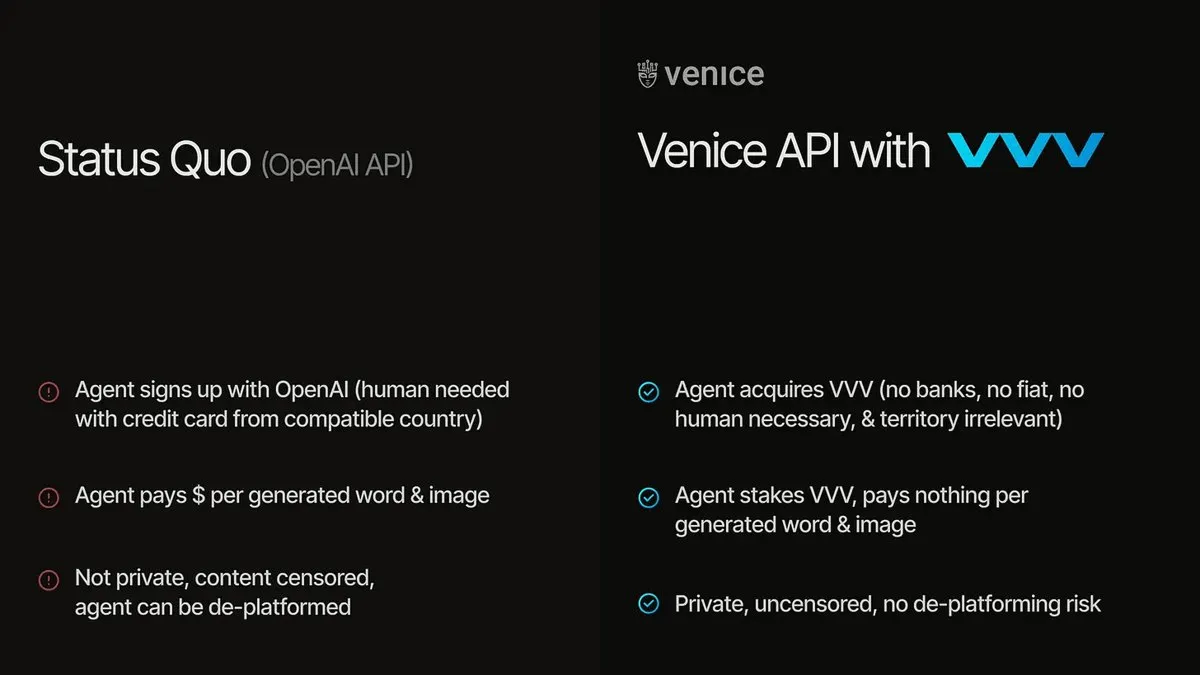
Venice’s API lets you integrate open-source models into your apps. No approval processes. No usage caps. Just raw AI power.
The staking system is just genius.
Stake VVV tokens to prioritize your inference requests during peak times.
Need urgent computation for a client project?
Higher stakes mean faster processing. It’s like a decentralized VIP lane.
Costs drop further when using Venice’s AI agents. These bots auto-optimize resource allocation, trimming cloud expenses by 30-50% compared to AWS or Google Cloud.
Register to start staking VVV today.
Conclusion: Comparing Venice.ai vs ChatGPT
Pros
- Zero censorship → ChatGPT filters outputs; Venice encourages creative risks.
- True privacy → Venice deletes data post-session; OpenAI stores chats for training.
- Crypto integration → VVV tokens enable staking rewards and governance – ChatGPT lacks Web3 utility.
Cons
- Smaller community → ChatGPT’s plugins and tutorials are more abundant.
- Learning curve → Venice’s decentralized setup requires basic crypto knowledge.
- Token inflation risks → VVV’s 14 million annual minting could dilute value if adoption lags.
So, Venice.ai isn’t for everyone.
It’s for rebels: designers who hate creative limits, developers who want decentralized compute, and crypto natives chasing 100%+ APY.
If that’s you, use my affiliate link here and join 400,000+ others building the uncensored future.