

Roman Kamushken
Ask a coding agent for a landing page and you know the result before it renders. Inter everywhere, a purple-to-blue gradient behind the hero, three cards nested inside a card inside a section. We covered why that look spreads in why every AI startup looks the same; this post is about the tools people now install to stop it.
A design skill is a folder with a SKILL.md file of instructions, plus optional scripts, that the agent loads when the task matches. The harnesses in this guide are Claude Code, Codex, Cursor and OpenCode. I went through 13 repos that trend under the label "design skill". On 3 November 2026 they range from 1.3k stars to 145k, and the star count tells you almost nothing about which one fits your work.
So this guide sorts them by the job they do. Pick the job first and the tool inside it second. Then add 1 or 2 tools that do not fight each other.
Five different jobs hiding under one word
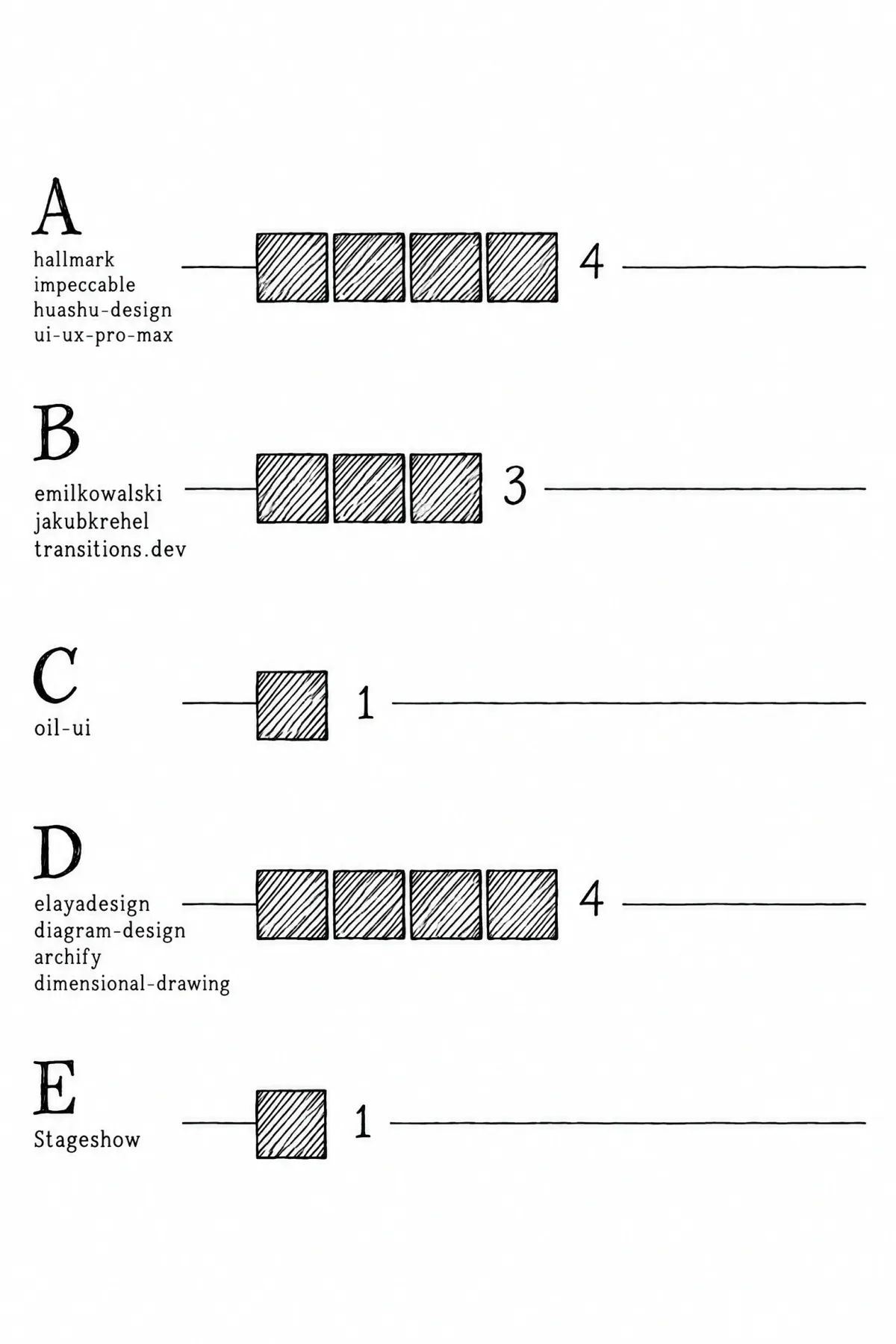
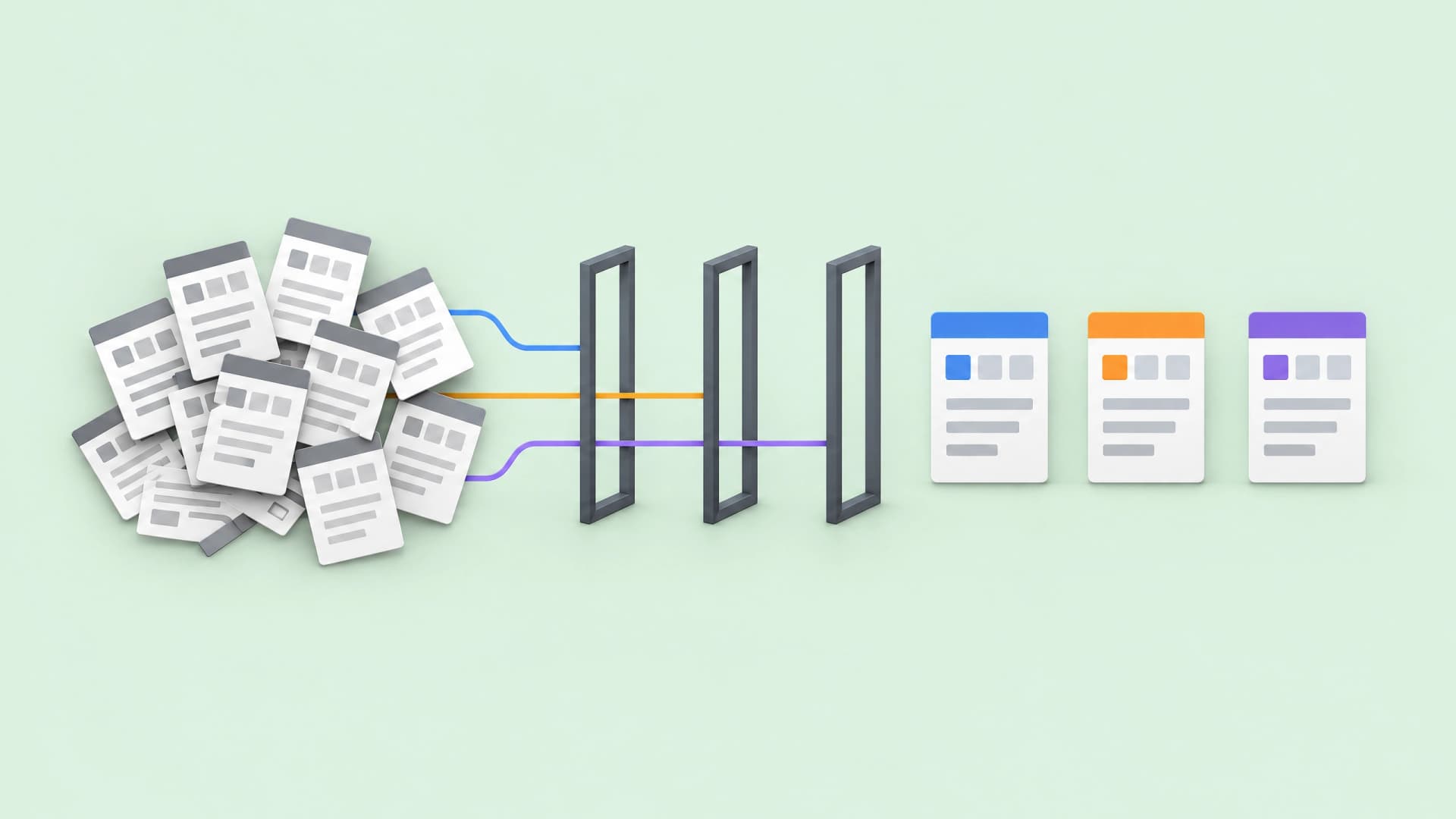
Five lanes, one job each.
Every repo here calls itself a design skill. In practice they split into five jobs, and the split matters more than any metric.
• A. Build from scratch. The skill generates a page and checks it. hallmark, impeccable, huashu-design, ui-ux-pro-max-skill.
• B. Polish by discipline. Rules for one craft area, applied to code you already have. emilkowalski/skills, jakubkrehel/skills, transitions.dev.
• C. Explore directions. 2 or more variants side by side so a human can choose. oil-ui, plus modes inside other packs.
• D. Adjacent artifacts. Diagrams, decks, animated showcases. elayadesign, diagram-design, archify.
• E. Fake product UI. Miniature interfaces for marketing illustrations and hero demos. Stageshow.
The rule that follows is simple. Two tools in the same lane compete, so you pick one. Tools in different lanes combine, so a working setup usually spans two or three lanes.
What the numbers do and do not tell you
Stars and commits below come from GitHub on 3 November 2026. The week column compares against a 27 October snapshot, or 31 October for Stageshow, which went public that day.
| Tool | Lane | Stars | Week change | Commits | License |
|---|---|---|---|---|---|
| hallmark | A | 46.8k | +9.7k | 322 | MIT |
| impeccable | A | 101.3k | +11.8k | 2,622 | Apache-2.0 |
| huashu-design | A | 28.6k | +1.7k | 105 | MIT since May 2026 |
| ui-ux-pro-max-skill | A | 144.7k | +3.7k | 289 | MIT |
| emilkowalski/skills | B | 53.2k | +3.0k | 59 | MIT |
| jakubkrehel/skills | B | 10.6k | +1.9k | 144 | MIT |
| transitions.dev | B | 6.1k | +0.3k | 559 | Custom, tooling MIT |
| oil-ui | C | 2.7k | +0.3k | 98 | MIT |
| elayadesign | D | 13.9k | +5.7k | 16 | MIT |
| diagram-design | D | 64.6k | +3.2k | 417 | MIT |
| archify | D | 93.1k | +3.3k | 1,759 | Apache-2.0 |
| dimensional-drawing | D | 1.8k | +1.3k | 1 | MIT |
| Stageshow | E | 1.3k | +1.1k since 31 Oct | 1 | MIT (in folder) |
Every repo had a commit in the 11 days before 3 November. The youngest two, dimensional-drawing and Stageshow, were created in the last week of October; the oldest, impeccable, dates from 16 November 2025.
Stars measure a launch, and a launch says nothing about maintenance. elayadesign/ai-design-skills has 13.9k stars on 16 commits, and Stageshow collected 1.3k stars on a single commit in 3 days. impeccable sits at the other end with 2,622 commits, which is what a maintenance record looks like.
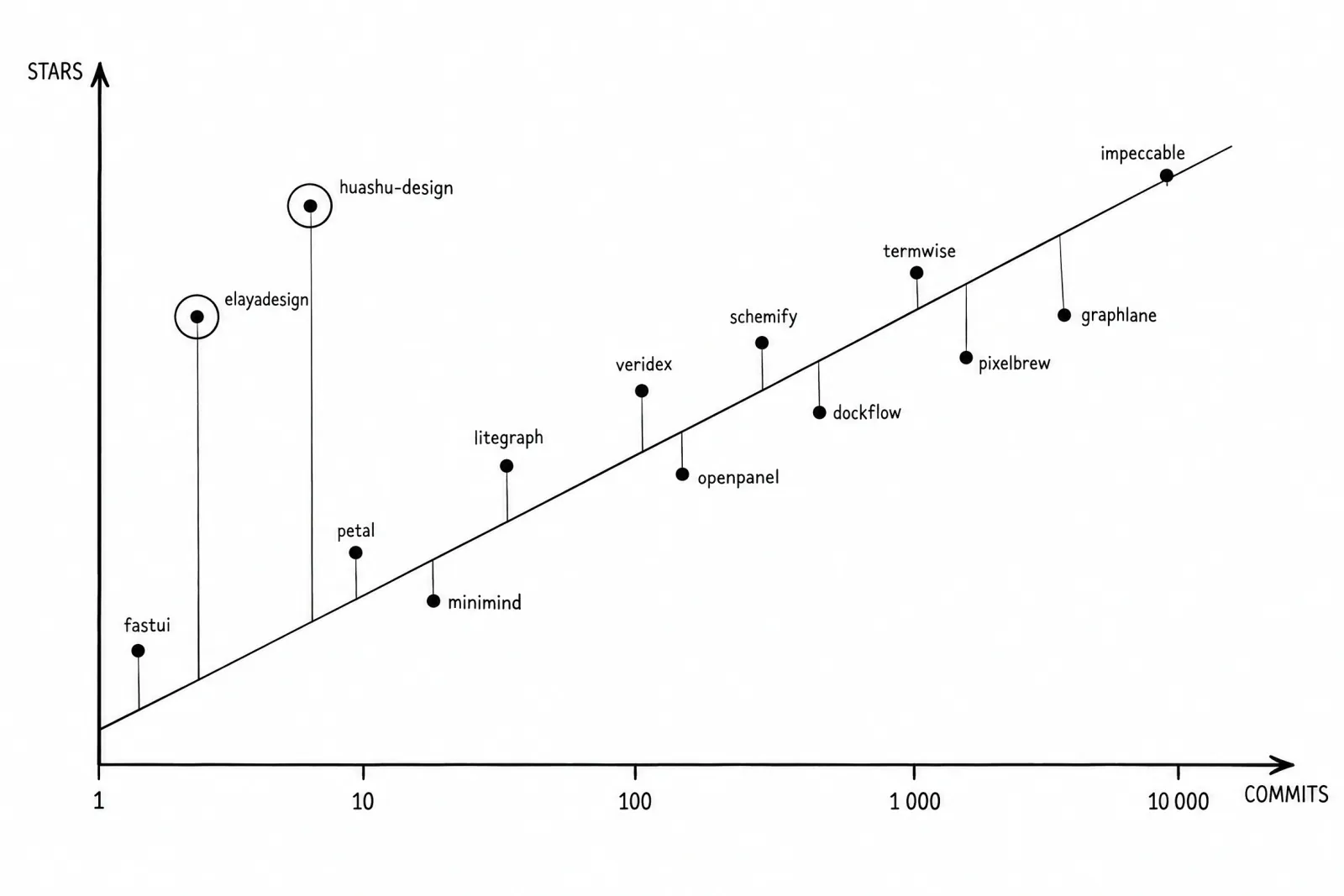
The next two tables predict your experience better than stars do. The first one shows what each skill contains and how it checks its own work.
| Tool | What's inside | How output is checked | Output |
|---|---|---|---|
| hallmark | Rules + linter | Browser render at 8 widths, then a fresh-context review | Self-contained HTML/CSS |
| impeccable | Rules + linter | 62 deterministic detectors, CI exit codes | Code in project |
| huashu-design | Rules + scripts | Fact lint, no score | HTML, PPTX, MP4, PDF |
| ui-ux-pro-max-skill | Data + search | Checklist only | Recommendations, MASTER.md |
| emilkowalski/skills | Rules only | None | Code in project |
| jakubkrehel/skills | Rules only | Review skills, no linter | Code, ranked reports |
| transitions.dev | Rules + code | Live refine panel | CSS in project |
| oil-ui | Rules + scripts | Human, side by side | HTML variants |
| elayadesign | Rules + code output | None | Code |
| diagram-design | Rules + code output | Style rules only | HTML + SVG |
| archify | Rules + validator | Atomic validation, repair receipts | Interactive HTML, PNG, PDF |
| dimensional-drawing | Rules + scripts | Not documented | HTML, MP4 |
| Stageshow | Rules + code | Film gate, contact sheet, rehearsal file | React components |
Read the "how output is checked" column before the stars column. A skill with no checker is a style guide the model may or may not follow; a skill with a renderer or detector can refuse to ship.
The second one shows what each skill needs from you. "Harnesses named" counts the agents listed in the README; "Skills CLI" means it also installs into any harness through npx skills add. The full harness lists sit in each tool's section below.
| Tool | Works on | Harnesses named | Dependencies | Author |
|---|---|---|---|---|
| hallmark | Scratch, redesign of a path | 5 | Node 18+ | Company (Together AI) |
| impeccable | Scratch + existing code | 19 | Node, Rust engine | One person |
| huashu-design | Scratch | 6 | Python scripts | One person |
| ui-ux-pro-max-skill | Advises, never builds | 24 | Python 3 | Team |
| emilkowalski/skills | Existing code | 0, Skills CLI | None | One person |
| jakubkrehel/skills | Existing code | 1, Skills CLI | None | One person |
| transitions.dev | Existing code | 3, Skills CLI | Node | One person |
| oil-ui | Both | 1, Skills CLI | Python 3 | Independent |
| elayadesign | Scratch | 5, Skills CLI | None | One designer |
| diagram-design | Text you describe | 13 | None | One person |
| archify | Text or a repo | 4 | Node | One person |
| dimensional-drawing | A UI component | 5, Skills CLI | Playwright + ffmpeg for video | One person |
| Stageshow | Scratch | 0, Skills CLI | Node 20.19+, React 18+, Chrome | One person |
A. Building a page from scratch without slop
This lane generates a page and then judges it. The judging part is what separates the four tools, so read each one for its checker first.
Nutlope/hallmark
Nutlope/hallmark comes from Together AI and targets one thing: marketing and landing pages that do not look generated. It ships 50 themes, each under 8 KB, and a build reads exactly one of them.
Before writing, a pre-flight asks for your fonts and palette plus real material, then scripts/theme.mjs deal offers 3 themes. The hero gets built and reviewed cold before the rest of the page exists.
The checking is the reason to pick it. sloplint.mjs --render loads the page in a real browser at 8 widths, then a fresh-context subagent reviews it. Gates come in 3 levels: Floor never ships (contrast, focus, reduced motion, invented facts, broken mobile), Reflex flags model defaults you can override with a reason, Finish covers details.
/hallmark redesign <path> keeps your content and wiring, and sloplint --kept fails the run if a field disappears. /hallmark audit <path> only reports.
npx skills add nutlope/hallmark -g
Harnesses named in the README: Claude Code, Codex, Cursor, OpenCode, GitHub Copilot.
Output is self-contained HTML and CSS. For components inside a React app with its own design system, this is the wrong tool, and the project is 6 months old with one vendor behind it.
pbakaus/impeccable
pbakaus/impeccable by Paul Bakaus started from Anthropic's frontend-design skill and grew into the heaviest option here. One skill holds 24 commands and 62 deterministic detectors, with a Rust engine behind the npx wrapper.
The detectors hunt the familiar tells: Inter on everything, purple-to-blue gradients, nested cards, grey text on colored backgrounds, icons in rounded tiles. The detector also runs as a CLI that exits with 2 on findings and 1 on an error, which makes this the only skill here that drops straight into CI.
npx impeccable install
npx impeccable detect src/
Telemetry is on by default, and you should know what it covers. At the start of a new design the skill fetches visual directions from the impeccable.style catalog; turning telemetry off keeps that request and stops the anonymous record of which directions were shown and picked. The README says your project name and files are never sent, and neither is code or PRODUCT.md.
npx impeccable telemetry off
Harnesses named in the README: 19, led by Claude Code, Cursor and Codex.
You can also set DO_NOT_TRACK=1, or put "telemetry": false in .impeccable/config.json.
The 24 commands are a lot of surface. A newcomer spends the first afternoon learning the vocabulary, and the license moved from MIT to Apache-2.0 along the way.
alchaincyf/huashu-design
alchaincyf/huashu-design turns one sentence into a finished artifact, and the artifact list is wide: web pages, iOS prototypes, decks that export to editable PPTX, motion to MP4 or GIF, infographics. Its exploration flow is the interesting part.
Three logics (best designer, real-world reference, seconds roulette) each produce two candidates, and the three strongest of six become real designs. A style library of 92 looks sits underneath, plus a ledger that remembers your preferences between sessions.
scripts/design_lint.py checks facts only and gives no score. The license became MIT on 14 May 2026, and an English README now exists, which answers the most common objection to it.
npx skills add alchaincyf/huashu-design
Harnesses named in the README: Claude Code, Cursor, Codex, OpenClaw, Hermes, Trae.
Breadth costs depth. If all you need is a product UI, the deck and infographic machinery is weight you carry for nothing.
nextlevelbuilder/ui-ux-pro-max-skill
nextlevelbuilder/ui-ux-pro-max-skill is the biggest repo in the sample at 144.7k stars, and the least like the others. It is a searchable knowledge base: 192 palettes, 74 font pairings, 79 styles, 34 landing patterns, plus reasoning rules per product type.
scripts/search.py runs BM25 over that data using the Python standard library and no network calls. The --design-system flag assembles a recommendation, and --persist writes it to design-system/<app>/MASTER.md.
Its pre-delivery checklist covers 4.5:1 contrast and focus states, reduced motion, plus breakpoints at 375, 768, 1024 and 1440. There is no renderer and no linter, and the README says search results "do not automatically rewrite your app."
/plugin marketplace add nextlevelbuilder/ui-ux-pro-max-skill
/plugin install ui-ux-pro-max@ui-ux-pro-max-skill
Harnesses named in the README: 24, led by Claude Code, Cursor and Codex.
A paid Premium tier at uupm.cc adds brand identity work, so the free repo is also a funnel.
If you would rather hand the agent a finished system than a blank page, an editable landing template gives it fixed parts to fill instead of choices to invent.
B. Polishing an existing interface by discipline
These packs build nothing. They carry one person's rules for a craft area and apply them to code you already have, which is why they combine well with each other.
emilkowalski/skills
emilkowalski/skills is Emil Kowalski's motion playbook, written by the author of Sonner and Vaul. The README lists 16 skills now, with remove-animations as the latest addition.
The core is emil-design-eng, surrounded by animate, review-animations, improve-animations and animation-performance. Two skills matter beyond motion. pick-ui-library stops the agent from hand-rolling a toast when a tested library exists, and break-ui stress-tests a component with the worst data you can feed it.
mobile-native handles sticky hover, the 100vh bug and input zoom on mobile web, while animate-expo covers React Native. animation-vocabulary is the quiet win: it gives you words for motion, so your prompts stop saying "make it smoother".
npx skills@latest add emilkowalski/skills
It is one person's taste, declared as such, with no linter and no themes. The rules land only when the agent reads them at the right moment.
jakubkrehel/skills
jakubkrehel/skills by Jakub Krehel, who publishes the Interfaces journal, has the widest discipline coverage here. Its 14 skills merged 3 earlier repos in July 2026 and split the craft into clear lanes.
• better-interface returns one ranked report covering 6 areas, accessibility through polish
• better-typography handles type scale and font features, better-colors builds palettes with semantic tokens
• better-accessibility follows WCAG 2.2 for keyboard and focus work, ARIA, forms, screen readers
• interface-review checks a branch or PR for interface regressions
• build-design turns a Figma frame or image into code on your existing tokens
This is the pack for a React app with a design system already in place. It respects your tokens instead of inventing a theme, and 10.6k stars against peers at 50k says more about marketing than quality.
npx skills add jakubkrehel/skills
Harnesses named in the README: Claude Code only, with the rest covered by the Skills CLI.
The 14 skills overlap at the edges. Run better-interface first and let its report tell you which specialist to call.
Jakubantalik/transitions.dev
Jakubantalik/transitions.dev is half library, half skill. The README table lists 12 ready CSS transitions, among them card resize, number pop-in and a success check with a path draw.
Each one runs on custom properties on :root with a t-* namespace and a reduced-motion guard. The CLI drops the code into your project, which is the real difference from Emil's rules.
npx transitions-dev add card-resize
npx skills add Jakubantalik/transitions.dev
Harnesses named in the README: Cursor, Claude Code, Codex.
transitions-refine live injects a timeline and panel into your running app, so the agent tunes motion against tokens while you watch. The same install adds a secondary skill, transitions-ui-generation, which makes an interface appear as if an agent is generating it: a dotted wireframe traced from the element's structure, then the real UI.
Some transitions sit behind Pro (npx transitions-dev login), and the license forbids redistributing them as a competing library while the tooling stays MIT. Check current pricing on the site before you plan around it.
C. Exploring directions and choosing
This lane is about seeing 2 or more options before committing. One small tool does it on purpose, and 3 bigger packs do it as a side mode.
oil-oil/oil-ui
oil-oil/oil-ui is small and young, with 2.7k stars and 98 commits since 30 September, so treat it as on the radar. By default it recommends one direction; ask, and it builds more than one and opens them side by side.
The comparison page takes HTML files or images, and even running dev pages. It switches between desktop and mobile, opens actual size, and steps through variants with arrow keys; clicking Select copies a sentence you paste back to the agent.
It works inside a .oil-ui workspace, needs Python 3, and checks for updates at most every 10 minutes without uploading anything (OIL_NO_UPDATE_CHECK=1 turns that off). Oil UI Pro costs $9.99 once and adds the AI-default checks plus DESIGN.md recording.
npx skills add oil-oil/oil-ui
Harnesses named in the README: DeepSeek Harness only, with the rest covered by the Skills CLI.
Exploration without a dedicated tool
You may already own this: prototype in Emil's pack and variant in Krehel's build switchable versions, state-machine lays out every state, and huashu-design runs its six-to-three flow.
D. Adjacent artifacts
These skills make things that sit next to the interface: diagrams, showcases, technical drawings. Two of them compete directly, so the section ends with a fork.
elayadesign/ai-design-skills
elayadesign/ai-design-skills is the clearest hype gap in the sample: 13.9k stars on 16 commits. It now holds landing-page-design and a new figma-designer, which designs inside Figma with variables, named text styles, auto layout and components in every state.
landing-page-design runs an intake, then structure and conversion copy, then a visual system. Design values sit in one section at the bottom of each file, so a fork changes them in one place.
The credit chain needs telling. landing-page-design adapts ideas from Leonxlnx/taste-skill, while design-to-motion, the animated-showcase skill the repo became known for, moved to its own repo, and that URL returned 404 when I checked on 3 November.
npx skills add elayadesign/ai-design-skills
Harnesses named in the README: Claude Code, Cursor, Codex, Windsurf, Cline.
Manual copy into .claude/skills/, .cursor/rules/ or AGENTS.md works too.
This is partly a compilation, and the stars arrived before the code did. Use landing-page-design as a light option without a linter, and plan to check its output yourself.
cathrynlavery/diagram-design
cathrynlavery/diagram-design makes editorial diagrams: 45 types, each in a minimal light variant, a minimal dark one, plus full-editorial. Output is self-contained HTML and SVG that needs no build step or JavaScript.
The philosophy is the selling point. No shadows, 1px hairlines, a 4px grid, accent color on one or two elements, a target density of 4 out of 10, and one line worth pinning above your desk: "The highest-quality move is usually deletion."
It imports Mermaid and draw.io, and onboarding reads your site to match the brand.
/plugin marketplace add cathrynlavery/diagram-design
/plugin install diagram-design@diagram-design
Harnesses named in the README: 13, among them Cursor, Claude Code, Codex, Qoder, Copilot and Gemini CLI.
Use it for docs and blog posts where the diagram has to look designed; the same restraint carries into AI infographics for marketing teams. It is static by design, so anything a reader should click needs another tool.
tt-a1i/archify
tt-a1i/archify turns ideas and codebases into interactive visuals. It has 10 diagram types and can read a repository to produce a source-backed map.
Under the hood it writes a typed JSON IR and validates atomically before delivery; validate --json returns repair receipts the agent can act on. Output is self-contained HTML with PNG, PDF and 1200×630 share-card exports, and version 3.2.0 shipped on 18 October.
Install Archify for me by reading https://raw.githubusercontent.com/tt-a1i/archify/main/llms.txt
Harnesses named in the README: Cursor, Claude Code, Codex CLI, OpenCode.
The README carries a sponsor block with API-relay referral offers. Notice it before you paste the install prompt into an agent.
Static or interactive
The fork between the last two is clean. diagram-design gives you a static editorial picture from text you describe; archify gives you an interactive map, and it can build that map from your codebase.
Pick by where the diagram lives. A blog post wants the first, an onboarding page for a repo wants the second.
enesozturk/dimensional-drawing deserves one line: give it a UI component and it returns a one-page technical drawing, with 1.8k stars on a single commit. Install it with npx skills add enesozturk/dimensional-drawing.
E. Faking product UI for marketing
Stageshow
Stageshow lives in benjitaylor/skills as a folder, so searching GitHub for a repo called stageshow finds nothing. The install command names the skill inside a repo with a different name.
npx skills add benjitaylor/skills --skill stageshow
Benji Taylor is reported as head of design at X and SpaceX, which makes him the strongest author in this sample. The repo is the least mature one: 1.3k stars on exactly one commit, pushed 31 October.
The job is fake product UI: still illustrations, hero demos with a cursor, feature cards, phone screens. It builds a miniature interface where one thing happens, and a.click() draws a cursor press instead of automating anything.
If your landing page uses a bento grid, this is the skill aimed at filling its cells. The whole skill is organized around five ways these illustrations fail.
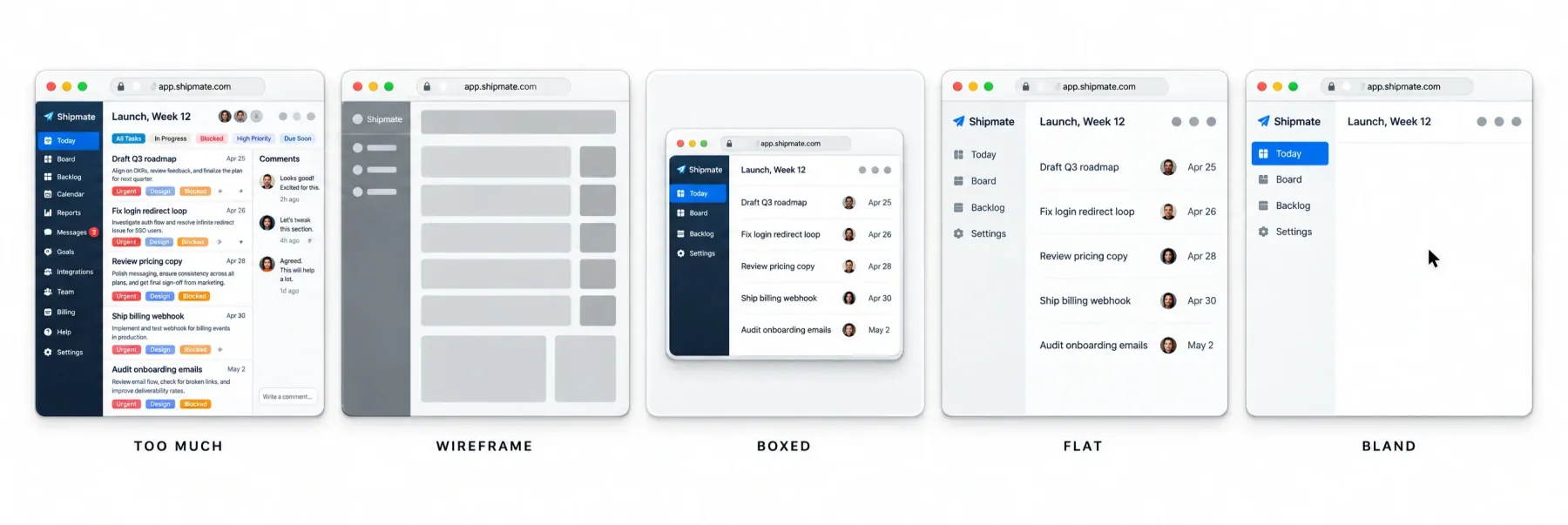
• Too much. Real words on every row.
• Wireframe. Two grey blobs.
• Boxed. A whole window squeezed into a card like a pasted screenshot.
• Flat. Everything at one weight.
• Bland. A grey window with a cursor, the brief's style nowhere in sight.
The workflow has 7 steps: Medium and place, Look, The story, Start from an example, The screen, Choreograph, Rehearse. A plan is written before any code, and every build starts from a gold example.
Rehearsal is the checking stage. film.mjs --gate films the demo, lays the frames out on a contact sheet and reports measurable defects; you then check at 390 px and look at the loop seam.
node scripts/film.mjs '<your URL>' --select '.your-demo' --gate
A REHEARSAL.md next to the component records the gold example it copied and what changed, plus what nobody checked. The skill itself says a gate ending in rehearsal passed is "necessary, not sufficient".
The author lists the limits himself, in 4 lines worth reading as written.
• "It also can't draw." Anything that needs an illustration or a photo you make by hand and drop in.
• "The checks catch mistakes, not dull ideas." A demo can pass every gate and still bore people.
• "It's opinionated, though, and a lot of it is just my taste." The rules are one designer's taste, presented honestly.
• "a skill like this is only useful for a while." He expects models to absorb these rules, and says some already have.
Requirements are modest: Node 20.19+ for the playground, React 18+, playwright-core with a local Chrome for filming. The verdict is simple. Strongest author, least tested code in the sample, so try it on one hero before you plan a launch around it.
☞ Compare Stageshow with design-to-motion and transitions-ui-generation, never with hallmark. hallmark builds real pages; the other three show an interface in motion.
The ecosystem around the skills
Three projects sit next to these skills. None of them is a design skill in the strict sense, and each one changes what the skills produce.
• VoltAgent/awesome-design-md collects about 84 DESIGN.md files in the Google Stitch format, extracted from real sites such as Linear or Stripe. The skill supplies the process, the file supplies the visual language, and both hallmark and impeccable read it.
• The idea behind those files is old: write the decisions down before anyone draws. It is the same move as a UI kit foundation, tokens first, screens second.
• nexu-io/open-design is a local-first workspace with 151 design systems and 100+ skills, packaged as an Electron app under Apache-2.0. Pick it if your team wants a GUI and shared work instead of a terminal.
• DietrichGebert/ponytail is an anti-overbuilding ladder. Ask for a date picker and the agent uses <input type="date"> instead of installing flatpickr, so it pairs with any pack from lane B.
The selection framework
Find your row, install the left-most tool, stop there until it ships something.
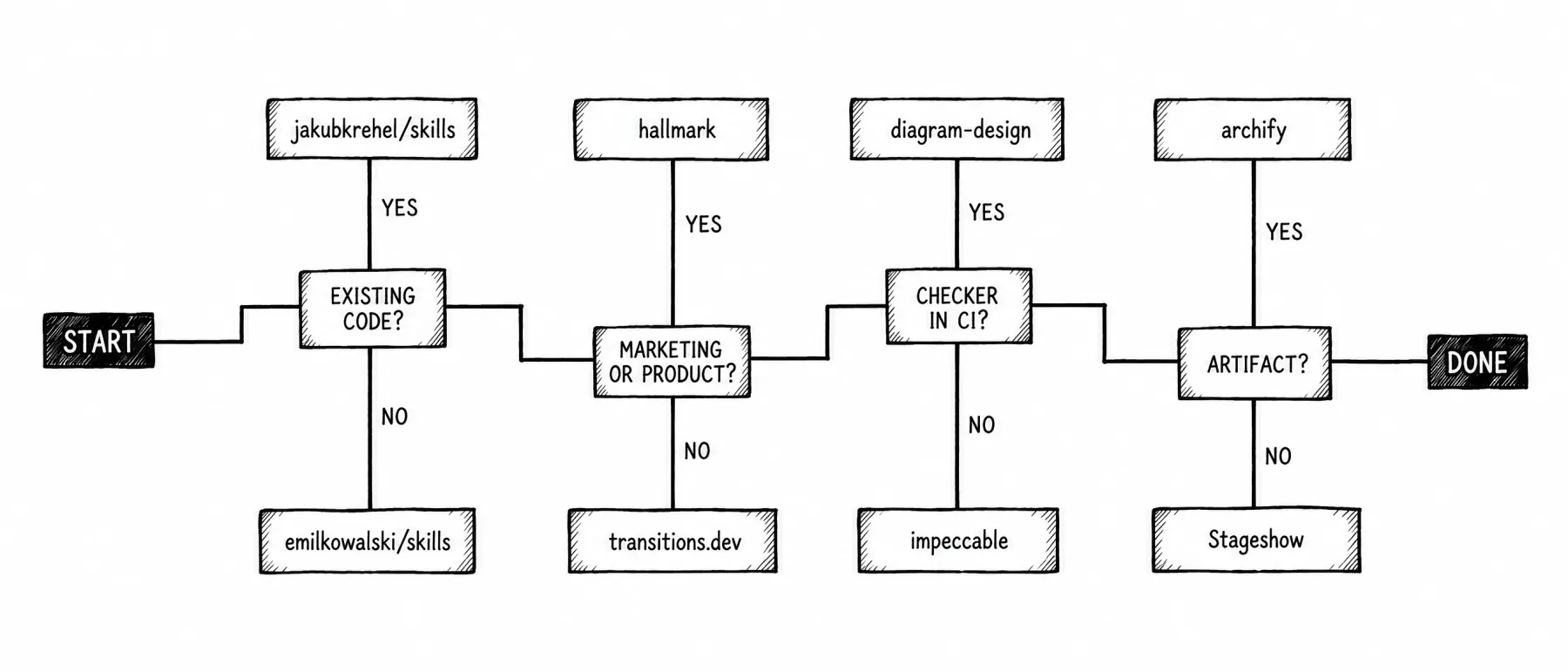
| If you need | Start with |
|---|---|
| A landing page without a designer that must not look generated | hallmark; huashu-design if you also need decks; elayadesign landing-page-design as the light option |
| Fake product screens and cursor demos for a landing page | Stageshow |
| A React app with a design system where the agent breaks details | jakubkrehel/skills plus emil-design-eng, with ponytail against extra dependencies |
| Quality gates in CI or on PRs | impeccable detect with exit codes; jakubkrehel interface-review |
| Motion in a real product | emilkowalski/skills for rules; transitions.dev for ready code |
| Motion in a marketing illustration | Stageshow with film.mjs |
| Accessibility against WCAG | jakubkrehel better-accessibility; hallmark Floor gates as the minimum net |
| Fast exploration of visual directions | huashu-design six-to-three; oil-ui; prototype or variant |
| A specific brand as reference | awesome-design-md plus a skill that reads DESIGN.md |
| Diagrams for docs or a blog | diagram-design for static editorial; archify for interactive or codebase maps |
| A showcase for social media | Stageshow; elayadesign design-to-motion (unavailable at the time of writing) |
| A GUI and team work instead of a terminal | open-design |
| Mobile web or React Native | emilkowalski mobile-native with animate-expo |
If the honest answer is "a landing page by next week", a finished landing template gets you further than any skill. The agent edits sections that already work instead of inventing them.
☛ Pick by the job you have this week. Installing for a job you might have next quarter is how setups bloat.
Stacks that hold up
Each stack takes one tool per lane and stops at three.
→ Solo founder shipping a landing page. hallmark to build, ponytail to keep the code small, Stageshow for the hero demo. hallmark outputs self-contained HTML and CSS while Stageshow outputs React components on React 18+, so the demo lands on the page as an exported still or a screen recording, never as a live component. film.mjs writes PNG only (a contact sheet, or one 2x frame with --still), so the video you capture yourself.
→ Design engineer in a product team. jakubkrehel/skills for daily review, emilkowalski/skills for motion, impeccable detect in CI only. Teams on a React kit with tokens already defined get the most from it, because both packs respect what exists.
→ Front-end developer at an agency. impeccable as the single builder across clients, with each client's DESIGN.md written by /impeccable document from the existing site (init adds PRODUCT.md), transitions.dev for motion that ships as code. awesome-design-md serves as the format reference and as a source only when the client is a well-known brand.
→ Technical writer. diagram-design for static figures, archify when the reader needs to explore a codebase, nothing else.
Which skills fight each other
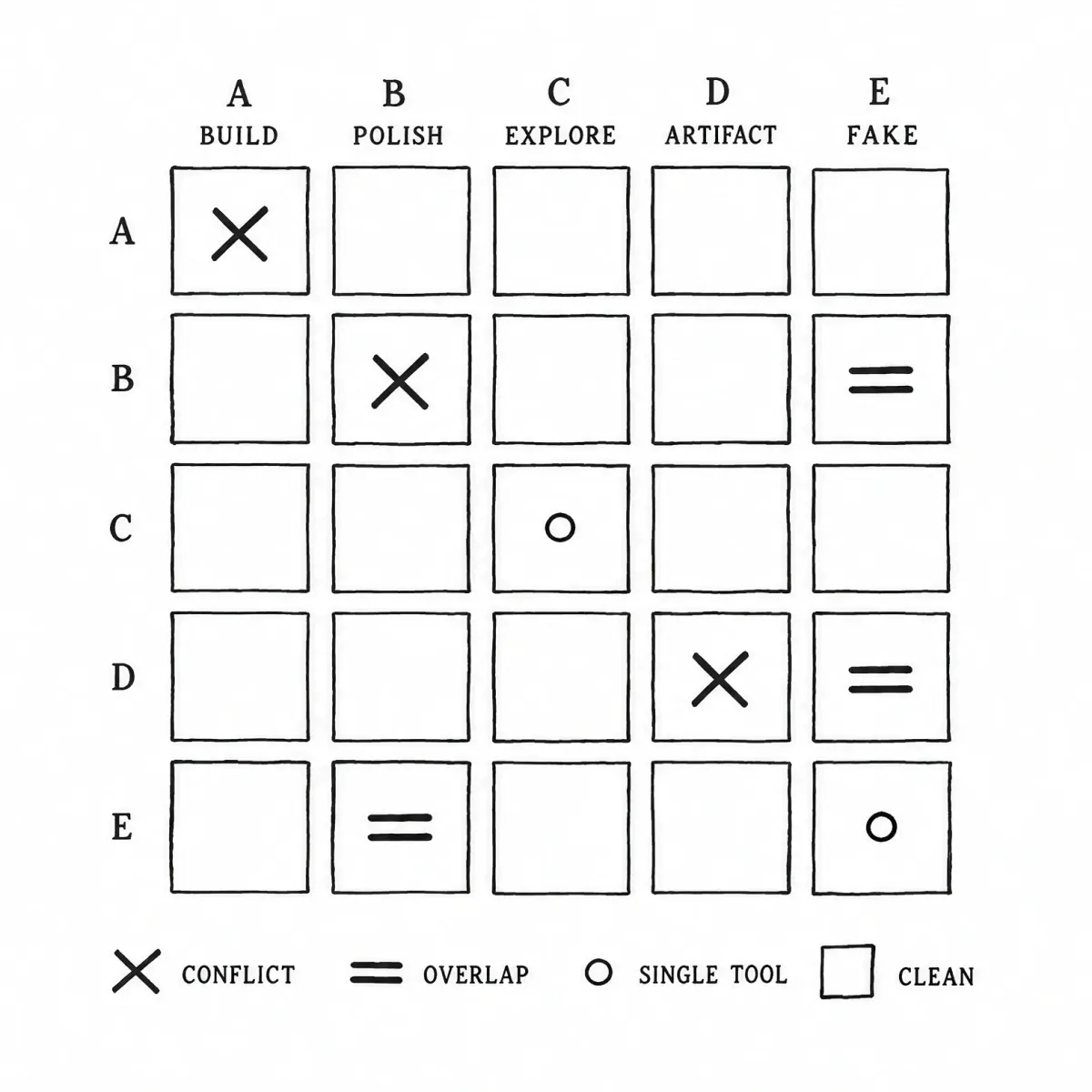
Conflict, overlap, single tool, clean.
→ Conflict. hallmark and impeccable both want to own the page pipeline, and both read and write DESIGN.md. Install one.
→ Clean combination. emilkowalski/skills and jakubkrehel/skills are rule sets with no pipeline of their own, so they stack, and ponytail sits on top without friction.
→ Overlap. Stageshow, design-to-motion (unavailable at the time of writing) and transitions-ui-generation all show an interface in motion. Stageshow invents a product from scratch while the other two animate one that exists, so choose by whether you have a real screen.
→ Possible duplication. Stageshow ships its own craft references, so adding Krehel's better-ui on top may repeat rules. Test the pair on one component before you commit.
What not to do
❶ Installing everything at once. Five packs giving advice on the same button produce averaged mush, and you cannot tell which rule did what.
❷ Picking by stars or by the author's name. Stars measure a launch week, and elayadesign and Stageshow both prove it.
❸ Trusting a skill without a checker on production. Rules the agent may skip are a style guide; a renderer or detector is a gate.
❹ Forgetting telemetry and licenses. impeccable calls its catalog on new designs, transitions.dev has Pro parts, huashu-design was not MIT until 14 May 2026.
❺ Expecting a skill to supply taste. Designers who dislike AI usually object to exactly this, and every author here admits the checks stop at mistakes.
What to watch
• flohoeller/affectui, React components for agent interfaces at 446 stars. It is a code library, so it fits next to the patterns in AI agent UI design patterns.
• deeplethe/solid-glass, a design system for AI apps at 2k stars.
• oil-ui, for whether its comparison page turns into a team habit.
• dimensional-drawing, which needs a second commit before anyone can judge it.
• Stageshow, where the open question is whether commit two arrives before the models absorb its rules.
Frequently asked questions
What is a design skill for AI agents?
A design skill is a folder with a SKILL.md file of instructions, sometimes with scripts or data, that a coding agent loads when the task matches. Some skills only carry rules for typography or motion. Others add a linter or a browser render, so the agent can check its own output before you see it.
Do design skills stop AI slop?
Partly. Skills with a checker, such as hallmark's browser lint or impeccable's 62 detectors, catch the measurable tells: default fonts, weak contrast, broken mobile layouts, nested cards. They cannot judge whether an idea is dull. Stageshow's author says it plainly in his own docs: the checks catch mistakes, which leaves taste with you.
Can I run more than one design skill at once?
Yes, if they own different jobs. Rule packs without a pipeline of their own, like emilkowalski/skills and jakubkrehel/skills, stack cleanly with ponytail. Two page builders do not: hallmark and impeccable both want to run the build and both read and write DESIGN.md. Pick one builder and add discipline packs around it.
Which design skill should a beginner start with?
Start with the job you have this week. For a landing page with no designer, hallmark has the shortest path and a linter that refuses obvious failures. For an existing React app, install jakubkrehel/skills and run better-interface for one ranked report. Add a second skill only after the first one has shipped something real.
Are design skills for AI agents free?
Twelve of the 13 repos are free under MIT or Apache-2.0. transitions.dev uses a custom license with MIT tooling, and some of its transitions need a Pro login. Two of the free ones sell extras: Oil UI Pro costs $9.99 once, and ui-ux-pro-max has a Premium tier. huashu-design moved from a personal-use license to MIT on 14 May 2026.
Do design skills work in Cursor and Codex, or only Claude Code?
Most work beyond Claude Code. Nine of the 13 install through the Skills CLI with npx skills add, which works with any harness that reads skill folders. Cursor and Codex appear in 9 of the 11 READMEs that name harnesses at all. Stageshow and emilkowalski/skills name none, so test them on one small task in your harness first.
What is DESIGN.md and do I need one?
DESIGN.md is a plain file that records the visual decisions of a product, such as type scale and color tokens. hallmark and impeccable both read it, and /impeccable document writes one from an existing site. awesome-design-md collects about 84 examples from real brands. You need one when the agent works on a product that already has a look to keep.
Do design skills send my code anywhere?
Rule-only packs run locally and send nothing. impeccable is the exception: at the start of a new design it fetches directions from its catalog, and anonymous telemetry stays on until you run npx impeccable telemetry off. Its README says code and project files are never sent. oil-ui checks for updates every 10 minutes and uploads nothing.